
Hey there!
Thanks for checking out our blog. We’re here to help you find the best apps to use in your filmmaking projects. Whether you’re just starting out, or you’re a seasoned pro looking for some new technology to take your projects to the next level, we’ve got something for you.
We’ve been working in filmmaking and film-related tech for years, and we love what we do. We’ve discovered some truly amazing tools during our work—from apps that will help you choose the right camera lens, to apps that will help shoot automatically as soon as a face appears in front of the camera. We’re always on top of the new releases, so if you want to stay up-to-date with what’s coming out soon, or what’s already hit the market and had rave reviews from our team (and from other industry professionals), then check back often!
But first: let’s dig into today’s review.
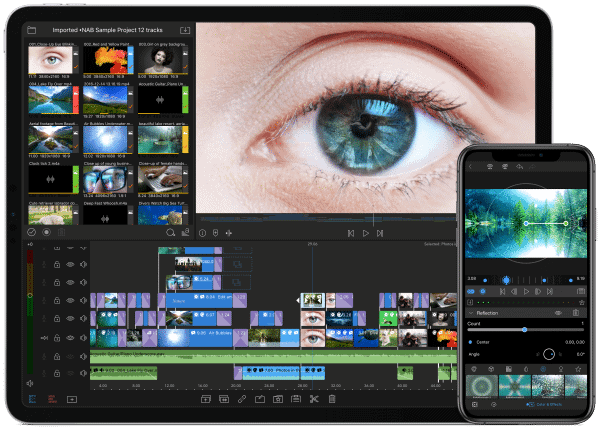
Best Apps For Filmmaking
- ShotDeck
Shot Deck boast that it’s “The Industry’s best research tool” and we can see why. They have a massive online library of high-definition movie images that’s fully searchable by color, mood, location, genre, frame size, event the camera that was used, and more! ShotDeck is an incredible resource to get inspired, pull reference photos for your next shoot, and build decks for projects.
Price: $12.95 per month
BEST APPS FOR CINEMATOGRAPHERS
- Scriptation
Scriptation is the Emmy® award winning app annotation app used on thousands of productions worldwide, and you can get started for free in the App Store.
Scriptation allows you to read and make notes on your script with a wide range of customizable annotation tools. Insert shot lists, floor plans, storyboards, reference photos, and more directly into your script. Not only that, but Scriptation can transfer those notes into new script revisions so you never have to recopy your notes again.
Scriptation is designed for organized collaboration. Share notes, highlight lines, bookmark scenes, and separate annotations conveniently into layers.
As one App Store reviewer advised emerging filmmakers: “I guarantee this app becomes standard on set.” So be prepared to use it on your next big production.
Try out Scriptation’s free script annotation app and see for yourself.
Price: Free
BEST APPS FOR CINEMATOGRAPHERS
- Shot Designer
Shot Designer promises to make it “ridiculously easy” to block complex scenes. Shot Designer strives to be the ultimate film app for directors by combining camera diagrams, shot lists, storyboards, and animation all in one place. And, everything you create is inter-connected. Any changes you make in the diagram update the shot list, and any changes you make in the shot list change the diagram, and so on.
Price: $19.99
Filmmakers Best Apps Shot Designer
BEST APPS FOR CINEMATOGRAPHERS
- FiLMiC Pro
FiLMiC Pro is an incredibly advanced film production app for iOS and Androids that enables you to make the most out of your device, virtually turning it into a professional camera. This app gives you fine-tuned control over your phone’s camera, including manually changing the exposure, ISO, shutter speed, focus, zoom, and more.
In addition to unlocking the full potential of your phone’s camera settings, FiLMiC Pro has many customizable options including the ability to record up to a dozen different resolutions and aspect ratios, advanced audio recording features, four encoding options to balance between quality and file size, video sharing capabilities through apps such as Facebook, DropBox, Vimeo, and 3rd Party Hardware Support for several popular lens adapters and gimbals.
And, FiLMiC Pro has the ability to adjust video settings (exposure, contrast, saturation, tint, color temperature) after capture. We’ve even used it to film some of our videos.
Price: $14.99
Best Filmmaking Production Apps FIlmic Pro
BEST APPS FOR CINEMATOGRAPHERS
- Shot Lister
Shot Lister is the professional shot list and scheduling app that is self-dubbed “a better way to make your day.” No more crumbled piece of paper with all of your scribbled plans and touch the digital future of shot listing.
Shot Lister is designed by filmmakers to deliver the only solution that can build, organize, schedule and share shot lists and shooting schedules digitally. Tap and drag to reorganize your day in seconds. Organize and store hundreds of scenes and thousands of shots with industry standard formatting.
Everything is fully customizable and live-editing allows you to reschedule on the go.
Price: Free
best apps for filmmakers 2021
- Meteo Earth
“Interactive 3D Globe Brings Weather to Life”Meteo Earth Filmmaking App
No one likes to be caught out in the rain, unless it’s what the script calls for. Whether you’re looking for sun, rain, cloud cover, snow, hail, or a tropical storm, Meteo Earth is by far the coolest way of seeing 24 hours into the future. Adapted from a professional weather forecaster’s tool, this app is particularly useful for checking for cloud cover and imminent rain. Where most weather apps will only give you an hourly breakdown with novel symbols, this one turns you into a by-the-minute weather man.
Available on Mac, PC, iPhone, and Android.
http://www.meteoearth.com/
Price: Free
- Google Earth
Continuing the theme of 3D globes, Google Earth is another god-like app that I keep finding new uses for. Most major cities are mapped with 3D models, making it a fantastic virtual location scouting tool. Recently, I needed an open top, multi-story car park to the east of Denver with a clear westerly view for a timelapse. Try asking a local on the street for one of those. Google Earth helped me find one in just a few minutes. Taking it one step further, I was able to track the precise position of the sun, simulating how it would move in my actual timelapse.
Available on Mac, PC, iPhone, and Android.
https://earth.google.com/web
Price: Free
Use Google Earth For Filmmaking
- Sun Seeker
Predict the suns movement for the perfect shot with Sun SeekerWhile Google Earth is very powerful, it’s quite time-consuming to get a prediction for the sun’s location when you’re out and about. Sun Seeker, on the other hand, uses an augmented reality approach, allowing you to point your phone at the sky and see the sun’s location at any time of day and throughout the year. I’m often seen standing in the street or on a bridge waving my phone around like an old man who thinks it’ll help him find reception. When I’m scouting a location, I take screenshots within this app. These screenshots end up becoming a part of my pre-production plans.Available on iPhone and Android.
https://itunes.apple.com/gb/app/sun-seeker/id330247123?mt=8
Price: Free - The Photographers Ephemeris
It’s easy to mistake me for a weather man with all of these apps but hold on, this one is unique. At the core of this app is a mapping tool for seeing how sunlight will fall on the land, at any time, anywhere on earth. It gets better. Hidden within the settings is an option called ‘Skyfire’, a unique tool for predicting where the most colourful sunrises and sunsets will be over the next 2-4 days. Want to know whether it’s worth getting up at 4AM tomorrow for a sunrise? Perhaps you can plan your shoot around an otherworldly sunset that’s going to get you the money shot. You can even set you phone to notify you when one is on the way.
Available on iPhone and Android.
https://www.photoephemeris.com/
Price for Skyfire: £28.99 per year with a 30-day free trial.
Skyfire app is great for timelapse shoots
- DSLR Filmmaker Toolkit
At the name suggests, there are a lot of film making tools built into this one. It has helped me save some space on my phone by consolidating a few apps into one. The electronic slate (clapper board) has saved me a couple of times when I’ve been caught without one. If, like me, you’re no good at quick mental arithmetic, the timelapse calculator will get your head around all the interval and duration settings on your intervalometer. The viewfinder function will allow you to simulate almost any camera, sensor and lens combination for visualising your shots. (Artemis Director’s Viewfinder is a nice dedicated app for this, if you prefer.) If that wasn’t enough for you, it also has a shot log, depth of field calculator, and spirit level.
DSLR Video making app with slate
Available on iPhone only.
http://www.dslrtoolkit.com/
Price: £5.99
- AJA Data Calc
This simple yet effective app lets you choose from a long list of common codecs to calculate how much storage space you’ll need. You can also reverse it to work out how much recording time you can get out of each card.Available on iPhone and Android.
https://www.aja.com/family/software
Price: Free
Conclusion
Let us know your thoughts in the comment section below.
Check out other publications to gain access to more digital resources if you are just starting out with Flux Resource.
Also contact us today to optimize your business(s)/Brand(s) for Search Engines