
Since the release of iOS 14, the world of widgets has been growing and expanding. But which widgets are worth your time? We’ve found some of the most entertaining and functional widgets for you to try.
You can download all of these widgets on your iPhone and iPad—just click any image to be brought directly to the download page. Then, hit the “Add Widget” button, and you’re on your way!
Here are some of our favorite widgets:
Best Apps For Widgets Ios 14
1. Launcher
Launcher is one of the most customizable and powerful widgets that you can get for your iPhone. Yeah, you read that right. The widget app is fully customizable and lets you quickly launch your favorite apps.
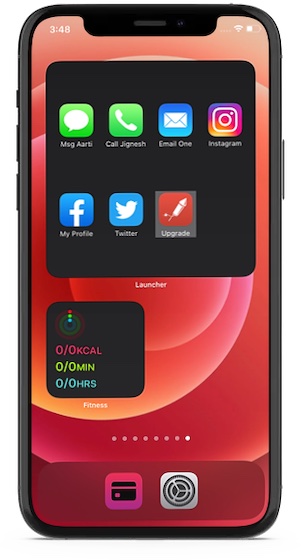
What’s more, you can also fine-tune it to call, message, email, and even kickstart FaceTime video calls. Not just that, you can also use it to quickly access your favorite websites.
Notably, if you often listen to music on your iPhone with some of the best music apps out there, the widget app lets you play your preferred music with your preferred music app with music launchers and even change app icons, labels and stack widgets. Bear in mind that only the premium version of Launcher can let you unlock all the goodies.
Taking everything into account, it’s one of the most useful iPhone widgets right now.
Install: (Free, in-app purchases)
2. Widgetsmith
Boasting a solid collection of widgets, Widgetsmith is one of the most loved iPhone home screen widgets. As the widgets are fully customizable, you can fine-tune them in line with your preference. For instance, you can dynamically schedule your custom widgets to show weather information in the morning, calendar during the workday, and the super handy activity ring progress (requires Apple Watch) in the evening.
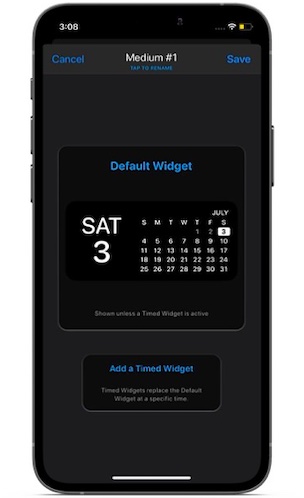
Bear in mind that if you want to unlock all the cool features like access to tide and weather-hosted data of this feature-packed iOS home screen widget app, you will need to upgrade to the premium version of the widget app.
Install: (Free, $1.99/month)
3. Photo Widget: Simple
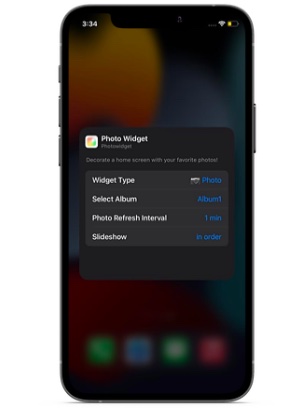
While the Apple Photos app widget is quite useful, it doesn’t offer much customization. The stock photos widget app picks up featured images on its own, which can at times be annoying especially if you don’t want those images to show up on the home screen. Sure you can remove images from featured images in the stock photos widget, but it’s still an annoyance. And this is where a pretty nice third-party iPhone photos widget comes into play. Using Photo Widget: Simple, you can create an album of images and set the desired refresh interval so that they will automatically cycle through. And if you ever wish to hide any specific ones, you can do so without breaking any sweat. Keeping in mind these notable features, Photo Widget: Simple deserves to be rated as one of the best free iOS home screen widgets.
Install: (Free)
4. Smart Stack
There is a lot to like about Smart Stack. Probably the best part about it is the ability to show information depending on how you use your iPhone. For instance, the widget will display podcasts during the time when you like to catch up with your podcasts and show reminders at the time when you prefer to check what’s lined up for you.
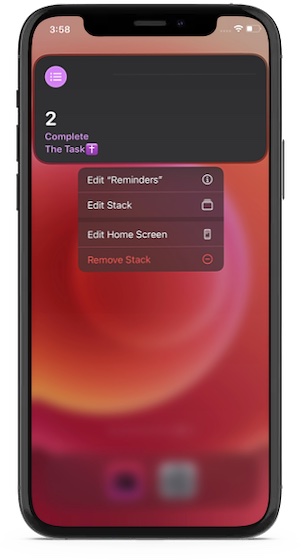
Interestingly, it’s the combination of several app widgets including Photos, Music, Reminders, Weather, Calendar. Oh yes, it also includes Siri Suggestions. You can scroll through the widgets to take a glance at the essential information right from the home screen. Depending on your needs, you can even customize Smart Stack to suit your needs better. For instance, you can rearrange the order of the widgets and even remove the unwanted ones.
Comes Pre-installed
5. Apollo for Reddit
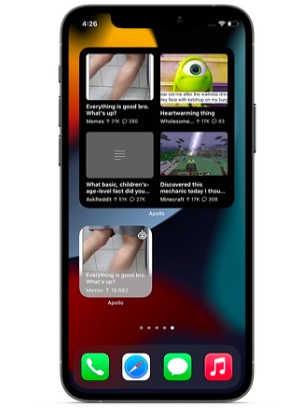
Widely considered as the best Reddit app, Apollo is designed for the folks who want to keep a tab on their subreddits right with utmost ease. Apollo iPhone home screen widget sports a simple and lightweight design. Interestingly, it comes in several different sizes and designs to suit your needs better. I have found the “Posts Grid Widget” quite impressive as it shows multiple posts in a grid from a feed of your choosing. If you love to keep a tab on the trending images of a subreddit, Apollo’s wallpaper widget should win you over right away.
Install: (Free, $0.99/month for premium version)
best widget apps for iphone
Here are some of the apps you can download and use on your iPhone to give iOS some widget zing.
Widgetsmith
Widgetsmith
Widgetsmith
If you want to make extensively customized widgets, then Widgetsmith is your best bet. The tool ships with a wide variety of widgets that can be personalized, ranging in function from displaying the date and time to showing the weather and even astronomy-related versions.
As well as providing you with widgets, it can also be used to manage what widgets appear on your home screen by setting up rules in the app. For example, you could display specific widgets for different periods of the day to match the types of information you would typically need.
It also includes a bunch of tools such as a timezone converter, calendar, and its own weather app, all triggerable by tapping widgets. Integrations with Apple Health are also available, though some elements such as Tide and Weather hosted data do require a premium subscription.
Widgetsmith’s base app is free, with it available for iOS and iPadOS 14.0 or later. The premium subscription costs $1.99 per month, or $19.99 per year.
Launcher
Launcher
Launcher
While you could use folders to collect apps together on the home screen, sometimes you want them to be ordered nicely without needing the extra tap for access. Launcher provides just that and more.
An app-launching widget, Launcher provides a customizable list of icons for apps that you can tap and launch quickly. However, it does a lot more than just open apps.
You can set up Launcher to start a call, message, email, or FaceTime conversation with specific contacts, quickly get to often-visited websites, run Shortcuts, and play music playlists, for example. You’ve also got customization options for icons and backgrounds, the ability to change the iPhone’s settings, and even an option to use it on the Apple Watch.
The base Launcher app is free, requiring iOS or iPadOS 13.0 or later. Numerous in-app purchases are available, including enabling Pro or Premium versions of the app and to “buy Greg a Song.”
Smart Battery Widget
Smart Battery Widget
Smart Battery Widget
Though iOS includes a battery widget, it’s literally limited to just showing how much battery is remaining in the iPhone, iPad, and related devices. Smart Battery Widget promises to give you more information about your hardware and more choices in how you view it.
The widget can provide you with estimations of how long you can spend performing certain activities on the iPhone before running out of battery. For example, it may say you have enough charge remaining to watch a few hours of YouTube, or for gaming, or for making calls, instead of an arbitrary percentage.
There is also data provided on storage, such as volume remaining and estimates of how much of different kinds of media you can add to it. You can even see network usage for cellular and Wi-Fi connections, including volume and speeds.
The Smart Battery Widget is a free download, and requires iOS and iPadOS 13.0 or later.
Widget Wizard
Widget Wizard
Widget Wizard
Widget Wizard offers a way to create your own custom widgets, but with as minimal fuss as possible. The app allows you to make complex-looking widgets that can combine data from multiple sources, and you can pick and choose what is on display.
The tool has a default Agenda widget, as well as some for countdowns, a monthly calendar, reminders, and a clock. There’s also a stat bar that tells you your battery percentage and other numerical bits of data, as well as over 35 health-related stats and a subscription-based Weather widget.
There’s the option to make the widgets customizable with accent and background colors, fonts, and other theme elements, though as part of an upgrade to the Pro version.
The base Widget Wizard app is free, with Pro priced at $3.99, and Pro and Weather at $4.99. It requires iOS or iPadOS 14.0 or later.
Bears Countdown
Bears Countdown
Bears Countdown
If you need a reminder of upcoming events, Bears Countdown can help. The app, adorned with cute art of bears, lets you collect together anniversaries, vacations, birthdays, and other deadlines or important dates, showing you everything that’s coming up and how long you have left until it happens.
For our purposes, the app also includes a widget, so you can quickly see how many days there are until an event without needing to open the app to check at all.
The core Bears Coundown app is free, and requires iOS and iPadOS 12.0 or later. In-app purchases are available, including Bears Unlimited for $2.99.
Conclusion
Let us know your thoughts in the comment section below.
Check out other publications to gain access to more digital resources if you are just starting out with Flux Resource.
Also contact us today to optimize your business(s)/Brand(s) for Search Engines