
The Best Apps for Your Workout, At Home
Whether you’re a fitness fanatic or just trying to get some light exercise in, we all know that there is one thing that can make our workout experience better: music. With the right music, we can push ourselves harder and feel better about the time we’re putting in at the gym. But what if you prefer to work out at home?
We’ve got you covered. We’ve compiled a list of the best apps to use when you want to turn up the beats while you sweat it out. Check them out below!
Best Apps For Workout At Home
Peloton – at home fitness
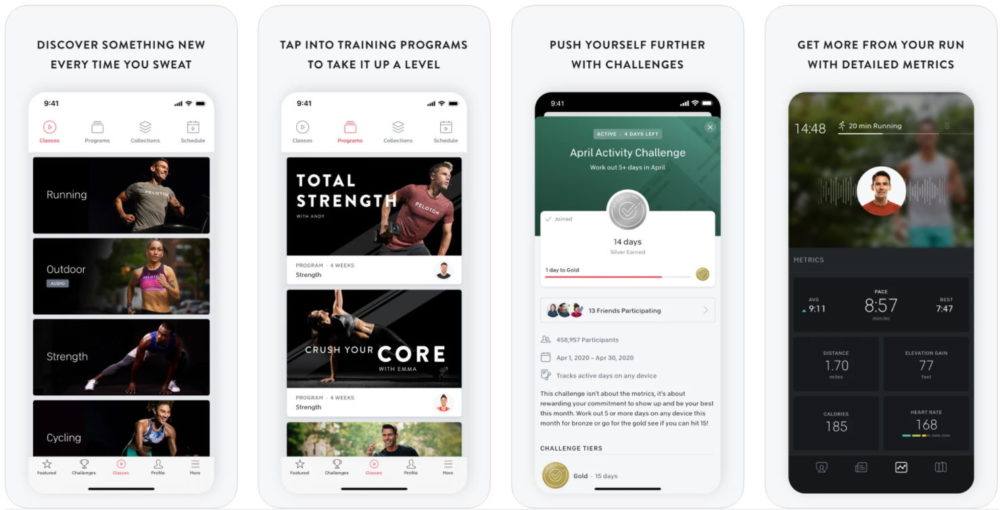
Peloton, as a company, is known mainly for its famous spin bike. It revolutionized home cardio workouts by bringing an immersive spin class experience right into your living room.
What many people don’t know, however, is that this fitness giant also has a great home fitness app that you can use even if you don’t own a Peloton bike, or indeed any fitness equipment at all.
The Peloton app has workouts organized into groups, which is ideal for getting started. You can choose from cycling, stretching, boot camp, strength, cardio, meditation… the list goes on.
The workout database is rich, with thousands of on-demand workouts available at any time. There are options for all skill levels and equipment, as well as bodyweight-only workouts. Workouts vary in length, which means you’ll find something suitable no matter how busy you are.
This app lets you add friends and work out alongside other people, making your experience more enjoyable and helping you push through the pain. There are also live classes you can access, to make working out even more dynamic.
If you own a smartwatch, you can connect it to the Peloton app to gain access to live tracking and analytics. The app also has an achievement system to keep you motivated: when you unlock a milestone, you earn a badge for your profile. There are also group challenges to get you involved in the Peloton community.
It’s worth noting that you can use the app for outdoor activities too, such as running, Obviously, if you own a Peloton bike, you will be able to utilize the app to its full extent.
The Peloton fitness app is a terrific fitness companion, with only one flaw: the price. There’s a 30-day trial period for new users, but you will need to pay $12.99/month + taxes after that, making it one of the most expensive apps on our list.
If you have the budget for it, though, the tens of thousands of workouts will keep you busy and fit forever.
Available on iOS and Android
Boostcamp

What makes Boostcamp unusual is that it offers some of the most popular workout programs out there, designed by renowned coaches. With Boostcamp, you already know what you’re going to get: all workouts on offer are tried and tested by thousands of people to help guarantee results.
Although most workouts require a well-equipped home gym, there are a few bodyweight-only programs (such as Reddit’s recommended bodyweight routine, discussed below) that make it suitable for home use.
There are also programs for cardio training and mobility, which means all aspects of fitness are covered. The app is relatively new on the market, at least compared to other names on the list, so you can expect more programs to be added as more coaches join up.
Boostcamp is entirely free. This is phenomenal, since the app lets you use some of the best workout programs out there without paying a dime. The tracking and progression system is excellent too, and the app has a community where you can ask questions and express opinions. All of this is entirely free, with no catches.
Although other apps on this list offer more home workouts, Boostcamp is a highly-polished app that gives access to some of the best workout programs at no cost, making it one of the best free fitness apps out there. It will likely get even better as its workout database continues to grow, but it’s very easy to recommend even now.
Available for iOS and Android
JEFIT
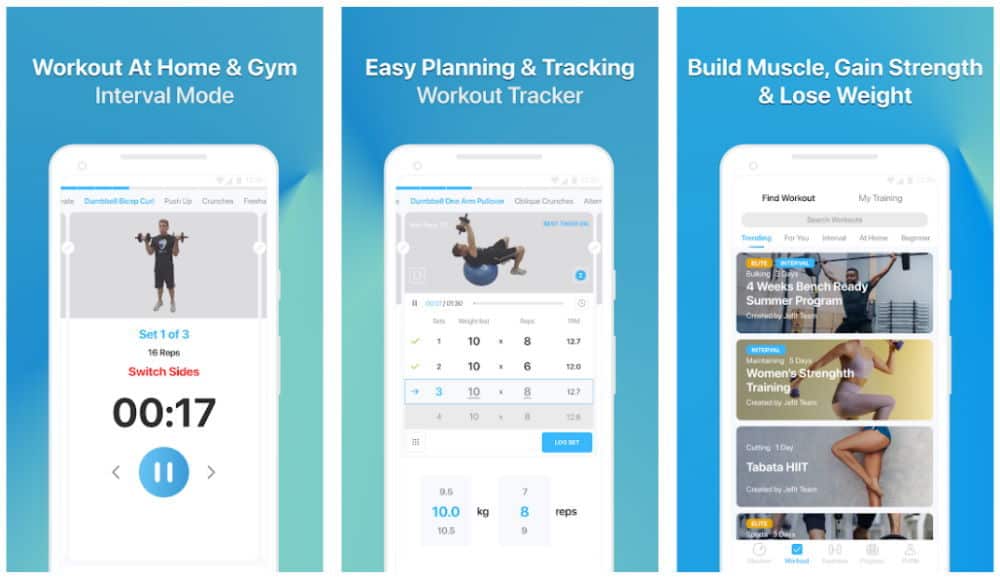
With more than eight million users, JEFIT is one of the most popular apps for workout tracking, but it also has a terrific exercise and workout database. That makes it the go-to app for all skill levels: beginners benefit from learning exercise form and getting workout ideas, and more advanced users can use it for careful workout planning and progress tracking.
JEFIT is very generous when it comes to pricing. The free version is excellent, as you can access the exercise database, and there’s a good amount of free workout plans you can try too.
JEFIT Elite gives you more workout plans, along with HD video guides and detailed progress reports. You also get cloud backups and no ads. An Elite subscription costs $6.99 per month, or $3.33/month if you choose to pay annually, which makes it quite an affordable choice.
You can also use JEFIT from your computer via a web browser, which makes workout planning even more accessible.
Overall, JEFIT is excellent value, with an impressive free tier and an affordable premium option. Yes, the app could do with a design overhaul to make it look more attractive and modern, but considering how much you get for the price, we really have no complaints.
Available for iOS and Android
Fitbod

Fitbod has one distinctive feature that sets it apart from most apps on this list: it automatically creates custom workout plans for you, based not only on your current fitness ability, but also on the equipment you own.
This is crucial for people who only own a pair of dumbbells but don’t know where to start or how to program their workouts. All of the exercises are shown in HD video, helping ensure you perform them with good form. Fitbod can also create bodyweight-only workouts, which means you’re able to use it even if you don’t own any equipment.
Not only Fitbod will create a workout based on your current fitness level, but it will also make sure you’re progressing over time. That means your workouts will remain challenging, since Fitbod will increase reps and sets, using different exercises and intervals to ensure your workouts will never get boring, and you’ll keep improving.
Fitbod will also track your progress, and you can access the details in the analytics section of the app. You can connect it to a smartwatch or fitness band to keep track of the intensity live.
Fitbod has a few minor flaws, with users complaining it doesn’t remember changes you’ve made to your workouts, meaning you will often have to edit them manually. Even so, overall Fitbod is one of the best home workout apps out there, and indeed one of the best fitness apps in general.
Fitbod is a premium app: there’s a free trial, but after that, you’ll have to pay $9.99 per month, or $59.99 if you opt for a yearly subscription. An excellent investment, if you ask us.
Available on iOS and Android
Freeletics
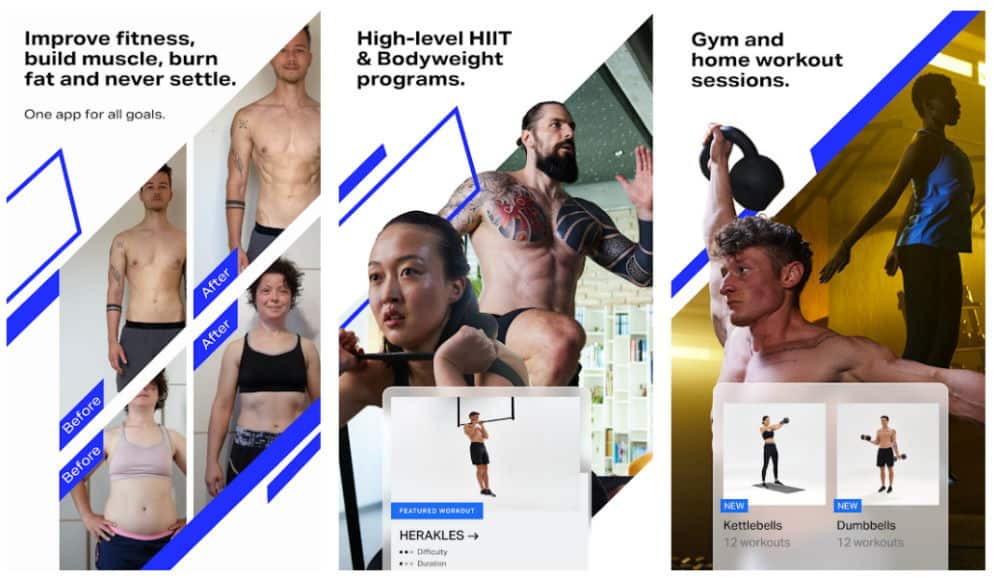
Freeletics is similar to Fitbod, with a clever algorithm that suggests workouts based on your current fitness level, the number of times you want to work out per week, and the type of exercise you are interested in. This makes sure you get a plan that you can actually stick to, which helps keep you accountable and delivers better results long term.
Upon finishing a training session, you will give the Freeletics virtual coach feedback, which will ensure your next session is at the right intensity. Freeletics workouts are challenging, that’s for sure (some might say grueling,) so don’t be worried about things getting too easy and stale!
Freeletics used to be for calisthenics only, but now it also supports training with weights. Even so, it shines for intensive bodyweight-only routines, and if that’s your main focus, you will find Freeletics more than sufficient.
If your plan is getting big via weight training, though, some other apps on the list are probably a better choice. Freeletics is predominantly HIIT-focused, aiming to build endurance and get you shredded through strength training.
Freeletics has a separate nutrition app, but it isn’t as good as the training app. You’ll get smoothie recipes, tailored advice, and nutritional plans suitable for your needs, which is good as far as it goes, but there are established nutrition apps, calorie counters, and calculators that are much more comprehensive.
Freeletics has a limited free version, which is fine for getting started. It has 20 HIIT bodyweight workouts and 25 exercises, plus you gain access to the community. If you want to unlock all of the features, though, you’ll need to pay.
The premium version, Freeletics Coach, is only available in 3/6/12 month plans, and starts at $35 per quarter. Although there’s a 14-day trial period, the payment scheme is a bit inconvenient, as it’s inflexible if you change your mind later. Even so, Freeletics is a solid home workout app, especially if you like bodyweight HIIT.
Available on iOS and Android
Strong
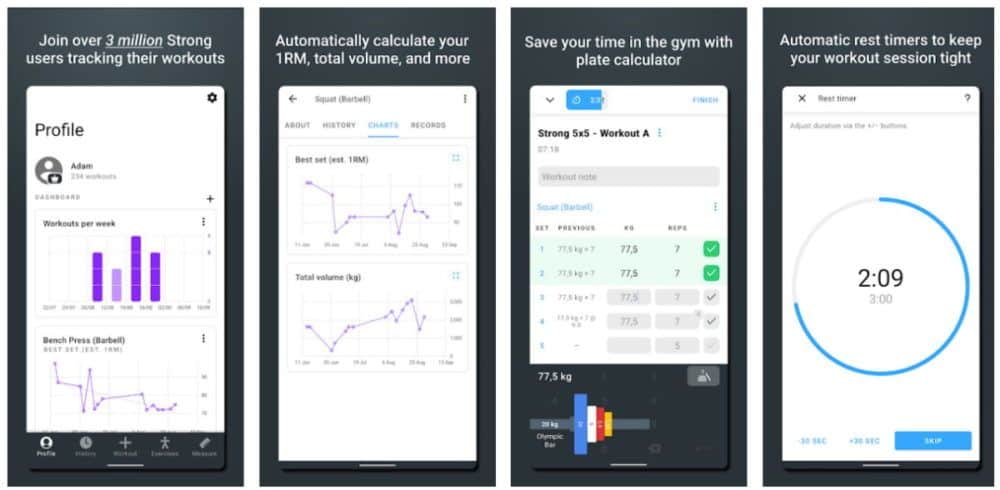
The Strong app is primarily intended as an advanced workout and progression tracker, but it does have some workout templates to get you started. It really shines when it comes to monitoring your progress, though, and is the best workout tracker on this list.
The app tracks everything, and it is incredibly intuitive to use even mid-workout. It’s like a digital notebook that keeps everything organized and is easy to search through later. You can enter sets, reps, rest times, and how the exercise felt. At the same time, you’ll see your previous personal best, so you know what to aim for this time around.
If you opt for Strong Pro, you get more advanced stats and analysis to help you push your boundaries even further. You will also be able to track your body measurements to see your progress in a different way. Everything is shown in easy-to-understand graphs and charts, and you gain access to advanced calculators to help you set up optimal warm-ups, as well as a weight plate calculator.
Overall, if you already know what you’re doing and need a detailed tracking system to push you to the next level, you will love Strong. The free version is useful, but you will need Strong Pro to unlock all of the tracking features. It’s pretty affordable, at $4.99/month or $99.99 for a lifetime version.
Strong is the best workout tracking app on this list, with the only real issue being that it’s more intended for weight training. Not many people have the necessary equipment in their home gyms to make full use of it, but if you do, this is the only tracker you’ll ever need.
Available on iOS and Android
best workout apps free
C25K
iOS, Android
If you want to run but don’t know where to start, this app is it. Short for Couch to 5K, the C25K app will take you from zero to 5K in just two months. All it takes is 30 minutes per day just three times per week and you’ll develop a base that can take you through your first 5K finish line onward—maybe even to training for your first marathon! And, if you have the Fitbit Ionic or Versa or have a Samsung Galaxy watch, the C25K app is available to use directly on your watch to make the guided workouts even more seamless.
‘Calorie Deficits’ Are the Only Proven Weight Loss Strategy, According to Health TikTok—But Is It True? Here’s What Experts Say
Related: 125+ Free Streaming Workouts
FitOn
iOS, Android
If you’re looking for a free workout app that is actually free—no additional purchases required—look no further than FitOn. Not only will you be able to access workouts across multiple disciplines such as dance, yoga and HIIT, you can search by the body part you’d like to focus on and even create custom programs to help you reach your goals. Even if you don’t come in with a defined goal in mind, you get to experiment with different types of workouts for free so you can find out the types of exercise that make moving fun.
Fitbod
iOS
Fitbod’s goal is to make you stronger and they do that by adapting your workout plan to your current strengths and weaknesses. The app is always collecting data on your current fitness level and adjusts your training—such as sets, reps and weight—accordingly, all to get you fitter in the safest way possible. If you’re looking for a strength training app that can give you a workout plan based on the equipment you have available, this one’s for you. Android users, don’t despair; Fitbod is currently in beta testing to get the app rolled out to you.
Related: What Is HIIT? Everything You Need to Know About One of the Hottest Fitness Trends
Running Apps
Strava
iOS, Android—Free; in-app purchases available
If you’re looking for the social media equivalent of a running app, Strava is for you. Not only is this GPS app a great way to track your runs in real-time and keep tabs on your training milestones, but you’ll also have the opportunity to connect with old friends and make new ones in your community through the workout app. Even better, connect with pros and coaches like Lauren Fleshman, Rich Roll and Devon Yanko, who all have active profiles to get an inside look at how and where some of the elites are logging miles in both training and racing.
MapMyRun
iOS, Android—Free; in-app purchases available
Powered by Under Armour, the MapMy family of workout apps have street cred that is well deserved. MapMyRun specifically is great for tracking your runs (with the option to let friends and family see your live location) and finding new routes in your area. If you want to step up the ease of use, get a pair of Under Armour smart shoes, which connect to the app automatically, making this a great workout app for women looking to precisely track their miles.
Related: How to Get a Full-Body Workout at Home
Charity Miles
iOS, Android—Free
Want to go the extra mile? Log your miles using Charity App and earn money for the charity of your choice just by running. It really is that easy! Start an account and choose from their list of charities—including St. Jude’s Children’s Research Hospital, Wounded Warrior Project, National Park Foundation and the Leukemia & Lymphoma Society, among others—and funds come out of a corporate sponsor pool with every mile tracked via your phone’s GPS.
Conclusion
Let us know your thoughts in the comment section below.
Check out other publications to gain access to more digital resources if you are just starting out with Flux Resource.
Also contact us today to optimize your business(s)/Brand(s) for Search Engines