
Youtube is the world’s most popular social media platform. It is where millions of people upload, share and watch different types of content. There are a lot of engaging and informative videos on Youtube, but you can only watch them online. However, there are a lot of reasons why people want to download Youtube videos and save them on their computer or mobile device. For example, downloading a video will allow you to watch it later without an internet connection. In other cases, people want to edit the video for professional purposes or create a clip using parts of it.
Whatever your reason is for downloading Youtube videos, there are many tools that will help you with that process. You can find apps that will download the video in seconds and save it on your computer or mobile device. This article will tell you about the best apps for downloading Youtube videos.
Table of Contents
Best Apps For Youtube Video Download
| YouTube Video Downloader | Platform | Supported File Formats | Download Source | Features | Price | Ratings ***** |
|---|---|---|---|---|---|---|
| SnapDownloader | Windows & macOS | MP4, MP3 | 900 websites: YouTube, Facebook, Twitter, Vimeo, Dailymotion, etc. | Download video and audio, download YouTube playlists, channels, and VR videos, save videos up to 8K resolution, 900 websites supported, in-app Proxy, high-speed downloads | Free trial or lifetime license for $19.99 | 5/5 |
| By Click Downloader | Windows | MP4, WMV, MP3, FLV, 3GP, etc. | All sites are supported | Download entire playlists & channels, entire Instagram pages, etc. | It is available for free. Premium version: $4.99. | 5/5 |
| YTD Video Downloader & Converter | Windows & macOS | 3GP, AVI, FLV, MOV, MP3, MP4, and WMV. | YouTube, Facebook, Dailymotion, Vimeo, Metacafe etc. | Download videos from 50+ sites. | Basic: Free Premium: $0.99 – $4.99 per month. | 5/5 |
| Allavsoft | Windows & macOS | MP4, MOV, AVI, WMV, FLV, MKV, 3GP, WEBM, MPG, VOB, MP3, FLAC, WAV, M4A, WMA, OGG, iPhone, Android, iPad, PSP, iMovie, Xbox etc. | YouTube, Spotify, Vimeo, Twitter, Facebook, Soundcloud, Dailymotion, Lynda, NBC, Medici TV, Xhamster, Youporn, Pornhub, PBS, BBC, Bing, Yahoo, Metacafe etc 1000+ websites. | It is easy to use. Automatically detects advertisements and does not download them. Downloaded files can be transfered anywhere and be kept forever. | Free trial. Lifetime license at $59.99, 1 month license at $19.99, 1 year license at $29.99 | 5/5 |
| VideoHunter | Windows and Mac. | MP3, MP4, WEBM, etc. | Supports more than 1K websites. | YouTube Playlist Download, Batch Download, etc. | Available for free. Montly License: $9.95 for 1 device. Yearly License: $29.95 for 2 devices. | 5/5 |
| VideoSolo Inovideo | Windows & Mac | MP4 & MP3 | 50+ popular websites are supported. | Batch download, advanced download technology, etc. | It starts at $9.95 per month. | 4.5/5 |
| Leawo Video Downloader | Windows & Mac | MP4, AVI, FLAC, AAC, MOV, MKV, WAV, etc. | 1000+ websites are supported including YouTube. | Download live stream videos, 720P & 1080P HD video download etc. | Free trial, The price starts at $29.95 per year. | 5/5 |
| iTubeGo | MacOS, Windows, Android, and iPhone devices. | MP3, MP4, M4A and other formats. | YouTube, Netflix, Facebook, Instagram, and Dailymotion, Vimeo, BBC, and many 1000+ other platforms. | Download videos from 1000+ online video platforms Supports MP3, MP4, M4A, and other formats. Desktop version supports batch downloads. Download YouTube playlist. | Free | Premium: $19.95 yearly license | $29.95 lifetime license for 1 PC, Free Trial. | 5/5 |
| 4K Video Downloader | Windows, Mac, Ubuntu. | MP4, MKV, FLV, 3GP, etc. | YouTube, Vimeo, TikTok, Facebook, Instagram, Tumblr, Flickr, SoundCloud, DailyMotion, etc. | Smart Mode Feature, In-app Proxy setup, 360 degrees videos download, Private YouTube Content download. | Personal License: $15 one time for 3 computers. Business License: $75 onetime fee for 5 Computers. | 5/5 |
| WinX HD Video Converter Deluxe | Windows, Mac. | MP4, 3GP, MKV, FLV, MOV, WMV, AVI, WEMB. | YouTube, Facebook, Video, Dailymotion, Instagram, Vimeo and 1000+ sites. | – Allow unlimited downloads of 8K, 4K, HD and SD videos from 1000+ sites. – Support batch video downloads. – Convert download videos to other formats. – 16X faster video download speed with GPU acceleration. | Free + Premium. Premium version cost $29.95 (Instead of $59.95) after 50% limited time discount. | 5/5 |
| VideoProc | Windows & Mac | MP4, FLV, AV1, webm, m4a, MP3, WAV, iPhone, Android and almost all formats. | YouTube, Facebook, Instagram, Dailymotion, Twitch and other 1000+ sites etc. | Save videos, music, playlists and channels from 1000+ sites; record YouTube live; allow batch downloading, select quality, search subtitle. | Free | 5/5 |
| Y2Mate.com | MacOS, Windows, Linux, Android and iPhone devices. | MP3, MP4, AAC, 3GP, FLV, MO, WMV. | YouTube, Facebook, Video, Dailymotion, Youku, and more. | Allows unlimited downloads of HD and SD videos Supports MP3, MP4, AAC, 3GP, FLV, MO, WMV and other formats Upload files to Google Drive or DropBox. Compatible with all browsers. | Free | 5/5 |
best youtube video downloader for android
KeepVid
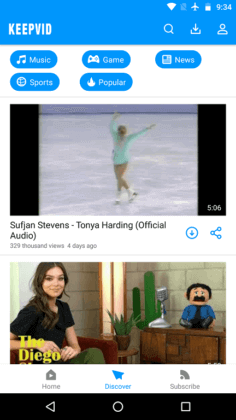
KeepVid is a popular and excellent video downloader app for Android devices. It downloads YouTube videos very quickly as compared to other video downloader app. It also offers to download videos from various video sharing sites like Twitter, Tumblr, Facebook, etc.
It offers to download HD quality of video up to 4K resolution. It also contains a built-in audio and video player. The app even downloads the YouTube videos as an MP3 format without any third-party plugin.
The app is absolutely free but displays ads. To remove the ads, go for the premium version.
Follow the below steps to download YouTube videos using KeepVid on Android:
- Launch the KeepVid app, open YouTube in it, and search for the video that you want to download.
- Select the video that you want to download and tap on the blue download button.
- Now, select the quality of the video and it will save automatically.
Download KeepVid from its official site keepvid.com.
YouTube Go
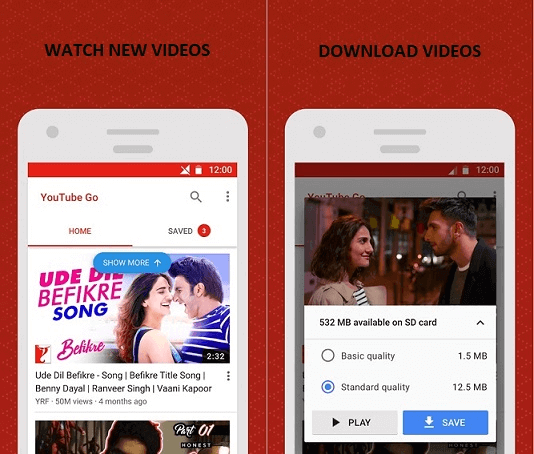
YouTube Go is one of the popular lightweight Android apps to download YouTube videos. It also allows you to share high-quality videos without the internet. However, there is a drawback of this application; it doesn’t allow you to download videos from other sources such as Facebook, Instagram, etc. Download YouTube Go from Google Play Store.
InsTube
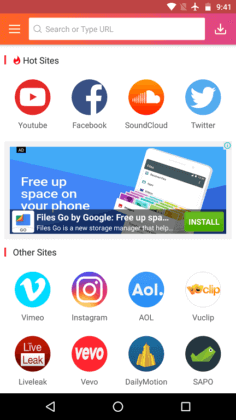
The InsTube app is another popular and widely used YouTube video downloader for Android phones. It also offers to download videos from various video sharing sites like Instagram, Twitter, Vimeo, etc.
The InsTube app offers you to select the various qualities of YouTube videos before its downloading. Using this app, you can add bookmarks video and create a secret space in your device to hide videos if required.
To download the YouTube videos using InsTube on Android phone, follow the below steps:
- Launch the InsTube app and go to your interested website.
- Search the video that you want to download and click on it.
- Now, click on the red download button to download.
- Select the video quality.
- Click on the “fast download”, and it starts video downloading.
Download InsTube app from its official site instube.com.
Videoder
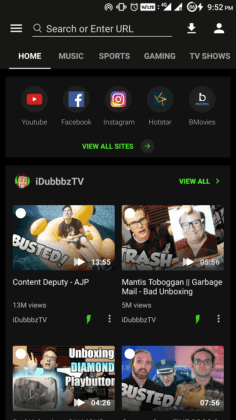
Videoder is an excellent YouTube video downloader for Android devices. It offers you to download videos from other sites such as Facebook, Instagram, YouTube, etc. This app provides to stream and download videos in all formats. You can download videos of any quality as you like. The downloaded videos can be shared to other apps also. Videoder has an attractive user interface.
This app is not available on the Google Play Store. You can download this application from its website (www.videoder.net) and install it on your Android phone. Videoder is free to install but display ads. However, the ads can be removed by buying its premium plugin from the Google Play Store.
Follow the below steps to download the YouTube videos using Videoder:
- Launch the app and open YouTube.
- Search for the video that you want to download.
- Click on the download button and select the download link that pops up. You can choose the various formats for the video.
Download Videoder from a website videoder.net.
Snaptube
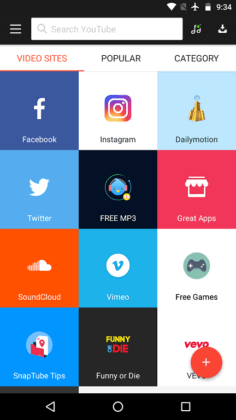
Snaptube is an authentic video downloader which provides the facility to download the YouTube videos absolutely free. It has an engaging user interface that categorized popular websites and videos. It offers you to search YouTube videos from its search bar directly.
Snaptube application offers fast YouTube video downloading, and you can select different video quality before its downloading. The downloaded videos can be shared on Twitter, Facebook, etc.
To download the YouTube videos using Snaptube, follow the below steps:
- Launch the Snaptube application and select the YouTube mobile site from its homepage.
- Search for the video which you want to download in its search bar.
- When the list of videos appears and you find the right video, then select it and click on the red download button.
- Select the quality of video, and your video gets starts downloading.
Download Snaptube app from its official site snaptubeapp.com.
TubeMate

TubeMate is also a popular app which offers to download YouTube videos in Android phone. It has a stylish user interface and is easy to use. It offers you to download videos from various video-sharing sites. It provides a built-in browser to access the websites that you want.
TubeMate also provides an option to select the video quality and its format before downloading. The downloaded videos are saved automatically into the phone’s internal storage.
Follow the below steps to download the YouTube videos using TubeMate on Android:
- Launch the TubeMate app and go to the video-sharing site.
- Select your desired video from the search results and select video quality and resolution.
- Now, tab the download button.
Download TubeMate from its official site tubemate.net.
YMusic
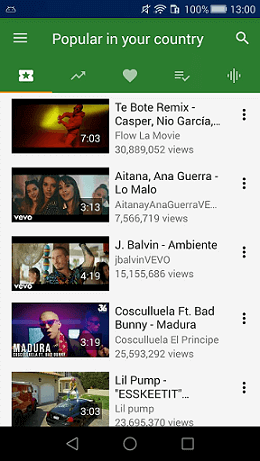
YMusic also offers its users to download YouTube videos. Users of this app can go to the trending YouTube videos and popular music. This app downloads videos into MP3 and MP4 formats.
The drawback of the YMusic app is that it only allows us to listen the audio and not allows us to watch a video.
Download YMusic app from its official site ymusic.io.
Conclusion
Let us know your thoughts in the comment section below.
Check out other publications to gain access to more digital resources if you are just starting out with Flux Resource.
Also contact us today to optimize your business(s)/Brand(s) for Search Engines