
In a world where many people feel overwhelmed by the amount of information they are exposed to online, it can be difficult to determine the veracity of news they read. This problem will only increase as Google and other search engines continue to work on improving their ability to provide users with personalized articles.
This extension helps users determine whether an article they are reading is fake or real.
Table of Contents
Chrome Extension For Fake News
Browser extensions are a constant companion to your online journeys. From storing your passwords to checking your grammar, they play an indispensable role in the digital experience of many web users.
What if browser extensions had the power to detect fake news in a matter of seconds? Imagine the time, effort, and frustration you would spare by having AI-powered algorithms or fleets of human fact checkers alert you to misleading articles before you even started reading.
These tools are out there. They go by an assortment of different names, but they ultimately provide similar value propositions. They alert you, the digital consumer, to bias in articles and publications.
These browser extensions couldn’t be more timely. Fake news has become so prevalent that mistrust is leading some to simply ignore news-related information altogether. Why read an article, after all, if there is a chance that the author has dishonest motives?
Browser extensions are among the tools that can restore confidence in digital news media. They can help readers detect and avoid the unreliable in favor of fact-driven, comparatively honest articles and publications.
These browser extensions are only a download away. They may ultimately change the very way that you navigate, consume, or reject digital news.
Media Bias/Fact Check
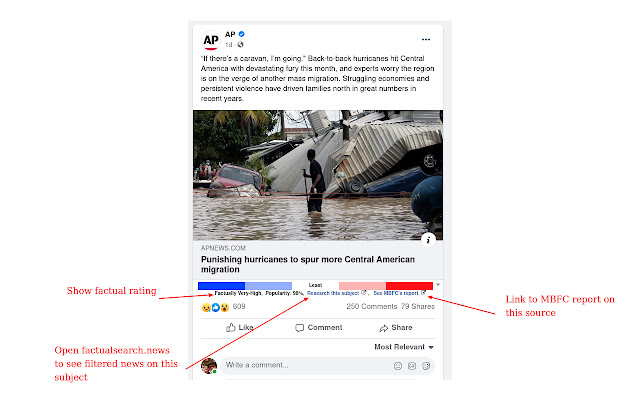
Media Bias/Fact Check is a website founded in 2015. Its mission is to make readers aware of misinformation and political bias within digital stories. It offers a browser extension for users of both Chrome and Firefox.
The extension works for news sites as well as Twitter and Facebook. Using the Media Bias/Fact Check database, the browser displays an icon showing any accuracy or bias on each page that you encounter.
When you click the MB/FC extension icon, it displays additional notes about the site. The Media Bias/Fact Check rating system includes: Least Biased, Left Bias, Right Bias, Conspiracy-Pseudoscience, Satire, Questionable Sources, and other variants. The Media Bias/Fact Check database contains evaluations of more than 3,000 websites.
FakerFact
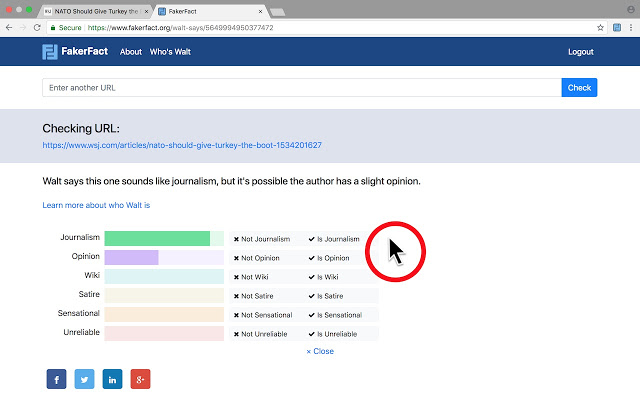
FakerFact is a browser extension centered around the services of an AI bot named “Walt”. Walt reviews articles on the fly, giving its opinion on whether a piece is satirical, journalistic, a wiki, sensational, or agenda-driven. Many articles hold multiple designations.
Users simply click the FakerFact icon when browsing articles of 100 words or more. Doing so will display Walt’s opinion about the article. The extension works with both Chrome and Firefox.
The extension is currently in its beta stage, but may help you develop your own critical eye when it comes to digital content. Users can also visit FakerFact.org to submit specific URLs for Walt’s diagnosis.
TrustServista
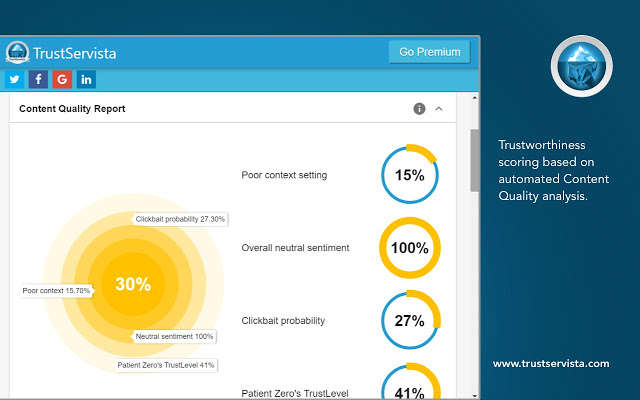
TrustServista is an AI-powered browser extension and platform aimed specifically at media members, fact checkers, and content creators.
The extension analyzes any digital news article. All users have to do is click on the extension icon. To gauge the trustworthiness of articles, TrustServista examines the style, factual references, context, and other relevant facets of a written work. It generates an overall trustworthiness score for each piece of news.
Free users can verify up to 300 URLs per month, while those who pay $2.99 per month can use TrustServista for an unlimited number of articles.
Stopaganda Plus
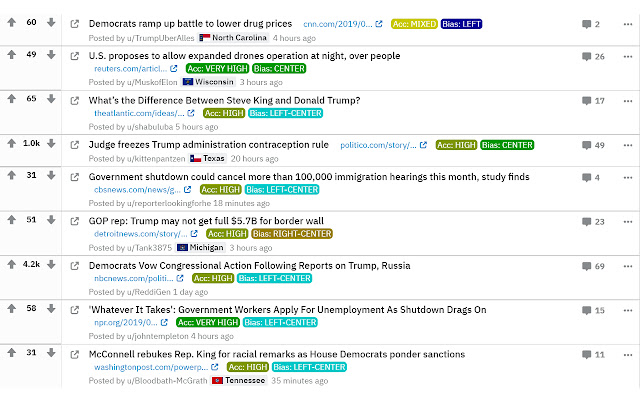
Stopaganda Plus is a fact-checking and bias-detecting browser extension. Its evaluations are based on the ratings of fact-checking site Media Bias/Fact Check.
Stopaganda Plus works with both Chrome and Firefox. A unique feature of the extension is that it works with Reddit, Twitter, Facebook, DuckDuckGo, and Google. It is fashioned to detect both inaccurate information and biased sources.
Stopaganda Plus may be a useful tool for those seeking politically-neutral news articles. It may appeal specifically to Reddit users, as it displays bias tags (Right, Left, etc.) for articles posted on Reddit threads. This eliminates the need to click individual posts and examine them for bias or inaccuracies.
Check
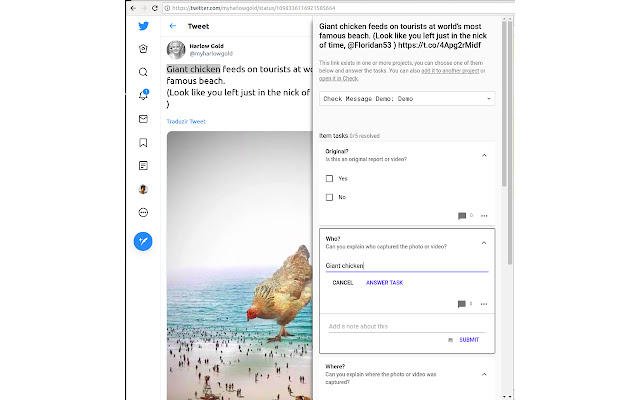
Check is a browser extension from Meedan, a technology-focused non-profit. The purpose of the extension is to “improve the investigative quality of citizen journalism and help limit the rapid spread of rumors and misinformation online”.
Built for collaboration, it allows a digital team to post links in need of fact-checking to a shared dashboard. If the media posted in the sidebar is already on Check, then the extension will let the poster know.
Check is more of a collaborative organizational tool than active fact-checking service. Still, it can provide value for teams that are willing and able to do their own fact-checking.
TrustedNews
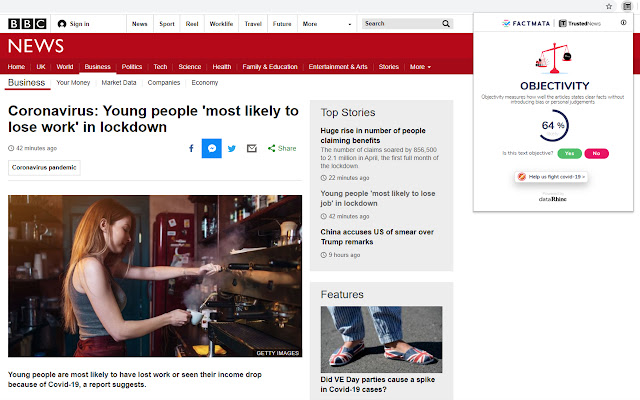
TrustedNews is a Chrome extension from Eyeo, the creator of Adblock Plus. First released in beta in 2018, version 1.1.0.1 (which was updated in October 2020) is available on the Chrome Web Store.
The plugin focuses on the language of a news article to detect opinion or bias. It identifies phrases like “in my opinion” to alert the reader when an author injects their own beliefs into an article. Though this may not catch more subtle forms of bias, it can be helpful as a convenient red flag for articles that contain overt opinions.
The TrustedNews extension relies on fact-checking services like PolitiFact and Snopes to gauge the veracity of online content. Sites, rather than individual articles, are rated as biased, malicious, user-generated content, satire, clickbait, untrustworthy, or unknown.
You can read more about the TrustedNews rating system here.
The Factual
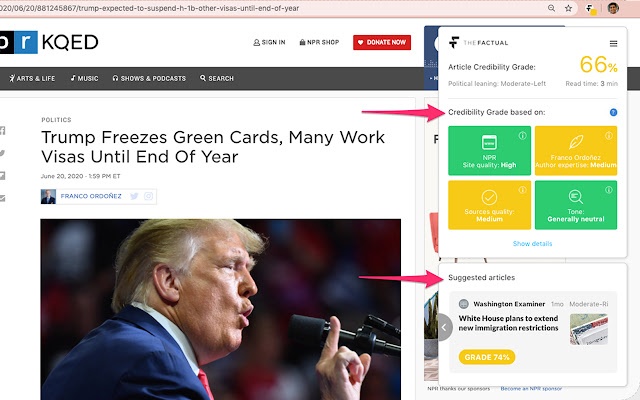
The Factual is an algorithm-powered app and browser extension that rates the credibility of digital news articles. It generates credibility ratings for more than 10,000 news articles each day.
The browser both evaluates the credibility of articles you encounter as you view them and applies existing ratings to articles in your social feeds. The latter feature is meant to help you locate trustworthy stories while avoiding fake news-y ones.
Logically
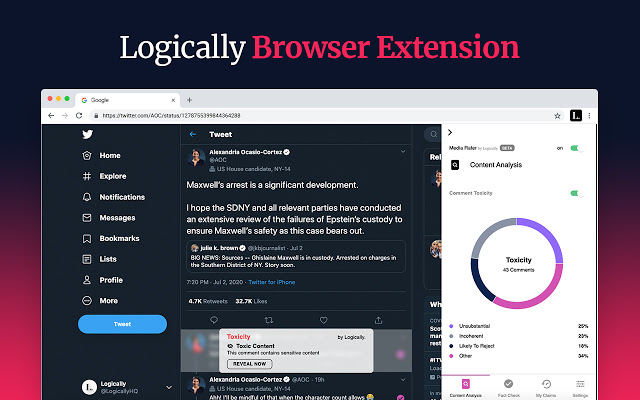
Logically is a fact-checking service and platform for the private, public, and consumer sectors. In August 2020, it announced the launch of its browser extension, which exists parallel to the Logically app.
Logically’s AI is formed in combination with research partners and assessments from experts in the fact-checking field. The browser extension relies on Logically’s assessments to identify trustworthy sources, and conversely those that are questionable.
Using the extension, users can create a list of Trusted Sources. Those sources will show up on their news feeds. Alternatively, users can mute sources from their social and news feeds based on personal preferences.
The Logically extension also provides detailed information about authors of news articles for greater context. It analyzes the “toxicity” of comments on articles, evaluates sourcing, and explores how stories are being shared socially. This is all meant to provide the reader context about the information they encounter online.
CaptainFact
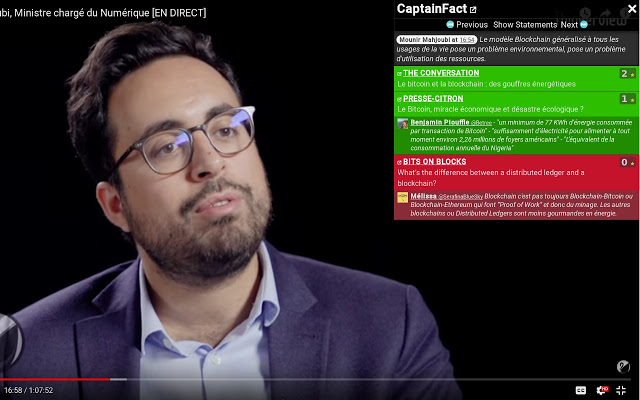
CaptainFact is a “collaborative fact-checking platform” with a browser extension for both Chrome and Firefox.
It is primarily aimed at video media. On platforms like YouTube, creators who use CaptainFact allow viewers to engage with their videos. Specifically, viewers can comment on the veracity of the content in the video, and the creator can respond.
From overt mistruths to omissions and other types of fake news, CaptainFact brings open-source fact-checking to visual media online.
NewsGuard
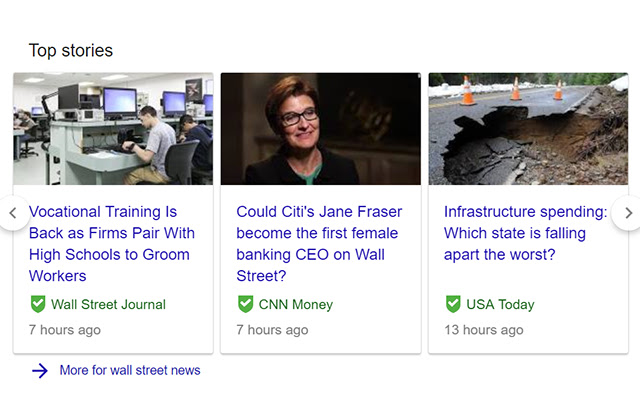
NewsGuard is a browser extension that provides trust ratings for online news. Those ratings are generated by humans, not algorithms, which is a selling point for the extension.
It has trust ratings for more than 6,000 sites, and claims that its rated sites account for 95% of online engagement. The rating system is binary: green for trustworthy, red for untrustworthy.
NewsGuard relies on “experienced journalists” to formulate its ratings. Green sites are those that adhere to “basic standards of credibility and transparency”. Red sites are those that do not honor journalistic standards, including those with clear agendas or re-reporting of misinformation.
You can read more about NewsGuard’s rating criteria here.
Newstrition by Our.News

Newstrition is an app, as well as browser extension, that applies “Newstrition” labels to online news stories. The labels are meant to reflect the accuracy, transparency, and objectivity of specific news articles.
It bases its labels on the publisher’s credibility, as sourced from fact-checking site AllSides. It also considers the sources the article relies on, reputations of the article’s authors and editors, findings from other fact-checkers who have reviewed the article, and ratings from users of Our.News.
The Newstrition label accounts for bias, accuracy, and content type (satire, clickbait, etc.).
Hoaxly

Hoaxly (also stylized as hoax.ly) is a browser extension currently offered for use with Chrome. For each website and specific URL that you visit, the Hoaxly bot compares the link with its index of fact- and bias-checked URLs.
The index contains reports that specific URLs could or do contain fake news. For matching articles, Hoaxly users will be alerted that the page they are reading could contain misleading or untrue information.
The Hoaxly team also offers chatbots and a fact-checking application programming interface (API). It has suggested that continued use of its Chrome extension may lead them to develop a Firefox-specific extension.
Closing
Being a digital citizen means being barraged, constantly and from all angles, with information. Hiding surreptitiously within seemingly-harmless paragraphs of letters and punctuation is misinformation—fake news with a true corrupting potential.
But who has the patience to comb every article for signs of bias or shameless falsehoods?
We know that most humans don’t have this capacity for fake news spotting, at least not consistently. Information overload has fueled an “I’ll take your word for it” approach to digital news consumption. Fake news is blossoming as a consequence.
Everyone who gets any sort of information online should embrace technology’s help.
Browser extensions can handle the minutiae of fake news detection. By providing real-time or archived reports of an article or website’s legitimacy, these tools allow a more efficient path to the information that you seek.
Simply embed one or more extensions into your Chrome or Firefox browser. You may soon find that sifting through fake news isn’t your job alone, but instead largely the work of your browser extension.
In a time when fake news is becoming increasingly sophisticated, why not embrace AI and human fact checkers as your allies in thwarting the threat of misinformation?
invid weverify google chrome extension
Details about the tool
This toolkit is provided by the InVID european project to help journalists to verify content on social networks (please note that external InVID services used via this interface, such as those presented under the Analysis and Keyframes tabs, are not open-sourced). It has been designed as a verification “Swiss army knife” helping journalists to save time and be more efficient in their fact-checking and debunking tasks on social networks especially when verifying videos and images.
The provided tools allow you to quickly get contextual information on Facebook and YouTube videos, to perform reverse image search on Google, Baidu or Yandex search engines, to fragment videos from various platforms (Facebook, Instagram, YouTube, Twitter, Daily Motion) into keyframes, to enhance and explore keyframes and images through a magnifying lens, to query Twitter more efficiently through time intervals and many other filters, to read video and image metadata, to check the video copyrights, and to apply forensic filters on still images. The main features of the toolkit are explained below, and in the following tutorial video.
Access menu
This is a new feature (supported in v0.59) to access the InVID plugin and to help journalists to retrieve video and image URLs within the code of a web page. After clicking on the InVID plugin button of the browser menu, the user is showed the following menu.
Open InVID launches the plugin
Video Urls displays the URL of a video present on a web page
Image Urls displays the URL of an image present on a web page
Below, there is an example of how the URL of an Instagram video can be retrieved using the newly added functionality.
Main features
The first Analysis tab allows you to query the InVID context aggregation and analysis service developed by CERTH-ITI. In a nutshell, this service is an enhanced metadata viewer for YouTube, Facebook and Twitter videos that allows you to retrieve contextual information, location (if detected), most interesting comments, apply reverse image search and check for tweets on the video (on YouTube). Be aware that the service may take some time if the video processed has a lot of comments. A new feature (a reprocess button) allows you to refresh the analysis.
The second Keyframe tab is an iframe opening the website of CERTH-ITI on video fragmentation. It allows you to copy a video URL (from Youtube, Twitter, Facebook, DailyMotion or Dropbox) or upload a video file (in mp4, webm, avi, mov, wmv, ogv, mpg, flv, and mkv format) in order to segment it in keyframes which then can be searched with a right click on Google, Yandex, Tineye and Baidu images. Our service extracts a rich set of keyframes (depending on the variation of the visual content of the video) and therefore gives the opportunity to enhance the video reverse image search. Those are the real video keyframes that differ from the thumbnails served by Youtube or Facebook. Last but not least, to strengthen more the reverse image search process, the service provides more keyframes on demand, after clicking on the “More keyframes” button that is placed at the end of the initially provided collections of keyframes.
The Thumbnails tab allows you to quickly trigger a reverse image search on Google, Bing, Tineye or Yandex Images with the four thumbnails extracted from a Youtube video. Up to four tabs (according to the number of thumbnails available) are opened automatically in your browser with the results of the reverse search while the four thumbnails are also displayed in the plugin page. This tab is somewhat redundant with what can be done with the Analysis tab but it is very fast and efficient if you just need to look whether a Youtube video has already been published previously. Please note that the Chinese search engine Baidu is not implemented here because it is filtering out Youtube content.
The Search tab allows to enhance a Twitter advanced search for keywords or hashtag using the since and until operators, either separately or together to query within a time interval, up to the minute. It translates automatically the calendar date, hour and minutes into an unix timestamp to facilitate the query, e.g. of first eyewitness pictures or videos within a time range just after a breaking news event. We have also added other features from Twitter advanced such geocode, near, from, language and various filter operators.
The Magnifier lens tab allows you to display an image through its url and to zoom or apply a magnifying lens on the image, or/and to enhance it through a bicubic algorithm to help you discover implicit knowledge such as written words, signs, banners … You can either enter the image url, upload an image from your local drive with the local file button, or drag and drop an image in another tab within your browser and copy and paste the local url. Once the image is displayed from an url, you can also perform a Google, Yandex, Tineye and Baidu reverse image search on it or use the Image forensic service designed by ITI and DW in the Reveal European project. If you are using a local image or you have modified any image (sharp, flip, bicubic), you can either download your modified image or copy a new url to paste it in google images tab which opens in your browser (watch the video below). This feature also supports links of stored images in Dropbox and Google drive.
The Metadata tab allows you to check the Exif metadata of a picture in jpeg format or metadata of a vidéo in mp4/m4v format, either through a link either through a local file. If geocoordinates are available in the picture metadata, a geolocalise button is provided automatically pointing to this location on Google map.
The Video Rights tab provides access to the InVID Rights Management application. This service gets a link to a YouTube, Facebook or Twitter video and retrieves metadata about its rights, unless access is restricted by the content uploader or the social network. First of all it provides the user with a summary of the reuse conditions, as defined by the social network the video is published in. If other reuses are intended, it is recommended to contact the content uploader. This can be done directly or under the guidance of the InVID Rights Management Tool (through the provided links). The latter facilitates contacting the uploader, confirming authorship, or managing the negotiation of the reuse conditions. Alternatively, the Video Rights tab includes information about copyright exceptions if it is not possible to get consent from the author, as the use by the press exception or fair use/fair dealing.
The Forensic tab is an iframe opening the still images forensic service developed by CERTH-ITI in a previous european project on social media verification, Reveal.
The Contextual menu (opens after right clicking on an image or a video url) allows you to trigger functionalities of this plugin on a still image or on a youtube video link. On an image, a right click will propose you either to inspect more closely areas of the image using the Magnifier, to evaluate the image using the Forensics filters, or to launch a reverse image search using several search engines. On a video link, a right click will propose you under the InVID menu to trigger either InVID video analysis or the Youtube thumbnail reverse search (for a Youtube video).
Licence
This toolkit is provided in open source via GitHub (https://github.com/AFP-Medialab/invid-verification-plugin/), under an MIT licence.
Download / Access the tool
Version 0.71 (latest)
A beta version for Chrome is available for Windows, Mac OS X and Linux users at https://goo.gl/Fo8i73 (or https://chrome.google.com/webstore/detail/fake-video-news-debunker/mhccpoafgdgbhnjfhkcmgknndkeenfhe?hl=en). To install the plugin, simply click on “Add to Chrome”. To update any previously installed version of it, go to chrome://extensions, check “Developer mode” and then click on the appeared “Update extensions now” button. Alternatively, you can simply re-start your browser.
A beta version for Firefox (compatible with all platforms) is available here. To install the plugin or update any previously installed version of it, after downloading and unpacking the zip file, simply drag & drop the created XPI file in a new tab of your Firefox browser.
Version 0.68
A beta version for Chrome is available for Windows, Mac OS X and Linux users at https://goo.gl/Fo8i73 (or https://chrome.google.com/webstore/detail/fake-video-news-debunker/mhccpoafgdgbhnjfhkcmgknndkeenfhe?hl=en). To install the plugin, simply click on “Add to Chrome”. To update any previously installed version of it, go to chrome://extensions, check “Developer mode” and then click on the appeared “Update extensions now” button. Alternatively, you can simply re-start your browser.
A beta version for Firefox (compatible with all platforms) is available here. To install the plugin or update any previously installed version of it, after downloading and unpacking the zip file, simply drag & drop the created XPI file in a new tab of your Firefox browser.
Version 0.67
A beta version for Chrome is available for Windows, Mac OS X and Linux users at https://goo.gl/Fo8i73 (or https://chrome.google.com/webstore/detail/fake-video-news-debunker/mhccpoafgdgbhnjfhkcmgknndkeenfhe?hl=en). To install the plugin, simply click on “Add to Chrome”. To update any previously installed version of it, go to chrome://extensions, check “Developer mode” and then click on the appeared “Update extensions now” button. Alternatively, you can simply re-start your browser.
A beta version for Firefox (compatible with all platforms) is available here. To install the plugin or update any previously installed version of it, after downloading and unpacking the zip file, simply drag & drop the created XPI file in a new tab of your Firefox browser.
Version 0.66
A beta version for Chrome is available for Windows, Mac OS X and Linux users at https://goo.gl/Fo8i73 (or https://chrome.google.com/webstore/detail/fake-video-news-debunker/mhccpoafgdgbhnjfhkcmgknndkeenfhe?hl=en). To install the plugin, simply click on “Add to Chrome”. To update any previously installed version of it, go to chrome://extensions, check “Developer mode” and then click on the appeared “Update extensions now” button. Alternatively, you can simply re-start your browser.
A beta version for Firefox (compatible with all platforms) is available here. To install the plugin or update any previously installed version of it, after downloading and unpacking the zip file, simply drag & drop the created XPI file in a new tab of your Firefox browser.
Version 0.65
A beta version for Chrome is available for Windows, Mac OS X and Linux users at https://goo.gl/Fo8i73 (or https://chrome.google.com/webstore/detail/fake-video-news-debunker/mhccpoafgdgbhnjfhkcmgknndkeenfhe?hl=en). To install the plugin, simply click on “Add to Chrome”. To update any previously installed version of it, go to chrome://extensions, check “Developer mode” and then click on the appeared “Update extensions now” button. Alternatively, you can simply re-start your browser.
A beta version for Firefox (compatible with all platforms) is available here. To install the plugin or update any previously installed version of it, after downloading and unpacking the zip file, simply drag & drop the created XPI file in a new tab of your Firefox browser.
Version 0.64
A beta version for Chrome is available for Windows, Mac OS X and Linux users at https://goo.gl/Fo8i73 (or https://chrome.google.com/webstore/detail/fake-video-news-debunker/mhccpoafgdgbhnjfhkcmgknndkeenfhe?hl=en). To install the plugin, simply click on “Add to Chrome”. To update any previously installed version of it, go to chrome://extensions, check “Developer mode” and then click on the appeared “Update extensions now” button. Alternatively, you can simply re-start your browser.
A beta version for Firefox is available for Windows, Mac OS X, and Linux users. To install the plugin or update any previously installed version of it, after downloading and unpacking the zip file, simply drag & drop the created XPI file in a new tab of your Firefox browser.
Version 0.62
A beta version for Chrome is available for Windows, Mac OS X and Linux users at https://goo.gl/Fo8i73 (or https://chrome.google.com/webstore/detail/fake-video-news-debunker/mhccpoafgdgbhnjfhkcmgknndkeenfhe?hl=en). To install the plugin, simply click on “Add to Chrome”. To update any previously installed version of it, go to chrome://extensions, check “Developer mode” and then click on the appeared “Update extensions now” button.
A beta version for Firefox is available for Windows, Mac OS X, and Linux users. To install the plugin or update any previously installed version of it, after downloading and unpacking the zip file, simply drag & drop the created XPI file in a new tab of your Firefox browser.
Version 0.60
A beta version for Chrome is available for Windows, Mac OS X and Linux users at https://goo.gl/Fo8i73 (or https://chrome.google.com/webstore/detail/fake-video-news-debunker/mhccpoafgdgbhnjfhkcmgknndkeenfhe?hl=en). To install the plugin, simply click on “Add to Chrome”. To update any previously installed version of it, go to chrome://extensions, check “Developer mode” and then click on the appeared “Update extensions now” button.
A beta version for Firefox is available for Windows, Mac OS X, and Linux users. To install the plugin or update any previously installed version of it, after downloading and unpacking the zip file, simply drag & drop the created XPI file in a new tab of your Firefox browser.
Version 0.59
A beta version for Chrome is available for Windows, Mac OS X and Linux users at https://goo.gl/Fo8i73 (or https://chrome.google.com/webstore/detail/fake-video-news-debunker/mhccpoafgdgbhnjfhkcmgknndkeenfhe?hl=en). To install the plugin, simply click on “Add to Chrome”. To update any previously installed version of it, go to chrome://extensions, check “Developer mode” and then click on the appeared “Update extensions now” button.
A beta version for Firefox is available for Windows, Mac OS X, and Linux users. To install the plugin or update any previously installed version of it, after downloading and unpacking the zip file, simply drag & drop the created XPI file in a new tab of your Firefox browser.
Version 0.58
A beta version for Chrome is available for Windows, Mac OS X and Linux users at https://goo.gl/Fo8i73 (or https://chrome.google.com/webstore/detail/fake-video-news-debunker/mhccpoafgdgbhnjfhkcmgknndkeenfhe?hl=en). To install the plugin, simply click on “Add to Chrome”. To update any previously installed version of it, go to chrome://extensions, check “Developer mode” and then click on the appeared “Update extensions now” button.
A beta version for Firefox is available for Windows, Mac OS X, and Linux users. To install the plugin or update any previously installed version of it, after downloading and unpacking the zip file, simply drag & drop the created XPI file in a new tab of your Firefox browser.
Version 0.56
A beta version for Chrome is available for Windows, Mac OS X and Linux users at https://goo.gl/Fo8i73 (or https://chrome.google.com/webstore/detail/fake-video-news-debunker/mhccpoafgdgbhnjfhkcmgknndkeenfhe?hl=en). To install the plugin, simply click on “Add to Chrome”. To update any previously installed version of it, go to chrome://extensions, check “Developer mode” and then click on the appeared “Update extensions now” button.
A beta version for Firefox is available for Windows, Mac OS X, and Linux users. To install the plugin or update any previously installed version of it, after downloading and unpacking the zip file, simply drag & drop the created XPI file in a new tab of your Firefox browser.
Older versions
A beta version 0.55 for Firefox is available for Windows, Mac OS X, and Linux users. To install the plugin or update any previously installed version of it, after downloading and unpacking the zip file, simply drag & drop the created XPI file in a new tab of your Firefox browser.
A beta version 0.54 for Firefox is available for Windows, Mac OS X and Linux users. To install the plugin, after downloading and unpacking the zip file, simply drag & drop the created XPI file in a new tab of your Firefox brows
Version history
Version 0.71 (Date of release: June 7, 2019): A redesign of the InVID verification plugin, which is now maintained and enhanced within the WeVerify H2020 project (under grant agreement N° 825297). This version includes: i) Facebook authentication in the Analysis feature to be able to process Facebook public videos, ii) Classroom and Interactive pages and iii) updated Tutorial (each feature has now a video tutorial in each language, available by clicking on the (i) button next to the corresponding tool).
Version 0.68 (Date of release: January 25, 2019): New beta release of the plugin, which contains some bug fixes that prevented the analysis of locally stored videos with the Keyframes tool.
Version 0.67 (Date of release: December 20, 2018): New beta release of the plugin, which i) integrates the Keyframes and Forensic tools directly through their APIs, ii) contains a crop function to the Magnifier, iii) is translated also in Spanish.
Version 0.66 (Date of release: October 29, 2018): New beta release of the plugin, which has some bugs fixed in the Magnifier and Metadata tools.
Version 0.65 (Date of release: October 8, 2018): New beta release of the plugin, which i) has some bugs fixed in the (Contextual) Analysis tool and ii) contains some improvements in the Metadata tool.
Version 0.64 (Date of release: September 14, 2018): New beta release of the plugin, which i) integrates the new Video Rights tool that enables the user to the check the video copyrights and ensure authorized video re-use, ii) includes the new and improved version of the (Contextual) Analysis tool, iii) contains a mechanism for handling “time_continue” YouTube URLs, and iv) allows better integration with Google analytics.
Version 0.62 (Date of release: July 13, 2018): New beta release of the plugin, which i) includes a GDPR-compatible cookie consent, ii) offers the Forensic functionality also via the contextual menu, iii) enables reverse image search using the KarmaDecay and the Bing search engines via the contextual menu, iv) has a bug fixed in the Contextual Analysis tool.
Version 0.60 (Date of release: January 31, 2018): Fixed bug in the Analysis tab of the plugin.
Version 0.59 (Date or release: January 26, 2018): New beta release of the plugin, which i) provides a new launch popup menu with two options to find out videos and images urls in the current page code (this is to help journalists identify the video link on Instagram, Vimeo, Liveleak… that can be opened in a new tab for download or directly used in the Keyframes features), ii) supports YouTube shorteners in all corresponding functions, iii) contains an enhanced contextual menu (with filters to avoid displaying a function that does not work properly), iv) offers a preview of picture for Metadata and support of Dropbox and GDrive URLs, v) includes a new API for Analysis with Twitter support, vi) integrates Tineye as reverse search engine in all tabs where reverse search is applied, vii) offers a link to timaanddate.com to « convert to local time » feature in Analysis, viii) enables filtering of YouTube URLs in the Thumbnails feature.
Version 0.58 (Date of release: November 20, 2017): New beta release of the plugin, which i) integrates an improved version of the video contextual verification tool that supports UTC time conversion, multilingual comment detection and verification and progressive display of results, ii) allows the application of reverse image search on YouTube thumbnails through the Bing engine, iii) includes an extended version of the video keyframe extraction tool that offers additional keyframes for reverse keyframe search, iv) provides an improved presentation of the collected image/video metadata, v) integrates Google Analytics for gathering information about its use (related privacy disclaimer has been added in the “About” tab), and vi) contains a tutorial that presents the functionalities of plugin.
Version 0.56 (Date of release: October 3, 2017): New beta release of the plugin, which i) contains a feedback mechanism (connected with a Slack channel) for instant reporting of issues regarding the functionality of the different components of the tool, ii) integrates a survey concerning the use of the tool, iii) offers the new “flip” filter of the Magnifier, that creates a mirrored instance of the given image and allows to download this instance or directly use it for reverse image search, and iv) permits the application of the Magnifier on images stored in Google drive (through the share link) or in Dropbox.
Version 0.55 (Date of release: August 4, 2017): New beta release of the plugin, which contains an updated version of the video fragmentation and keyframe reverse search component, and a newly added button in Metadata tab, that opens a Google Map centered on the geo coordinates of the image (if available)
Version 0.54 (Date of release: July 12, 2017): Open beta release of the plugin, which contains functionalities for contextual analysis, video fragmentation and keyframe/thumbnail reverse search, advanced Twitter search, image magnification, metadata analysis and forensic analysis.
Initial versions (v0.1-v0.5) of the plugin have been developed by AFP Medialab (Denis Teyssou, Jean-Michel Leung).
Conclusion
Let us know your thoughts in the comment section below.
Check out other publications to gain access to more digital resources if you are just starting out with Flux Resource.
Also contact us today to optimize your business(s)/Brand(s) for Search Engines