
Here’s comes a question to you. Do you want a free copywriting software that comes with one click article writing training videos and software? If it is so, you are always welcome here where I will introduce 5 best copywriting softwares you can use for building your online business or making remarkable wealth online right at now!
Table of Contents
Best Free Copywriting Software
BLOGABOUT
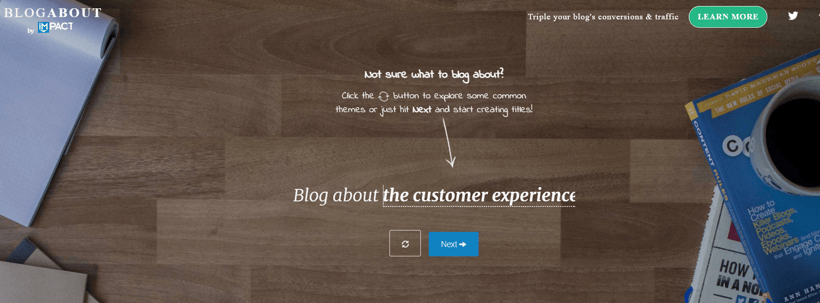
80 percent of readers never go beyond a headline, so first impressions are crucial. Created by Impact (Marcus Sheridan’s inbound marketing agency), BlogAbout generates prompts to help you choose an engaging title.
HOW IT WORKS:
- It generates common business topics, such as ‘customer service’ and ‘growth’ for inspiration and brainstorming.
- It then creates a variety of titles with blank spaces in to fill with your own keywords.
- A heart icon button allows you to save and log the titles you like. You can also email the titles to yourself!
PROS
It is quick and easy-to-use.
CONS
It has limited features.
EMV HEADLINE ANALYZER
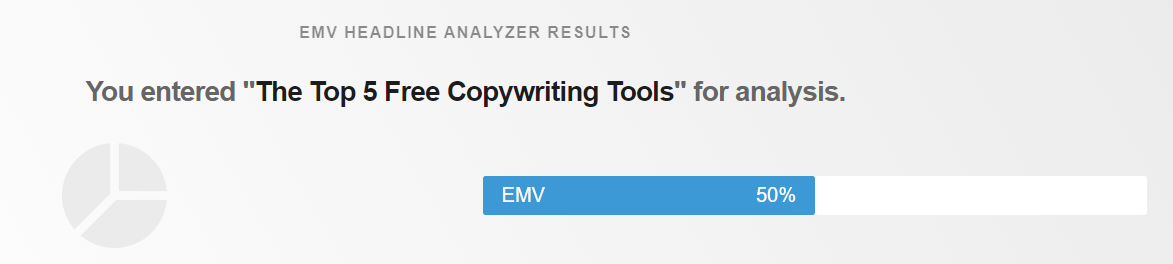
EMV Headline Analyzser scores your title based on how well your marketing content addresses people’s emotions (referred to as Emotional Marketing Value).
Emotion is key in resonating with online visitors, with studies showing that emotional content performs twice as well than unemotional content.
HOW IT WORKS:
Your EMV score is dictated by the number of EMV words you have in relation to the total amount of words in your headline. It also tells you the average EMV percentage for professional copywriting so that you can compare it to your own score.
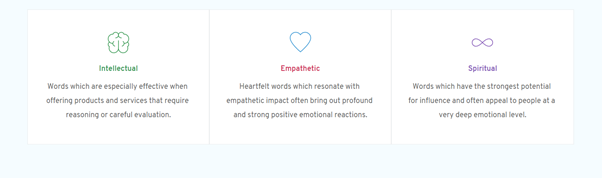
Interestingly, it also classifies your headline as one of three emotional types based on your word choices:
PROS
It assigns you a score that you can improve on and compare with other headlines.
CONS
It would be more helpful if it highlighted the emotional words you use.
WORDTUNE
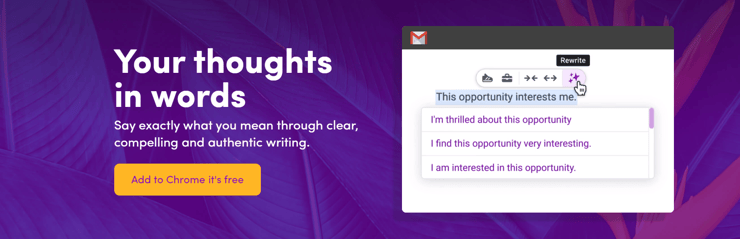
Wordtune cleverly rewrites your content using a form of artificial intelligence called NLP (an acronym for natural language processing).
HOW IT WORKS:
When you type or paste your content in the textbox, Wordtune offers a list of suggestions to select from to replace your original text. It can improve your sentence structure and make your writing shorter or longer.
PROS
It is particularly useful for marketers who want to repurpose their writing across different formats or platforms.
It works on a variety of browsers and on many other popular applications, such as LinkedIn, Twitter, and Facebook.
CONS
It is limited to rephrasing 280 words at a given time, so it does not work on longer pieces of text.
HEMINGWAY EDITOR
Named after the literary master, Hemingway Editor is the go-to tool to make your writing more concise.
HOW IT WORKS:
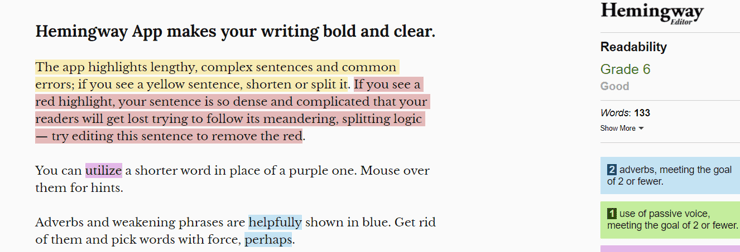
It highlights errors and lengthy sentences in your content using a colour coded system, with each colour representing a type of problem and the improvement needed:
- Yellow: shows a sentence that is too long – shorten it or split it into two smaller sentences
- Red: shows a sentence that is complicated and unclear to read – reword
- Purple: shows a phrase or word that has a simpler alternative – select one of the suggested shorter words
- Blue: shows adverbs or weakening phrases – delete and pick a word that is less hesitant
- Green: shows passive voice. Use an active voice instead to make your statement sound more powerful
PROS
It works on almost all web browsers and it helps to improve your own editing skills over time.
CONS
It only works if you want short and simple sentences, as it penalises long sentences.
WORDCOUNTER
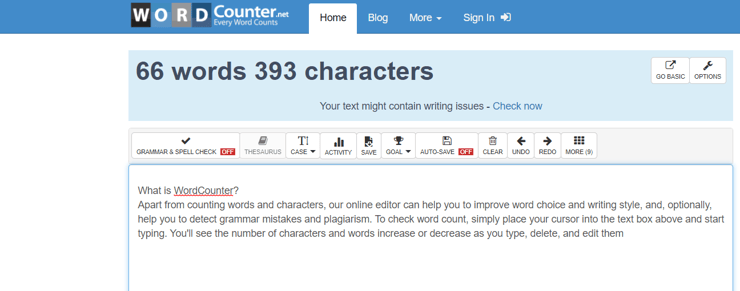
WordCounter is a counting tool with an impressive amount of features, using statistics to offer you a detailed analysis of your content.
HOW IT WORKS:
Type or paste content into the text box to keep track of how many words and characters you have used. This is particularly beneficial if you are writing towards a fixed word count.
Navigate towards the tool bar for additional insights, such as reading level, reading time, and speaking time. It can even offer information on keyword distribution by counting how many times particular keywords crop up in your text.
PROS
It offers a wide range of insights to select from.
CONS
Some features, such as the reading level, are not completely accurate.
best copywriting software
Here are some of the best copywriting platforms every copywriter should consider using:
1. Jasper (formerly Conversion.ai & Jarvis)

Best For: Small Businesses, Marketers, and Content Marketing Agencies.
G2 Score: 4.9/5
If you’ve hit writer’s block or are unable to convert from your written copy, then Jasper is the tool for you. Jasper is an AI-based copywriting software that helps you write sales pages and emails to capture leads, headlines, video scripts, copy for ads, and a lot more.
Their AI-based writing assistant Jasper is trained by conversion and copywriting experts, which helped it acquire incredible writing skills and write copies that convert.
They even claim that every line of their website copy was written by their own copywriting tool, Jasper.
Have a look at the content and be the judge yourself:

You’ll get access to over 40 copywriting templates based on different use cases. There’s a template available for every situation, including marketing strategy, email marketing, Amazon product descriptions, blog content, etc.
The process is also straightforward and requires only three steps.
To start with, choose a skill and enter essential data about your brand or product. You can also provide instructions like “the number of words,” “use a professional tone,” etc. Finally, the AI tool Jasper will generate multiple outputs simultaneously.
The editor is also intuitive, where your instructions and inputs go hand-in-hand with the AI copywriter’s output.

One downside is that the cost increases exponentially with the number of words generated. And the plan that allows unlimited words is slightly expensive at $109/month.
Pros:
- The ability to translate the content to over 11 languages
- Aligns the content with the tone of your brand
- AI copywriters community
- Live chat support
- 7-day money-back guarantee
- Allows team collaboration and management
- Integration with Surfer SEO (not included in the cost)
Cons:
- Slightly expensive
- Lacks human element
- It may return unoriginal content sometimes
- Might make grammar missteps every now and then
Pricing:
Jasper (formerly Conversion.ai) has two paid plans:
- Starter – $29 per month (20,000 words)
- Pro – $109 per month (Unlimited words)
The Starter plan is only sufficient for short-form copy, including short bios, headlines, product descriptions, etc. You need to purchase the Pro plan for long-form content like blog posts, books, video scripts, etc.
2. Copy.ai

Best For: Small Businesses, Startups, Ecommerce Brands, and Marketers.
G2 Score: Not available
Copy.ai is another AI-based copywriting tool on this list built with the GPT-3 technology. You can get started with a 7-day free trial, which is a plus and allows you to get familiar with the platform before committing yourself.
To start with, select the type of copy you want and then add a bit about your product – CopyAI will do the rest. You can even target specific customers in laser-targeted locations.
You get access to plenty of copywriting tools, including templates, which basically entails the type of content Copy.ai generates. It lets you create product descriptions, social ads, website copy, blog intro, blog outline, email copy, social media taglines, subject lines, etc.
I did a little experiment to create Instagram captions with CopyAI. For the sake of this experiment, let’s assume you’re selling “Drinks for a cold winter day” – and explicitly targeting Canadian Citizens during Winters.

If you scroll further, you’ll see more template options and plenty of other writing tools that allow you to perform different actions.
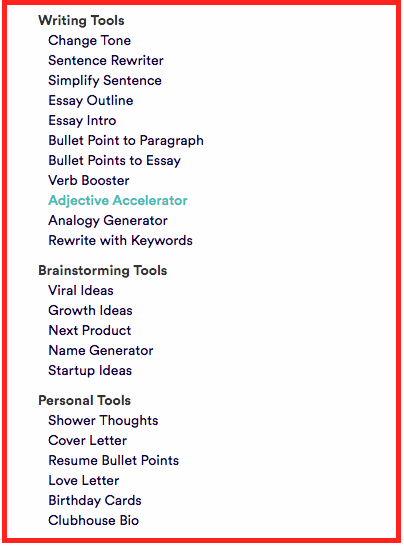
For instance, the “Change Tone” tool lets you choose from nine tones – friendly, witty, bold, professional, persuasive, relaxed, luxury, empathetic, and adventurous.

Finally, you’ll get 10 outputs at a time after clicking on the “Create” option. And if they are not to your liking, you can rerun it for more ideas.

I love how they even included eye-catching emoticons to the captions – a great addition to pull more audience on social platforms like Instagram. As you can see, some of the captions even have their unique hashtags.
This saves you a lot of time from brainstorming ideas and phrases. I even found the interface incredibly straightforward – it took me a little over 2 minutes to get 10 engaging captions.
That said, some sentences might not always make sense. It’s still an AI tool at the end of the day, after all.
For example, I used the “Adjective Accelerator” tool to spruce up my use of adjectives.
These are the results:

None of these captions make any sense, and a bit of the French language appeared out of nowhere.
However, after I clicked on the “make more” button, I received better results again. So, sometimes it can generate sentences that may not make sense.
For the most part, it’s a valuable tool that helps you generate every type of copy you want.
Pros:
- Generates 10 results at a time
- Multiple copywriting tools
- Easy to navigate UI
- 7-day free trial
Cons:
- The sentences may not always make sense
Pricing:
It offers two pricing plans, along with a 7-day free trial:
- Solo – $35 per month
- Custom – Quote-based
The free trial allows 100 runs per day, while the paid plans allow unlimited runs in a day.
3. Wynter.
Best For: B2B Product Marketers.
G2 Score: 4.9/5
Do you want to know what your target audience thinks of your content before you hit that publish button? Of course, you do!
And that’s where Wynter can help.
Wynter is a message testing tool that helps you identify how well your content resonates with your prospects. It lets you analyze your ad, email, and even website copy.
You’ll also be able to identify where you missed the mark and discover the blind spots in your copy, so you can fix it and get better results.
Start by setting your target audience by title, industry, company size, and more to get precise results. Wynter has a built-in panel of the target audience to choose from.

The panelists are vetted by Wynter’s team to ensure you get the best responses and feedback for your content.
Here’s a quick glimpse of the messaging test results:
Overall, Wynter works in five steps.
- Enter the URL of the page you want to test or upload a document.
- Choose your target audience from the panel provided by Wynter.
- Highlight the areas you want to test. You can also ask specific questions about selected areas.
- Wait for the results (you’ll get the results within 1-2 business days).
- Tweak your messaging based on the insights.
Yes, it’s that simple!
Pros:
- 100% money-back guarantee
- You can choose between broad or granular results
- Individually vetted B2B and consumer panels
Cons:
- A bit expensive
- You might not like the responses from all panelists
Pricing:
Tests with B2C panels cost:
- $99/value proposition test
- $249/full-page message test
B2B tests start at $199 per test.
The cost of the B2B tests will vary based on the number of B2B professionals you choose, the type of test, seniority level of panelists, and whether you require a summary report.
4. Convert.

Best For: Medium and Large CRO Agencies and Businesses.
G2 Score: 4.7/5
Convert is a flicker-free A/B Testing tool that helps you optimize your website content for better conversion.
It allows you to four types of tests:
- A/B Tests – Test different versions of the same element.
- Split Testing – Test completely different designs or versions of a page.
- Multivariate Testing – Test a group of elements on a single web page.
- Multipage Experiments – Test changes to specific elements across numerous pages.
It also has a WYSIWYG editor to perform all the tests – no coding required. And if you want to explore more, you can leverage their JS tester for dynamic testing that provides access to JS, jQuery, and CSS codes.
On the reporting front, you get access to in-depth reports that let you compare critical metrics and KPIs like CTR, ROI, average order value, etc.

You also get unlimited subdomains, unlimited client accounts, and the ability to run unlimited tests & variations – even with the free trial.
Pros:
- 15-day free trial
- API Integration
- Advanced DMP profiling
- Rich geo-targeting
- Privacy Notifications
- Post-test segmentation based on new/returning customers, browsers used, devices, etc.
- Integration with business tools like Zapier, HubSpot, WordPress, Drupal, Shopify, etc.
Cons:
- A bit on the expensive side with plans starting at $699/month
- Steep learning curve
Pricing:
Convert has three paid plans, starting at:
- Kickstart – $699/month
- Specialist – $879/month
- Leader – $1899/month
All of these plans come with a 15-day free trial and email, chat, and phone support.
5. Google Optimize.

Best For: Small Business Owners or Digital Marketing Professional Starting With Experimentation.
G2 Score: 4.2/5
Google Optimize is a free A/B testing and optimization tool that helps you identify what type of site content is engaging your customers the most.
It provides the following testing and evaluation options:
- A/B testing or A/B/n tests
- Split URL testing
- Multivariate testing for up to 16 combinations
- Experiment objectives (up to 3 preconfigured)
- Simultaneous experiments (up to 5)
The fact that it is built natively into Google Analytics is another bonus. This allows you to leverage your data in Google Analytics to spot issues with your content more quickly.
Other than that, Google Optimize allows basic URL targeting, user behavior targeting, and geo-location targeting. There are also technical targeting options that include cookies, JavaScript, and data layers.
Pros:
- Helps you create personalized web content
- Reports of experiment summaries
- WYSIWYG (What-You-See-Is-What-You-Get) website editor
- Integration with Google Ads, Google BigQuery, Firebase,
Cons:
- It has pre-selected experiment objectives, which limits your options
- Doesn’t allow audience customization
Pricing:
Entirely free of cost.
Conclusion
Let us know your thoughts in the comment section below.
Check out other publications to gain access to more digital resources if you are just starting out with Flux Resource.
Also contact us today to optimize your business(s)/Brand(s) for Search Engines