
A website is a fundamental element of any business’s marketing strategy. It can help you generate leads and increase sales.
In fact, even small businesses with budget constraints can afford to have one as there are many software tools that allow users to create a website without having to hire a developer.
This article will discuss the easiest web design software for Mac that you can use to create a beautiful and professional website.
Easiest Web Design Software For Mac
You truly deserve the best website builders for Mac which will take care of all your ideas, projects, and businesses.
No matter what type of website you would like to establish, these tools will speed up the process rapidly.
Whether a page for a blog, a portfolio, a corporate business, an online store, a restaurant, a wedding, you name it, these web development and design software are ready and set to realize them all.
It is crucial to understand that you only need your Mac, and you are good to go. Well, an internet connection would be good, too. Nope, prior experience is not necessary. Even if you lack coding and design skills, you can still win the website building game without hassle.
All website builders for Mac follow every latest web and tech trend, ensuring that the end page works smoothly and flawlessly. Predominantly, all tools also take care of web hosting and domain name registrations, keeping managing and maintaining your page from one account a small breeze.
You can now kick off your online presence with ease and confidence, knowing you cannot mess things up. And you have it all under complete control without ever needing to hire a pricey developer or designer to make corrections and whatnot.
Top Website Builders For Mac
Wix
wix website builder for mac
Wix is one of the most promising, easy-to-use, yet advanced website builders for Mac users. It is multi-purpose software that gives you a chance to create the exact page you want. Out of the box, Wix comes with a countless collection of ready-to-use templates, which you can also customize and fine-tune to match your branding regulations. You will need to undergo barely any work because the layouts are already outstandingly remarkable.
It all depends on the technical levels you are at which to choose. Moreover, Wix has three main characteristics that will get you going. They are Wix Editor, Corvid, and Wix ADI. The latter, artificial design intelligence, does the most work for you and creates the most fitting web design for your needs and requirements.
More Info
Shopify
shopify website builder for mac
Would you like to start your own eCommerce business but do not want to spend your entire budget just on building the page? If that is the case, then get your hands on Shopify. This website builder for Mac has it all and more for hammering out the most advanced online stores. On the flip side, you can also keep things as simple as possible and create a minimal yet high converting webshop. In brief, whatever comes to mind, you can make it happen with Shopify. Rules and boundaries are none.
With impressive customization features, predefined templates, and an endless collection of apps and extensions, making a page with Shopify is not complicated. Shopify also covers marketing, management, domain names, web hosting, and the initial website building. Start pushing items online with Shopify and experience epic success.
More Info
Zyro Website Builder
zyro website builder
Zyro is an all-around website builder that you can use with any platform or operating system. With so much material at your disposal, you can start, customize and put your website for the world to enjoy quickly. You need to know that Zyro works for many different industries and niches. And if you are down to perform additional customization tweaks, you can also go entirely against the grain and do your thing.
Moreover, Zyro can launch powerful eCommerce websites, too (without transaction fees). Some other treats are web hosting, domain registration, business name generator, and logo maker, to name a few. Pick the plan that suits your needs best and enjoy the smooth process of establishing an attention-grabbing website with Zyro.
More Info
Webflow
webflow website builder for mac
Instead of changing the dull code to make edits and improvements with Webflow, you code visually. This website builder for Mac is an excellent tool that never asks for any prior experience with web development and design. You can be a complete beginner and still hammer out the most professional and sophisticated page. With Webflow, all becomes a piece of cake. While you can choose a template, you can also start with a blank canvas and craft the ideal page for your project.
Webflow is great for someone who would like to create a full-blown website and a professional who would like to utilize it for prototyping purposes only. You can build everything custom with Webflow, making the final look fit your meticulous taste to the very last and smallest detail.
More Info
Weebly
weebly website builder for mac
Right off the bat, Weebly gives you an option to either create a website or an online store with it. Pick accordingly and get things moving forward with this cracking website builder for Mac. No limits and no boundaries, approach creating web spaces with an open mind, as Weebly brings to the table a ton of handy material that will get you going in close to no time. In short, Weebly is an all-in-one tool for freelancers, entrepreneurs, and everyone else in between.
Whether you plan to sell products or push your services and portfolio, make it huge with Weebly. When working with Weebly, you will go through a step-by-step guide on creating your page, making the platform very beginner-friendly. Once you get its gist, modify the layout, enhance it with your creative touches, and you are ready to go online.
More Info
Squarespace
squarespace website builder for mac
Blogging, marketing, selling goods and promoting brands and companies, Squarespace has you covered from start to finish. Let Squarespace take care of it from having no idea how to make a page to successfully running a high-end online presence. You don’t need to worry about any technical stuff, like web hosting, domain names, responsiveness, high loading speed, and cross-browser compatibility. Squarespace takes care of it all.
Squarespace comes with many designer-made templates that will help you get started sooner rather than later. Thanks to Squarespace’s intuitive editor, editing and improving the default settings is also kids’ stuff. But if you dig the lookout of the box, feel free to employ it exactly as is. In the kit, you will also find tools for email marketing, appointments, logos, and more. The sky is the limit with Squarespace.
More Info
1&1 IONOS
1-1 ionos website builder for mac
Bring your idea online with 1&1 IONOS. This easy-to-use, yet professional website builder for Mac is perfect for classic pages and eCommerce websites. You only need a computer and imagination, and you can start building, designing, and establishing with 1&1 IONOS. No prior knowledge is necessary to start making moves on the Internet with the one and only, 1&1 IONOS. With a broad selection of ready-made templates, you can quick-start your project and make it yours swiftly. It is a guarantee that you will hammer out a page without a hitch.
Once you get on board, 1&1 IONOS gives you access to way more than “just” the drag and drop page editor. It also comes with an SSL certificate, search engine optimization, email marketing, social media integration, backups, and restoring, to name a few. And to make things even more simple, there are just two plans available; one for websites and the other for online stores.
More Info
Site123 Website Builder
site123 website builder for mac
When you gain yourself access to Site123, a website builder for Mac, you will immediately understand the situation. When this all-inclusive software hits you with various features and functionalities, you only need to take charge, and you will be live pretty quickly. What’s best, with Site123, you can start on the internet free of charge. Can you imagine that you can build a page in as quickly as saying 1 2 3 today? That’s correct. Without spending a single penny, you can activate your own online space and start driving traffic to it.
But why exactly Site123? Because the entire process only requires three simple steps. You select the template, edit it and publish it. Yes, it truly is that simple. And your website will also be mobile-ready, flexible, optimized for search engines and high performing.
More Info
Weblium
weblium website builder for mac
If you are a loyal Mac user, the time has come to hook you up with the right website builder for your needs. Weblium is a solution that will get you on board in close to no time. Instead of hiring yourself a professional, you can now make it happen with Weblium in no time. Everything is set up for you, and once you would like to bring things together, let Weblium’s artificial intelligence do the trick.
Of course, you can get creative and modify the default settings of a Weblium template so it matches your style precisely. Other than that, Weblium has you sorted out in full. Indeed, domain name, hosting, site security, responsiveness, you name it, Weblium covers it.
More Info
GoDaddy
godaddy website builder for mac
GoDaddy is a giant web host and domain registrar which also comes with a convenient website builder. Of course, the tool adapts to all users without a hassle. Thus, we can easily call GoDaddy a website builder for Mac. Moreover, this remarkable page-building alternative comes with everything necessary to get you online as fast as possible. With the predefined designs and various practical features, you can take GoDaddy to your advantage and shine online. In short, manage your thriving business website from one location with ease.
With four different plans, you have enough options to get on the internet and make a difference. Not just that, but each package comes with a free test period that offers you to try it out and see all the perks that come with GoDaddy.
More Info
Jimdo
jimdo website builder for mac
On your initial approach to building a website, you might not be that confident that you will succeed at launching a decent one. However, as soon as you pick up a website builder for Mac, you are certain that you will. With Jimdo, you know that a dope page is just around a corner. And this corner is no more than three minutes away. As wizardry as all this might sound, Jimdo’s artificial intelligence will do the trick. Jimdo AI unlocks a whole new specter of options to realize your plans in a snap of a finger.
Instead of starting from scratch, Jimdo provides a personalized template right off the bat. All you need to do is update it with your content and details, fine-tune it, and you are ready for the launch.
More Info
Webnode
webnode website builder for mac
With a whopping fanbase of thirty million users, you know that Webnode is a serious deal. Do you know why the number of folks that use this website builder for Mac is so vast? It is simple; because Webnode offers you to bring into being a website entirely free of charge. You can pick the right premium plan later, after you get the full gist of Webnode.
And the features? Webnode sure has many to ensure the creation of the specific page you need. From templates, domain names, and hosting to form builder, statistics, online store support, and Google Analytics integration, Webnode has all the mandatory and more. For any additional questions and concerns, Webnode’s team of experts is always at your service.
More Info
Sparkle
sparkle website builder for mac
If you would like to enhance the process of building a page on your Mac, you better do it with Sparkle. This excellent, newbie-friendly and full of handy amenities website builder for Mac users is perfect for anyone. It does not matter what your prior experience is, as well as in what industry you operate, Sparkle will make things happen without a struggle. With the visual editing tool, you can develop a nifty and tidy page to push your products and services to new heights.
You have the freedom to design and make the best online presence you can think of. Sparkle’s websites are also fully optimized for speed and desirable performance. Your page will also be pixel-perfect, responsive, optimized for search engines and ready for social sharing. One tool, a bit of creative power and a Mac is all you need to proceed.
More Info
uKit
ukit website builder for mac
Out of the box, uKit comes with a striking collection of over 350 predefined templates in 38 different categories. It surely is a magnificent website builder for Mac, perfect for blogs, online portfolios, eCommerce pages and business sites. With uKit in combination with your signature style, you can go after making things a reality almost instantly. You also do not need to have even the slightest knowledge about web development and still reach fantastic results with uKit.
uKit ensures the freedom you deserve when setting up a page for your project. Edit colors, fonts, grids, add custom content and make things your way. The drag-and-drop technology makes performing tweaks and changes a breeze, indeed. Bear in mind, uKit also has a set of tools for marketing that will boost your potential through the roof.
More Info
Blocs Website Builder For Mac
blocs website builder for mac
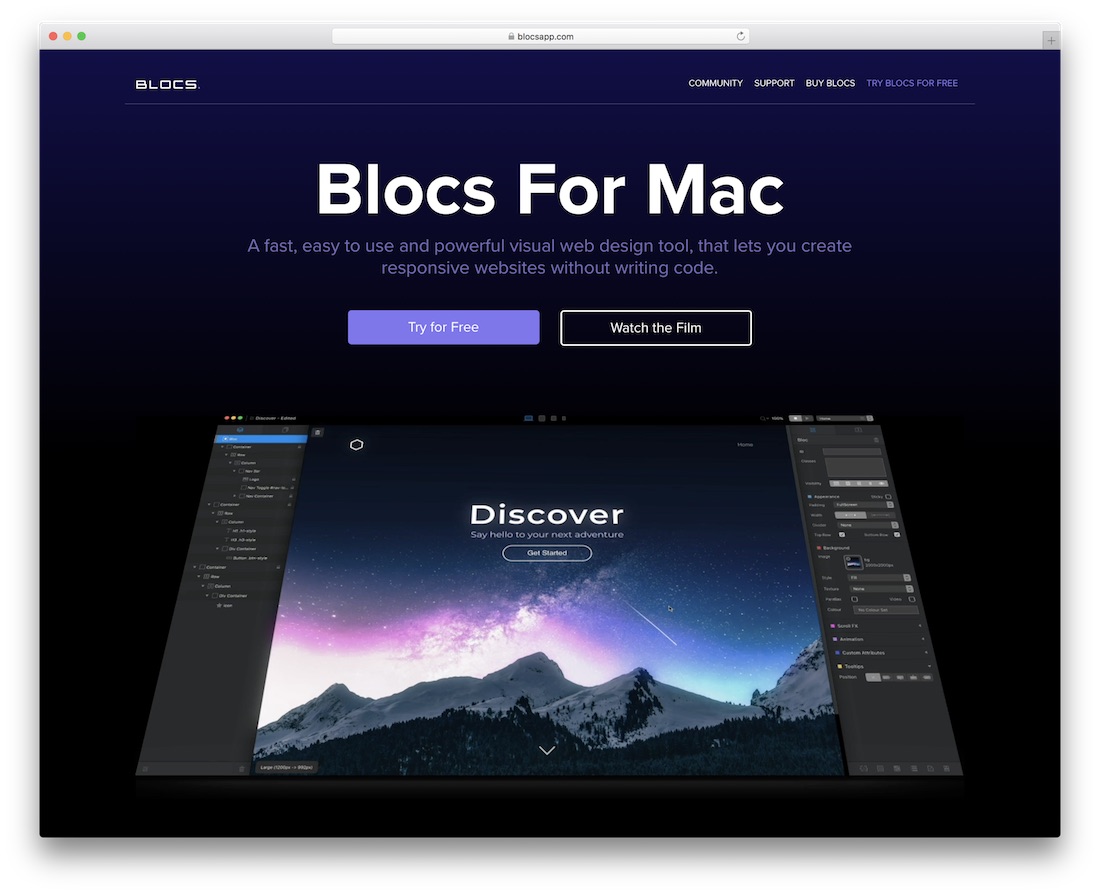
Blocs; when web design and development becomes as easy as pie. This website builder for Mac is a killer software that makes you build pages without the need to touch a single string of code. It all comes down to the fantastic visual editing, designing, and creating process. With that in mind, Blocs is a great solution for beginners, yet an excellent opportunity for quick prototyping for experts. And to get a full background of how things work over at Blocs’ end, make sure you first watch the video presentation.
Numerous predefined blocks are available to use, reuse, stack, and alter to match your project’s regulations. You can also add animations and other customized elements and components to spice up the overall experience. With Blocs, you will have an active page complete within minutes.
More Info
EverWeb Website Builder For Mac
everweb website builder for mac
EverWeb is a Mac-specific website builder for establishing mobile-ready, flexible and browser compatible pages. You can have a custom web design up and running with little time and effort, quickly attracting new visitors. You can now comfortably and strategically avoid technical work, doing only the fun stuff. More or less, it only takes some dragging and dropping to form the website for your business.
There is a lot more to EverWeb than the goodies mentioned. Core features of EverWeb are responsiveness, search engine optimization, drop-down menus, hove effects, over one hundred free templates, and powerful hyperlinking. If you are an advanced user, you can add custom HTML, CSS, and Javascript and create a one-of-a-kind online presence. Last but not least, EverWeb is compatible with different widgets and add-ons that will elevate your page’s performance.
More Info
uCraft
ucraft website builder for mac
Crafting with uCraft will surely be a fun and rewarding experience. This website builder for Mac users is a kit full of features and functions that will kick-start your page right away. You can choose from a wide variety of ready-to-use web designs which you can modify to your heart’s content. However, in many cases, you will want to use the template out of the box — yes, they are just that stunning and adaptive. If this happens to be the case for you, attach your information, details, and content and welcome new visitors and potential clients on board.
Instead of paying a hefty fee, when working with uCraft, you actually won’t need to spend a thing. You can kick it off for free and only later upgrade to a premium plan if you wish to. Even if you choose the free plan, you will still create a page that surely will not be half-baked. SSL security, SEO app, Google Analytics, and different customization tweaks are still available.
More Info
Mobirise
mobirise website builder for mac
If you are looking for more free website builders for Mac alternatives, you came to the right place! Mobirise is another spectacular component that will unlock a broad horizon of opportunities for you. While most software on this list offers in-browser editing, Mobirise is an offline app. You download it to your Mac gadget and start using it right away. There is no need to feel intimidated by the idea of downloading new software to your computer. Mobirise is easy to use, perfect for beginners, but works great for experts.
Mobirise comes with over 50 themes, more than 150 demo pages, and a banging collection of 1,500 blocks. All pages are automatically responsive, cross-browser-compatible, and optimized for loading speeds. Drag and drop blocks, edit text, add media, and set block parameters, with Mobirise, anything happens so quickly you will have a hard time sticking with it.
More Info
RapidWeaver Website Builder For Mac
rapidweaver website builder for mac
While you can always rely on a web developer and designer to sort out your web platform, you are here for a reason. You would like to do it yourself! Not only that, but you would also like to be in full control over your online presence at all times. And that is the whole idea behind RapidWeaver, a website builder for Mac.
RapidWeaver comes with many features that you can take to your full advantage. From Unsplash integration, device simulator and social media tags to GDPR compliance, beautiful pre-built themes and dark mode feature, RapidWeaver has all the must-haves and more. Make it yours by implementing your unique touch and shine online with a remarkable page.
More Info
IM Creator
im creator website builder for mac
Nothing should be holding you back once you unlock your access to IM Creator. It is a website builder for Mac that has already helped build millions and millions of pages across the web. Would you like to join the massive fan base and see rewarding results for yourself? We all know the answer. With IM Creator, you can start this very moment by simply creating an account. Nope, you do not need to know how to do the programming work, and you also do not need to open your wallet. Is IM Creator free? Yes.
IM Creator also comes with simple editing tools and ensures that your final product fits any device and browser like a dream. As a beginner, starting with a simple page that you can later expand according to your needs is advisable. Indeed, IM Creator is very flexible, perfect for single- and multi-page websites.
More Info
UXWeb
uxweb website builder for mac
You are your boss when it comes to website builders for Mac. In other words, once you have in possession of the software’s features, you are in total control of your website. Thanks to the simplicity the tool offers, you can now manage and maintain it without a sweat. And UXWeb is no different. This drag-and-drop website builder is fully compatible with iOS and macOS, ensuring smooth operation and ease of use. You can download the app right away and start experiencing its powerful features that will put you right on top.
No doubt, the page you are about to bring into being with UXWeb will follow all the latest web and tech trends. It will be responsive, fluently adapting to all devices, from handheld and up to desktop. Moreover, UXWeb also gives you a chance to modify the layout to your likings and make it match your taste precisely.
More Info
Pinegrow Website Builder
pinegrow website builder for mac
Pinegrow is a website builder for Mac that allows you to forge the right page for your business or project. If an idea for a business arises, you can now realize it insanely fast. You need Pinegrow, and you are ready to rock and roll. Create a one- or multi-page website that will present your idea on the web in the best possible light. The insanely newbie-friendly web editing tool that Pinegrow delivers makes the realization of any thought a possibility. Thoughts are things, as they say, so make the most out of them.
While drag-and-drop editing will cover the major part of web creation, you can still take the extra mile and go behind the scenes. In other words, change the core and add unique features to your Pinegrow-powered site.
More Info
Adobe Website Builder
adobe website builder for mac
Adobe might be known for something entirely different, but you can also use its website builder for Mac extension, which will surely do you well. It is a dynamic and intuitive tool that covers the creation of both simple and complex pages. If you already have an idea of how you would like your website to look, grab Adobe Website Builder now and start making an authentic version. They sometimes say, “It is easier said than done.” Well, this saying does not apply to Adobe.
The features of Adobe’s very own website builder include, but are not limited to, preset themes, free fonts, searchable content, web hosting, and custom content support. You are just a few short moments away from sharing your idea with the whole world; now, make it a reality with Adobe.
best website software for mac
If you’re researching what the best Mac website builder is, the answer is Wix. Thanks to its easy user interface, its massive feature list, and its reasonably priced plans, Wix represents the best value when it comes to website builders.
Rather than paying for Mac software, you pay a monthly fee – as low as $14 per month – to create and publish your website with Wix. There are regular Wix deals and discounts, too.
Our recommendations are based on independent tests and real-world user feedback. While Wix came out top of the pile, it’s not the only website builder we’ve rated.
From ecommerce templates to interactive galleries, there’s no limit to what you can achieve with the best website builders for Mac that we’ve rounded up for you. We also take a look at dedicated website builder apps and let you know if these would suit you too.
In this guide:
Top Website Builders for Mac
Website Builders vs Mac Website Software
Verdict: What is the best website builder for Mac
Frequently Asked Questions
5 out of 9
backward
forward
Best for
Rating
Overall score based on features, value, support, ease of use, and customer score
Free plan
Paid plan
Monthly
Try it Today
BEST ON TEST
Wix
Squarespace
GoDaddy
Weebly
Zyro
Duda
Jimdo
WordPress
1&1 IONOS
Best overall website builder
Best for growing businesses
Best for setting up quickly
Best for businesses on a budget
Best for beginners
Best for well-rounded, comprehensive websites
Best for ease of use
Best for a blog or publishing site
Best for multilingual sites
4.8
4.8
4.2
4.0
3.7
3.7
3.5
3.4
3.2
14-day free trial
30-day money back guarantee
14-day free trial
30-day money back guarantee
Starts from $14
$12 per month
$10.80 per month with code TECHCO10
$9.99 per month
$6 per month
$8.99 per month
$2.61 per month with Tech.co (Use the code “TECH” for up to 71% off and 4 free months)
$14 per month
$9 per month
$4 per month
$5 per month
See Deals
Save 10%
See Deals
See Deals
Save up to 71%
Try Duda
See Deals
See Deals
See Deals
Top Website Builders for Mac
The website builders we’ve rounded up don’t actually require you to install anything from the Mac App Store, which is always nice to avoid when you can.
You access all of the website builders below through Safari, Chrome or your preferred web browser of choice. This makes it quick and easy to create, edit and update a website – even if you’re using a lower-powered MacBook Air, rather than a MacBook Pro.
We have carried out extensive user-based research to rank and rate the most popular website builders out there. We ask the same questions you do: How easy are they to use? What features can they provide? Do they offer good value for money? What sort of customer support is available? Based on the answers to these questions, we then create our scores based on these factors, and others.
Each website builder we rate is based on real life use, with our testers having hands-on time with each service to work out what’s great, and what’s not so great.
Below are the top Mac Website Builders to come out of our testing:
Wix – Best overall website builder
Squarespace – Best for growing businesses
GoDaddy – Best for quick set up
Weebly – Best for businesses on a budget
Zyro – Best for beginners
Duda – Best for well-rounded, comprehensive websites
Jimdo Creator – Best for ease of use
WordPress – Best for blogging and publishing sites
Save on Wix
Don’t start building your website until you’ve caught the latest deals and discounts
Wix for Mac
5 out of 9
backward
forward
Best for
Number of templates
Portfolio sites
Business sites
Ecommerce sites
Pros
Cons
Rating
Overall score based on features, value, support, ease of use, and customer score
Free plan
Paid plan
Monthly
Try it Today
BEST ON TEST
Wix
Squarespace
GoDaddy
Weebly
Zyro
Duda
Jimdo
WordPress
1&1 IONOS
Best overall website builder
Best for growing businesses
Best for setting up quickly
Best for businesses on a budget
Best for beginners
Best for well-rounded, comprehensive websites
Best for ease of use
Best for a blog or publishing site
Best for multilingual sites
Over 800
113
20
56
127
100
Over 100
290
433
Great templates
Friendly onboarding experience
Advanced business functionality like CRM
Email and social marketing tools
Best knowledge center available
Robust analytics features
Quick, efficient website building
Easy to use SEO guidance
Plenty of must-have features built-in
Robust free plan
Great for beginners
Lots of SEO guidance
Very affordable platform
Easy to use with simple grid layout
Advanced features like heatmap and logo maker
Much easier to use than average website builder
Templates cover all industries
Ideal for web design businesses
ADI functionality
Best cost per feature option
Dedicated mobile editor view
Brilliant for bloggers
Easy to set up
Large and helpful user community
International growth features built-in
Quickest server response team
Best mobile site speed performance
No SEO support or guidance
No mobile editor or view
Slower site speed
No advanced customization options
Limited customization options
Website design is quite restrictive
Basic SEO features
A bit outdated design-wise
Few platform updates
Worst server response time
No app store
Limited marketing features
Little onboarding help at setup
Limited support on non-premium plans
More expensive than competitors
Few internal marketing features
No blog functionality
Limited SEO features
No internal marketing capabilities
Not the best choice for ecommerce
Slightly inflexible editor
No free plan or trial
Limited customization
Few advanced marketing features
4.8
4.8
4.2
4.0
3.7
3.7
3.5
3.4
3.2
14-day free trial
30-day money back guarantee
14-day free trial
30-day money back guarantee
Starts from $14
$12 per month
$10.80 per month with code TECHCO10
$9.99 per month
$6 per month
$8.99 per month
$2.61 per month with Tech.co (Use the code “TECH” for up to 71% off and 4 free months)
$14 per month
$9 per month
$4 per month
$5 per month
See Deals
Save 10%
See Deals
See Deals
Save up to 71%
Try Duda
See Deals
See Deals
See Deals
Wix
Wix is one of the best website builders in the business, and with good reason. It offers great value, providing a truly massive feature catalog that includes a logo maker, CRM functionality, and email and social marketing capabilities. It’s also refreshingly easy to use, with an intuitive drag and drop system, making it a great choice for new starters, as well as those with some experience.
Among its excellent range of features, Wix offers an extensive app store, allowing you to add functions to your site with just a click, from appointment booking to live chat. It also gives users powerful SEO tools to ensure that their website doesn’t languish at the bottom of Google’s search engine, meaning an excellent leg up for your website compared to competitors.
Additionally, if you’re new to website design and don’t really know what you’re doing, Wix’s powerful ADI, dubbed Wix ADI, will design a website for you based on a few criteria you provide. Just answer a few quick questions and you’ll be all set up fast and easy.
Wix offers a free version, but it’s fairly basic, and we don’t recommend it. The good news is that it has a good range of prices and won’t break the bank. You should opt for a paid package and you can have a professional-looking website up and running in minutes, for minimal cost.
While you’ll have to pay to get the best from Wix, you can get started for free easily
Wix
wix logo
Best overall website builder
4.8
In Short
Pros
Wix offers regular deals and discounts
Great templates
Friendly onboarding experience
Advanced business functionality like CRM
Our top choice of ecommerce platform
Cons
Can’t change site design after publishing
Slower server response time than some competitors
30 Second Facts
Three business plans starting from $23/mo
Business Unlimited Plan available for $27/mo
Business VIP Plan has extra support tools
Gallery
Click to expand
5 powerful Wix apps
wix templates
Wix online store wix review
Wix page editor Wix vs wordpress
Wix Personal & Business
Wix Ecommerce
Squarespace
Squarespace’s excellent range of templates enables website novices to whip up a professional-looking website in no time at all, and they are the linchpin of the service. With 113 templates to choose from, there are plenty of options, and with pretty much every facet editable, there really is no limit to how your site can look.
While Squarespace offers a fantastic range of options for those looking to create a website that looks the part, the interface can be a little confusing for first-time users. It’s something that you’ll get used to quickly, but be aware that there is something of a learning curve initially.
One excellent feature is Squarespace’s blogging function. Posts look the same when they’re being written as to how they will on the finished page, removing the need to continually go back and forth, previewing the site. Additionally, Squarespace offers a truly impressive set of marketing features that can help you grow your business by attracting and retaining customers.
If you like the sound of Squarespace, you can try it for free for 14 days or find out more about its pricing
Squarespace
squarespace logo
Best for growing businesses
4.8
In Short
Pros
Get 10% off with code TECHCO10
Email and social marketing tools
Best knowledge center available
Robust analytics features
Cons
Slower site speed
No advanced customization options
Pricing
10% off with code ‘TECHCO10’
14-day free trial
Personal plan: $14/month
Business plan: $23/month
Business plan fees: 3%
Free domain with 1-yr contract
Gallery
Click to expand
Squarespace website builder templates
Squarespace alameda template
Squarespace: basic information
Try Squarespace
GoDaddy
GoDaddy is a huge force in the web building industry, with 20 million users. One of the reasons for its popularity, aside from its extensive marketing budget, is the ease with which it lets users create new sites, thanks to a simple drag and drop system, and 24/7 customer support on hand for any issues that might crop up as you’re building your dream page. In fact, according to our research, GoDaddy provides the quickest setup process for a website, so you can get your online presence established in just minutes.
Sounds good, but do we recommend it? We used to insist that GoDaddy wasn’t a great option, but the website builder has added some serious functionality in recent years, allowing for more customization and better templates across all its plans. These improvements have brought GoDaddy way up the list, and we can confidently recommend them to anyone looking for a quick website.
Check out our GoDaddy review for more info
GoDaddy
GoDaddy Logo New
Best for setting up quickly
4.2
In Short
Pros
Quick, efficient website building
Easy to use SEO guidance
Plenty of must-have features built-in
Cons
Limited customization options
Website design is quite restrictive
Basic SEO features
Pricing
Includes Free Plan
Basic plan: $6.99/month
Standard plan: $10.49/month
Premium plan: $13.99/month
Commerce plan: $14.99/month
All plans have 24/7 support
Gallery
Click to expand
GoDaddy photo gallery images
GoDaddy website templates
GoDaddy: email
GoDaddy WordPress template editor
Try GoDaddy
Weebly
We don’t recommend free plans, but we must admit that Weebly has one of the best. It doesn’t put the same restrictions that other platforms do, so you can actually get a functional website live for free with Weebly. Plus, Weebly has a lot of great value plans, providing a lot more functionality than you’d think for the price. And with lots of SEO and knowledge guides, you can optimize your website performance easily.
Unfortunately, Weebly isn’t great if you’re looking for a shining example of design. Many users have noted that the templates are quite outdated, particularly compared to competitors like Wix and Squarespace. Still, it’s a great option for businesses on a strict budget, particularly if you can do without the more design-focused templates.
If you want to add features to your site, Weebly has an extensive app store, offering over 300 to choose from. One nice touch is the app review system, where users can leave ratings for the apps they have used, giving you guidance on which ones would work best for your site.
Like the sound of Weebly? Take a closer look at how it compares to Wix
Weebly
weebly scorecard logo
Best for businesses on a budget
4
In Short
Pros
Robust free plan
Great for beginners
Lots of SEO guidance
Cons
A bit outdated design-wise
Few platform updates
Worst server response time
Pricing
Personal plan: $6/month
Professional plan: $12/month
Performance plan: $26/month
Free version available
Free SSL Security
30-day Money Back Guarantee
Gallery
Click to expand
Weebly manage apps editor
Weebly editor
Weebly stats
Weebly editors: add new
Weebly element options
Try Weebly
Zyro
Outside of a free plan, you won’t find many website builders more affordable than Zyro. With this special deal from Tech.co, you can get started with Zyro for only $2.61 per month, a staggeringly low price for any website builder.
It’s worth noting that this low price does come at a cost. Zyro is definitely a more stripped-down version of a website builder, not providing most of the advanced features found on your average platform. This is a bit of a double-edged sword, as it does provide some serious ease of use, particularly for beginners who have never built a website before. Simply put, if you’re looking for a cheap option that won’t intimidate you with a lot of features, Zyro could be your best option.
Check out our Wix vs Zyro guide to see how these two options compare
Zyro
Zyro Logo Small
Best for beginners
3.7
In Short
Pros
Very affordable platform
Easy to use with simple grid layout
Advanced features like heatmap and logo maker
Exclusive low cost deal – just $2.61/mo with Tech.co
Cons
No app store
Limited marketing features
Little onboarding help at setup
Pricing
30-Day Money Back Guarantee
From just $2.61/month
Save up to 72% with Tech.co
Business plan: $11.49/month
Free 1 year of 1 domain included with plans
Gallery
Click to expand
Zyro Design
Zyro New Section
Zyro Template
Use the code “TECH” for up to 71% off and 4 free months
Duda
If you’re new to website builders, these last few options are going to be a great option for you, and Duda is one of them. With a notably easy to use interface that provides plenty of guidance for newbies, Duda walks you through the process to really make ease of use a priority. Plus, with plenty of templates aimed at all kinds of businesses, you won’t be burden by the paradox of choice too much.
Unfortunately, Duda has a few downsides. For one, it’s definitely too expensive for the limited features it provides. It’s particularly lacking internal marketing feature, which can help you reach out to new users. On top of that, its support options are limited to its more expensive plans, but that might not be a problem given how easy it is to use the platform.
Duda
Duda Logo Small
Best for ease of use
3.7
In Short
Pros
Much easier to use than average website builder
Templates cover all industries
Ideal for web design businesses
Cons
Limited support on non-premium plans
More expensive than competitors
Few internal marketing features
Pricing
Basic plan: $14/month
Team plan: $22/month
Agency plan: $44/month
14-Day Free Trial
Ecommerce Add-On Starts at $7.25/month
30-Day Money Back Guarantee
Gallery
Click to expand
Duda Layout
Duda builder on desktop
The Duda audioeye toolbar
Duda: adding title
Duda: site overview
Try Duda
Jimdo
Jimdo is another website builder that makes actually getting your website live incredibly easy. Thanks to the ADI, you can input a few simple criteria, and the platform will build the website for you, getting you live in just matter of minutes with professional caliber web design. You don’t even have to be an expert!
Again though, these low tier website builders have some pitfalls and Jimdo is no different. With no blog functionality, limited SEO features, no internal marketing features, Jimdo is not aimed at the larger companies that need a wide range of functionality. Still, if you need a website live fast, Jimdo could provide you with the platform you need.
Jimdo
Jimdo Logo Small
Best for ease of use
3.5
In Short
Pros
ADI functionality
Best cost per feature option
Dedicated mobile editor view
Cons
No blog functionality
Limited SEO features
No internal marketing capabilities
Gallery
Click to expand
Jimdo Background
Jimdo Designer
Jimdo Templates
Try Jimdo
WordPress
WordPress powers over 500 million websites, so it must be doing something right. It’s an ideal platform for running a blog, thanks to excellent tools and templates that will help you craft the best-looking blog out there. As a website builder for creating professional looking business focused sites, it doesn’t quite compete with our favorites, Wix and Squarespace, if only because it cannot offer the same ease of adding extra features that those platforms can.
In fact, we really wouldn’t recommend WordPress for anyone that isn’t starting a blog. It has almost no scalability for growing businesses, or any kind of marketing features to improve your audience.
The editor itself, however, is fairly intuitive, and has a great “what you see is what you get” approach, so that as you’re writing your page, you can see how it will look to your readers. Also, thanks to the huge, active user base, any issues you might come across are usually just a Google away, so if you do come unstuck, it likely won’t be for long.
If you’re more of an expert when it comes to website building and you still want to stick with WordPress, WordPress.org provides users with open-source access for free. However, it’s worth noting that you’re going to need a pretty serious knowledge base to design a website with WordPress.org, as the process can be quite complicated, particularly without any prior experience.
WordPress
wordpress logo
Best for blogging or publishing site
3.4
In Short
Pros
Brilliant for bloggers
Easy to set up
Large and helpful user community
Cons
Not the best choice for ecommerce or business sites
Slightly inflexible editor
Gallery
Click to expand
WordPress editor
WordPress preferences
Menu navigation in WordPress
WordPress website editor
Try WordPress
Website Builder vs Mac Website Software
While a web-based website builder is the most popular option, there is also dedicated software available that can do the same job. Software has fewer benefits compared to online services like Wix and Weebly – quite often you’ll have to pay more upfront, with potentially expensive licenses, you can only use them on the machine they are installed on, and some may have high requirements that won’t pose a problem to newer Macs, but which older models might struggle with. On the other hand, a website service is accessible from any machine, costs a few bucks a month, and guaranteed to run on your device.
The one appeal of dedicated software, is that you are fully in control – as they are not online, you are not relying on another person’s service, and you can also use them offline, so they don’t require an internet connection. If you’re the sort of person who likes total control, then dedicated site building software may appeal.
We take a brief look at some of the most popular options.
Sandvox
Sandbox makes big claims about its accessibility, stating that users will be able to create a website in under an hour. With a drag and drop interface that’s not too hard to believe, and those with coding experience can inject their own CSS or HTML to really make their website their own. It also offers in depth guides and on hand customer support should you need it.
RapidWeaver
RapidWeaver doesn’t require any prior experience, and it’s a decent starting point for newcomers who simply want to create a functioning website. Integrated SEO tools make sure that your site will be spotted by Google and rank well, and there are dozens of themes to choose from. The automatic navigation system means that your site won’t suffer broken links.
Tired of searching for the perfect website builder?
Sign up for Wix today, our top rated provider for Mac users
Click Here
Verdict: What is the best website builder for Mac?
If you’re looking for the best of the best, you cannot go wrong with Wix. Across all operating systems and devices, this easy-to-use, feature-rich website builder is designed for professionals and newbies alike, so you can get a good-looking website launched without a whole lot of hassle. Plus, with these prices, you can’t beat the value Wix provides for its users.
Website builders come in all shapes and sizes, particularly when you’re an avid Mac user. While all these options can initially sound daunting, hopefully, you now understand that finding the right website builder for you is simply about knowing what you need before making the decision.
Conclusion
Let us know your thoughts in the comment section below.
Check out other publications to gain access to more digital resources if you are just starting out with Flux Resource.
Also contact us today to optimize your business(s)/Brand(s) for Search Engines