
The question of how to take the best food photos is one that’s plagued amateur photographers since the advent of Instagram. Of course, there are always pros who can make even a pile of fast-food french fries look like a five-star meal, but what if you’re just an average person? What can you do to get your followers as excited about your food as you are?
Thankfully, technology has brought us a long way in the past few years. Now, it doesn’t matter if you’re shooting on an iPhone 4 or a brand new Samsung Galaxy—there are tons of apps that can help make even the most amateur food photo look like it was taken by the pros. These are our top picks for the best apps for food photography:
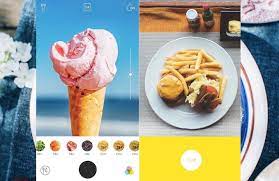
Table of Contents
Best Apps For Food Photography
Foodie
Foodie helps to bring out all the deliciousness from the plate onto your screen. It offers over 30 live filters to help you capture the right mood and atmosphere when taking photos from above. You can convert bland scenes into delectable masterpieces as you shoot vivid videos of your dining adventures. The food app also has a timer and the rule of third grids to ensure that you get the best angle for every shot that you take.
Download Foodie for iOS and Android.
Image Credit: App Store
Food Photo Editor
You need to have Food Photo Editor if you love editing your photos on your iPad. It has a huge collection of beautiful filters and effects for food photography. Besides the single-tap retouching, you’ll discover a fun and fast way to spice up the wonderful memory of a gorgeous meal.
Download Food Photo Editor on iOS.
Image of food app for food apps to level up your food photography articles
Image Credit: App Store
SnapDish AI Food Camera
SnapDish AI Food Camera is a smart and essential companion for the modern sociable foodie. This food app predicts how photogenic your snap is and makes your snaps look mouth-watering with filters dedicated just for food. Moreover, it’s a fun foodie community where you can share your food photos and recipes and find new ideas and inspiration for your cooking too.
Download SnapDish AI Food Camera on iOS or Android.
best free food photo editing app
1: VSCO
VSCO
This free app, which also comes with an advanced paid plan, has a great selection of features for editing. From presets to basic editing tools it is great for touching up your food photos. The VSCO journal is also handy area to give users tip and tricks on how to use the app for the best results.
2: Facetune
Facetune
This editing tool is commonly known as an app for editing selfies, however, there are a few features in it which are helpful when it comes to food photography. We’d advise using Facetune’s whitening tool to whiten any plates or white objects that could have been discoloured due to the lighting. The free editing app is also good to add details to any part of the image that could have been lost.
3: Snapseed
Snapseed
Another great tool for editing, one our personal go-to apps because it’s free and very powerful. You can select certain areas of a photo and apply edits, great for an odd ingredient on the plate you want to pop. Snapseed’s “healing” tool is also great to get wipe any splashes of food or marks that you don’t want on your images. The “selective” feature allows you to brighten, sharpen and saturate chosen areas and the sharpening tool will make it seem like your phone got glasses. This app lets you play with deep details in an image and is the first one we go to when editing our food shots.
4: Lightroom
Lightroom
Lightroom will let you recreate the scene as you saw it. The colour feature, which is used to edit the hue, saturation or luminance, is one of the easiest to use and really helps bring your photos to life. Lightroom can be used seamlessly on mobile and PC devices with the advanced package.
5: Foodie
Foodie
This app is all in the name; made for foodies with pre-created filters to bring out all the deliciousness from your plate onto your screen. This free app is great for shooting pics directly with filters applied and editing after. It also comes with a rule of thirds grid to ensure the best angle in every shot you take.
Conclusion
Let us know your thoughts in the comment section below.
Check out other publications to gain access to more digital resources if you are just starting out with Flux Resource.
Also contact us today to optimize your business(s)/Brand(s) for Search Engines