
Did you know you can get your passport photo taken right on your phone? With a few simple apps, you can take a picture of your face and have it ready to print in no time.
You won’t need to take the photo at an official photo booth or even go to a post office—you can just snap a pic with your phone, send it to the app, and that’s it!
If you’re looking for the best app for passport photos, we’ve got you covered. We looked around at all of them and found the ones worth checking out.
Best Apps For Passport Photos
Getting the perfect passport photo can be incredibly difficult. You have to get the correct size, pose, and background color, and you still want to look good. What if there was a smartphone app that could help you take perfect pictures to renew your passport? We’ve hand-selected seven of the best passport photo apps to make getting the perfect picture for your travels as easy as possible.
Use one of these apps to get the perfect passport photo
The Best Passport Photo Apps: Our Top 7 Picks
- Passport Size Photo Maker – Z Mobile Apps
- ID Photo Application – Siranet
- Passport Size Photo Maker – Yarsa Labs
- Passport Photo Maker – Appwallet Technologies
- Passport Photo Booth Creator – TRB Ventures
- Passport Photo – ID Photo – Codenia
- Official Passport Photo – Smartphone iD
- Passport Size Photo Maker – Z Mobile Apps
Best for Android
Passport Size Photo Maker – Z Mobile Apps
Passport Size Photo Maker – Z Mobile Apps
Great for specific countries
This app from Z Mobile Apps has an extensive database of pre-defined sizes for specific countries.
Passport Size Photo Maker – Z Mobile Apps is available for:
ios logoAndroid
Pre-defined sizes for different countries
Simple step-by-step editing process
Option to print photos too
In-app adverts can be annoying
Z Mobile Apps has created the best passport photo app maker that also has other functions. The Passport Size Photo Maker is available on Android devices via the Google Play Store.
Aside from passport photos, you can also resize images for a variety of social media platforms. Examples include Facebook cover photos, LinkedIn cover photos, and Twitter headers.
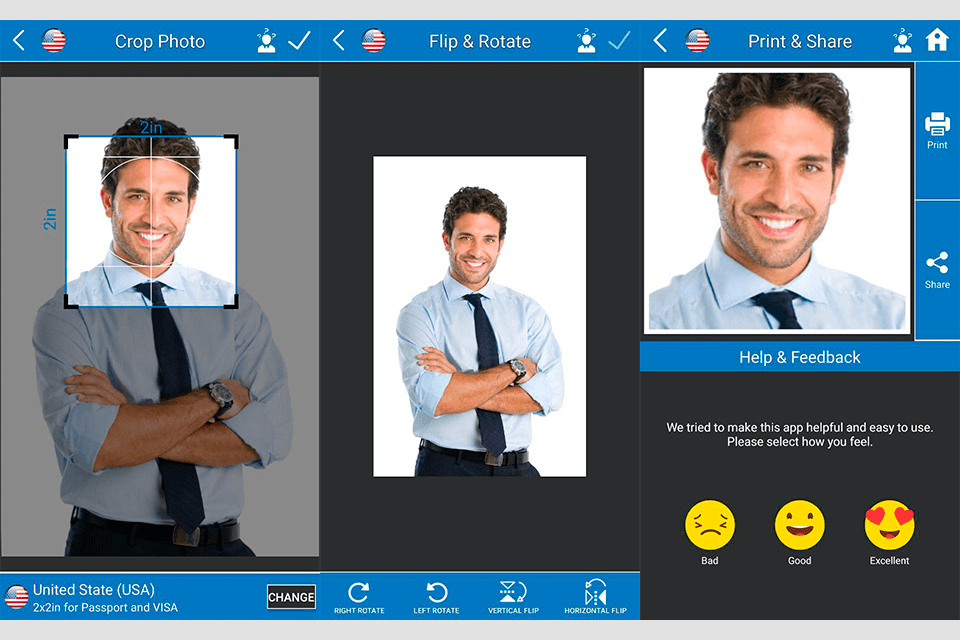
Crop and adjust screen from the Z Mobile app
We like that this app has a complete list of pre-defined passport photo sizes organized by country. The countries are listed in alphabetical order and it has a comprehensive database including countries like the United States, Australia, and Canada. Alternatively, you can also choose a custom size.
This app also has various steps for editing the photo so that it meets the exact passport requirements.
- ID Photo Application – Siranet
ID Photo Application – Siranet
ID Photo Application – Siranet
Great for a quick and easy process
This app from Siranet has a simple walkthrough to easily crop and adjust your photos to passport size requirements.
ID Photo Application – Siranet is available for:
ios logoApple iOS
ios logoAndroid
Easy walkthrough process
Has a range of pre-defined sizes
Available on both Android and iOS
Doesn’t relate sizes to country-specific requirements
Another top pick is ID Photo Application from Siranet. This handy passport photo app is available from the Google Play Store and Apple Store. The app looks relatively basic and isn’t polished, however it has a simple process and allows you to quickly create a suitable passport photo.
You start by choosing either a photo from your smartphone gallery or taking a new photo. From there you are presented with a range of pre-defined size options. The caveat here is that you must already know the photo size requirements for your country – it doesn’t give pre-defined sizes for different nationalities.
ID Photo from Siranet – a great passport photo maker
Once the size is selected, you can then crop and transform the photo so that it fits within the defined size parameters. This process is incredibly simple and anyone can easily figure out how to use it. When you’re happy with it, you can save the photo and download it for printing.
- Passport Size Photo Maker – Yarsa Labs
Best for iOS
Passport Size Photo Maker – Yarsa Labs
Passport Size Photo Maker – Yarsa Labs
Great for automatic alignments
The Passport Size Photo Maker automatically aligns your face vertically and has a large database of ID sizes.
Passport Size Photo Maker – Yarsa Labs is available for:
ios logoApple iOS
Simple step-by-step process
Paid version has background removal tool
Large database of country specs
Large database of country specs
Passport Size Photo Maker from Yarsa Labs is a decent app that has a range of editing options for passport photos. We like that this app has a large catalog of pre-defined sizes. You can find sizes for anything from Canadian passports, Indian Visas, Croatian driver’s licenses, and United States passports.
Passport Photo Maker from Yarsa on Android
The app uses a step-by-step process. This starts with image selection and size selection. Next, it automatically rotates and adjusts the image so your face is vertically aligned. After this, you can re-adjust the size and crop the photo so that it fits within the desired countries’ parameters.
The process is relatively easy, although the occasional advert does pop up as you are editing which is irritating. There is also a premium upgrade available that gives you access to the background removal tool and removes all adverts. This is potentially the best passport photo app for Apple devices but it is also available for Android users.
- Passport Photo Maker – Appwallet Technologies
Passport Photo Maker – Appwallet Technologies
Passport Photo Maker – Appwallet Technologies
Great for background changing
This Appwallet Technologies app allows you to change the background color and add borders if necessary.
Passport Photo Maker – Appwallet Technologies is available for:
ios logoAndroid
Simple intro phase
Has a large selection of pre-defined sizes
Background changer tool
Pop-up adverts are annoying
The best passport photo app for both passport photos and fun images has to be Passport Photo Maker by Appwallet Technologies. This app is available for download from the Google Play Store and is free to use. It does, however, have in-app advertisements which can be annoying and include full pop-ups.
RELATED POSTS
Best Apps to Change the Background of a Photo
Best Photo Border Apps
Best Face Editing Apps
For the fun side, you can add different suits to your photos. This may not be realistic for creating passport photos, but it is a fun tool to play with! Want to see yourself in a bright red suit? You can do this with Passport Photo Maker.
Passport Photo Maker from Appwallet Technologies
Aside from this, the passport photo utility is great. At the start, you can select the type such as passport, ID, or license, and the country specs. You can then go through various editing stages including crop, rotate, and adjustments. The step-by-step process is easy to grasp and the end quality of the image is also spot on.
- Passport Photo Booth Creator – TRB Ventures
Passport Photo Booth Creator – TRB Ventures
Passport Photo Booth Creator – TRB Ventures
Great for ordering prints
This app from TRB Ventures LLC is one of the few options to include print ordering and delivery.
Passport Photo Booth Creator – TRB Ventures is available for:
ios logoApple iOS
Can order prints for delivery
Simple editing process
Can also email or download images
It may not be the easiest to import photos
TRB Ventures LLC has created a great app in Passport Photo Booth Creator for iOS users. The app is simple to use and is one of the few apps that also allows you to order prints of the passport photo for delivery. You can order two passports prints for less than $6 and the order and shipping process appears to be smooth.
Photo Booth Creator from TRB
The app itself looks great and has a simple editing process. Once you have either taken or uploaded a photo, you can choose from a series of pre-defined sizes. An overlay is then shown of the person – you can then adjust your image using touch controls to fit within that overlay – simple.
We also like that you can either save your photo to your smartphone or email it to an external address for free.
- Passport Photo – ID Photo – Codenia
Passport Photo – ID Photo – Codenia
Passport Photo – ID Photo – Codenia
Great for multiple prints
This app from Codenia gives the option to download an image with multiple passport photos on for convenience.
Passport Photo – ID Photo – Codenia is available for:
ios logoApple iOS
Wide range of country specs supported
Simple adjustment process
Has a variety of download options
Not the simplest process to access color image downloads
If you don’t want to go through multiple steps and editing, an app like Passport Photo – ID Photo from Codenia is a great option. Once you open this app, you are immediately presented with the option to upload or take a photo. After the photo is displayed and there is a simple dropdown menu that allows you to choose different country passport photo specifications.
You can then see guide markers on the photo that shows where different facial aspects need to be. For example, it highlights where the bottom of your chin should be, and where the top of your head should be. You can simply resize and adjust the photo underneath these guide markers using touch controls.
Passport Photo from Codenia
Once you are satisfied with the image, you can download it in a variety of formats. For example, there is a single image option or a duplicate option that has four photos spaced next to each other. The only downside is that you have to agree to data collection to get full access to color images.
- Official Passport Photo – Smartphone iD
Official Passport Photo – Smartphone iD
Official Passport Photo – Smartphone iD
Great for check and approval
The Official Passport Photo app enables you to send photos to be checked and approved so that you know they are valid for use.
Official Passport Photo – Smartphone iD is available for:
ios logoAndroid
Check and approval process
Ensures your photos are valid
Easy to use app
Only suitable for UK citizens
If you want a handy app that allows your photos to be sent for verification and approval, Official Passport Photo by Smartphone iD is a great option. This is aimed at UK customers and you can get approval for various IDs including visas, passports, driving licenses, and residency permits.
RELATED POSTS
Essential Travel Photography Gear
Best Object Remover Apps
The app does not allow you to upload existing photos; instead, you must always take a new photo. This can be annoying, but it ensures you get it right. You then go through various stages to make sure the photo is correct.
Smartphone iD app with check and approval service
When the photos are taken, you must sign in with an account to have the photo sent for verification and approval. This is a paid service, but it is far more convenient than traveling to a photo booth, for example.
Which Passport Photo App Is Right for You?
We hope you have found this guide on the best passport photo app useful. We understand how difficult and time-consuming it can be to renew your passport and get the perfect passport photo. Luckily, any of these apps should help make the process smoother!
Need to update your passport photo? We have the perfect app
UK residents would benefit from the check & approval process included in the Official Passport Photo app, for example. If you want an app that is simple to use and has a large choice of pre-defined country templates, options like Passport Size Photo Maker from Z Mobile Apps, and Passport Photo – ID Photo from Codenia are both excellent options.
About The Author
Paul Skidmore
Paul loves traveling and photography. He is also a Lightroom and Photoshop expert and likes to test new photo software, apps, and gear. Paul frequently shares his travel photography tips on his travel blog and writes for known photography publications. Connect with Paul on Twitter.
passport photo editor app
One of the odd realities of digital technology is that we carry around high-end, megapixel cameras, take hundreds of photos a week, and end up printing and displaying very few of them.
It’s very convenient to capture many moments, but most of us don’t take the step to bring them out of the digital realm and into the real world. Social media streams and image curation sites can be virtual repositories for our memories, but sometimes, for special ones, “virtual” is not good enough.
We have good news. Software for editing and printing some of these images can be convenient, relatively easy, and free.
We’ve put together a list of 10 of the best free photo printing for software Windows 10 and smartphones to let you move the memories off your screen and into the real world. Print photos, photo books, invitations, posters, collages, postcards, calendars, keepsakes, and more (printed with your HP printer of choice, of course).
- HP Smart
For 10 years, the free and easy solution bundled with HP equipment was HP Photo Creations. It was retired on November 30, 2019. But not to worry; it has been replaced by a robust and free app that you can use either on your computer, or directly from the same smartphone that you took the pictures with. Meet HP Smart.
Android or iPhone
Available on either Android or Apple iOS 11 or higher, HP Smart is a powerful printing solution, directly in the palm of your hand that integrates with all your stored images, on your phone, or in the cloud.
Print Facebook photos
Facebook is an amazing storehouse of your images throughout the years, but getting those photos into a usable form, beyond the Facebook app, has always been a problem. The HP Smart app solves that problem, with a “Print Facebook Photos” section that leads you quickly into bringing them from the internet to your HP printer, wirelessly.
Print scanned documents
What’s more is that it has a smart editing feature called “Scan to Email,” for sending photos of documents or flyers that uses built-in editing and artificial intelligence (AI) to figure out the angle of the paper, and flatten it perfectly, at the correct angle, for attaching and sending via email.
Free to download:
Mobile apps:
Android/Google Play
Apple Store/iPhone/iPad
Desktop:
Windows 10
Mac
HP printers for your photos: Spotlight on HP Sprocket
A petite, affordable, Bluetooth photo printer, the HP Sprocket turns your smartphone into a Polaroid camera. This palm-sized micro-printer produces finished photos from your images. Starting at $79.
- Google Photos
Google’s previous image editing and storage solution, Picasa, has become Google Photos. You can still download and use the last available Picasa software package to use its desktop photo-editing features, just bear in mind that it will never be updated.
The fact of the matter is that you really will not need the desktop tools, since Google Photos, like HP Smart, offers all the same functionality from your mobile device, either on Android or iOS.
Google Photos took the best part of Google’s unsuccessful attempt at a Facebook-killer in Google+ and made it its own service and app, dedicated to image storage and editing.
Unlimited storage
The best part of Google Photos? The fact that it offers genuinely unlimited storage, with the slight caveat that each photo saved must be less than 16 megapixels. Since even the newest iPhone takes only 12-megapixel photos, this shouldn’t present too much of a problem.
Curating your photos
Editing, sorting, and searching your pictures in Google Photos is easy and intuitive. Cropping, adjusting tone or color, and adding vignettes are all available with a few swipes and presses. A great feature is the ability to apply a set of editing choices to multiple photos with a single keystroke, after selecting them.
Printing is easy
When it comes to printing options, while you can print directly from Chrome, you can actually set up your HP Smart app to print your Google Photos at home for more control over the final print. Or you can outsource it entirely if you’re willing to pay per print. Google Photos can send the pictures you want to print to your local CVS or Walmart, for .25 cents a print, on photo paper.
Download for free
Mobile apps:
Android/Google Play
Apple/iOS
Desktop:
PC or Mac
- Adobe Photoshop Express
Adobe’s name is synonymous with photo editing; “Photoshopping” has become a generic word to describe any edits or manipulations to a photograph. For many years, Adobe Photoshop was a high-end, professionals-only, toolset software package that needed a powerful computer setup to run.
And while the full Photoshop program is still a powerful professional tool, Adobe has opened up its tools, offering a smaller subset for simple image editing and collage building, called Adobe Photoshop Express.
Basic tools for free
Photoshop Express pares down the toolset of its flagship product for this free print program into a few basic, but essential and useful, tools. These include “Auto Fix,” a one-click solution that adjusts for the best brightness, exposure, and shadow settings on photos, and a selection of 20 free image filters.
Standard cropping, resizing, and retouching are simple tasks with the uncluttered, easy-to-use interface.
Straightforward printing
Printing your saved Photoshop Express retouched images is a matter of getting them back to your computer (either via Bluetooth, or emailing them to yourself and opening them with your email client) and printing as normal, or from your free HP Smart app. Like the others on our list, it is available as a mobile application on either Android or Apple phones, and also as a Windows 10 app on the Microsoft Windows App Store.
Free to download:
Mobile apps:
Android/Google Play
Apple Store/iPhone/iPad
Desktop:
Windows 10
HP printers for your photos: Spotlight on HP ENVY Photo 7855 All-in-One printer
HP ENVY Photo 7855 All-in-One Printer
With the HP ENVY Photo 7855 All-in-One printer, you can print photos, fax, scan, copy, and print from the web, your phone, or computer. Combined with HP Instant Ink, ink cartridges are delivered to your door and your printed photos cost less than five cents per print. Starting at $129. - Fotor Photo Editor
Fotor Photo Editor is an online, web application that gives you a powerful suite of image editing and photo retouching tools. Using Fotor, you can easily import and edit photos from your computer, your cloud-based storage service like Dropbox, or from a social media platform.
Filters and retouching
It offers a fun array of templates and stickers, along with enhancements like “beauty” filters that serve as a kind of digital Botox. Much of the site and application functionality is free, but a pay-to-use “pro” feature unlocks more filters and templates.
Fotor’s site bills the online tool as “fundamentally Photoshop, online.” For the purposes of photo retouching and adding effects and collage creation, they’re not too off base in that description. It is a very “Photoshop-like” interface, accessible from any web browser or as a mobile app.
Templates
Where Fotor really comes in handy is in its extensive array of templates that integrate your photos. It offers a free invitation maker, free flyer maker, free poster maker, and a Christmas photo editor for your holiday greeting cards. Plus you can print business cards and menus. In only a few clicks and tweaks, you’ll have some truly impressive and professional designs print-ready.
Free to download
Mobile apps:
Android/Google Play
Apple Store/iPhone/iPad:
Desktop:
Windows/Mac Web App: - PhotoScape
PhotoScape is a free-to-download image editing software suite that offers a wide but sometimes confusing array of features beyond simple photo retouching. Its interface is a little daunting and requires you to kind of follow your nose and tinker around a bit. But doing so pays off.
Worth getting to know
Within this surprisingly robust bit of freeware, there’s an image viewer, built-in screen capture tool, and a batch editing function that allows you to apply effects to multiple files. All this, plus a wide range of filters, effects, stickers, and icons to quickly spice up your photos. It even has an animated GIF creation and editing tool.
Great tool for beginners
PhotoScape is an image editing program for beginners more so than image-editing professionals. It presents its options in a kind of fun, “game-like” interface that encourages users to poke around and try different things. While PhotoScape is primarily a photo editor, this label doesn’t really do it justice, there is much more to it than basic retouching.
Free to download
For Windows
HP printers for your photos: Spotlight on HP OfficeJet 3830 All-in-One Printer
OfficeJet 3830 All-in-One Printer
The HP OfficeJet 3830 All-in-One printer is an ultra-affordable wireless network printer that offers copying, scanning, and printing full-size paper or photo prints. Starting at just $59. - IrfanView
IrfanView is named after its creator, a software programmer from Bosnia-Herzegovina named Irfan Škiljan. A refugee from the Bosnian War in the 1990s who fled to Austria, Irfan developed a “one man band” style photo-editing software package in 1996 as a freeware distribution, with a voluntary pay option for professional use.
A free alternative to pricey pro software
From a time when Adobe Photoshop was an $800 piece of software, IrfanView provided a surprisingly agile, efficient, fast, and lean piece of software, offering many of the same features as the Adobe commercial product, for free.
Still a great solution
All these years later, it has been updated to version 4.54 for Windows 10 and remained true to its roots: a small, elegantly programmed tool that still sees 1 million downloads per month from all across the globe. IrfanView’s export features, file format output support, and image optimization often outperform the $4-billion-dollar revenue-generating Photoshop.
20+ years, still a community of loyal users
IrfanView is a scrappy, can-do little program that does a lot of what the others do. But it is more of a homebrew enthusiast’s tool, for DIY computer users who are familiar with getting in and tweaking the controls and settings of their machine, as it sports a wide variety of plug-in and “skin” customization options. This single program and its dedicated user base and fans have supported Škiljan through voluntary donations since its first release.
Free to download
IrfanView for Windows 32 or 64 Bit - Paint.NET
Paint.NET began its life as a student project in 2004 by Washington State University computer science major Rick Brewster. It started as a “dot NET” replacement/upgrade to Microsoft’s barebones “MS Paint” program that comes bundled with Windows installations.
Grassroots developer community
As a freeware alternative to Photoshop, Paint.NET offers a lot of what the pro-tool has: layers, unlimited undo’s, effects, and plug-ins. What’s more, it is supported by a lot of smart and friendly computer-science enthusiasts who are constantly developing new tools and tutorials for the free package.
Download for Windows:
Paint.NET - GIMP
GIMP (an acronym for Graphic Image Manipulation Program) was the original hacker-freeware image editing tool. Initially only released on Linux, a freeware operating system for do-it-yourself computer enthusiasts, it was also a college project. This was a semester-long one, by a team of students in 1995 at the University of California, Berkeley, in their “eXperimental Computing Facility.”
Open source and going strong
Since its first Linux release, a community of open-source programmers have kept GIMP going and expanded it across many platforms; it is now available for both Windows and Mac. While it offers a very robust toolset for image creation and manipulation, be forewarned: it is a computer-science enthusiast’s tool as much as it is an image editor.
Being free and open source is as much of a draw in its popularity among its proponents as anything else about it; so don’t expect a user-friendly install process or an immediate, intuitive experience with the interface.
Download for free:
GIMP for Windows or Mac
HP printers for your photos: Spotlight on HP LaserJet Pro M404n printer
HP LaserJet Pro M404n Printer
For high-quality laser printing, check out the HP LaserJet Pro M404n printer. An all-purpose printer for work or photos, it offers wireless network printing via WiFi connection to phones. Starting at $199. - Photo Pos Pro
The oddly named Photo Pos Pro is another freeware image editor program, available for download on Windows. It began as a commercial product as a budget alternative to Adobe Photoshop but has since moved to the freeware/upgrade model.
While its interface and toolset look a little dated (it feels like a program from some time in the early 2000s in terms of its menus and windows) it does yeoman’s work in all the basic categories. And it is more than capable of editing and printing out photos on your PC.
Download Photo Pos Pro:
For Windows. - FastStone Image Viewer
FastStone Image Viewer is more of an image organizer and viewing program with a small set of editing tools than it is an image editing program. It rapidly generates and displays thumbnails and helps the user sort and organize folders with thousands of images in them. Its usefulness is mitigated a bit by modern operating systems, which have many native features that provide similar functionality.
Download free
For Windows
HP printers for your photos: Spotlight on HP DeskJet 2655 All-in-One Printer
HP DeskJet 2655 All-in-One Printer
The HP DeskJet 2655 All-in-One printer provides affordable wireless printing from your phone or computer. Prints, copies and scans. Starting at $49.
Recommendation
While we’ve presented 10 of the best photo printing software programs that are available for free and easy download, we’re recommending two specifically as good all-around free programs. Both HP Smart and Fotor are ideal for a number of reasons.
HP Smart, in particular, is a must-have tool because you can edit, retouch, and print directly from the same smartphone that you took your pictures on. And Fotor is a free cloud-based app that offers the most Photoshop-like toolset out of all the image-editing programs we’ve explored.
RELATED ARTICLES
10 Best Tools for Working Remotely from Home
7 Best Home Office Setup Ideas for Telecommuting
5 Best HP Home Office All-In-One Printers
5 Best HP OfficeJet Printers for Every Need
Printers: The Ultimate Guide to Choosing the Right One
ABOUT THE AUTHOR
Jolene Dobbin is a contributing writer for HP® Tech Takes. Jolene is an East Coast-based writer with experience creating strategic messaging, marketing, and sales content for companies in the high-tech industry.
Conclusion
Let us know your thoughts in the comment section below.
Check out other publications to gain access to more digital resources if you are just starting out with Flux Resource.
Also contact us today to optimize your business(s)/Brand(s) for Search Engines