
There’s nothing quite like the feeling of finishing a book. Whether it’s your first or your hundredth, there’s something magical about seeing all those words come together, and knowing you’ve created a complete story.
But writing is hard work. It takes time, effort, imagination, and—especially if you’re a beginner—a lot of guidance. That’s where apps come in.
Below you’ll find the best apps for writers in 2020, with features that will help you research, write, edit, format your manuscript and publish your completed work to the world!
Best Apps For Writers 2020
While Google Docs and Microsoft Word are more-or-less fine, a dedicated writer like yourself deserves something more substantial. Here are seven writing apps designed specifically for creative writing, with various organizational tools to take your work to the next level.
1. Reedsy Book Editor
Price: Free
Runs on: Web
Best for: Authors seeking an elegant, distraction-free writing interface that typesets your work into a professional-grade book
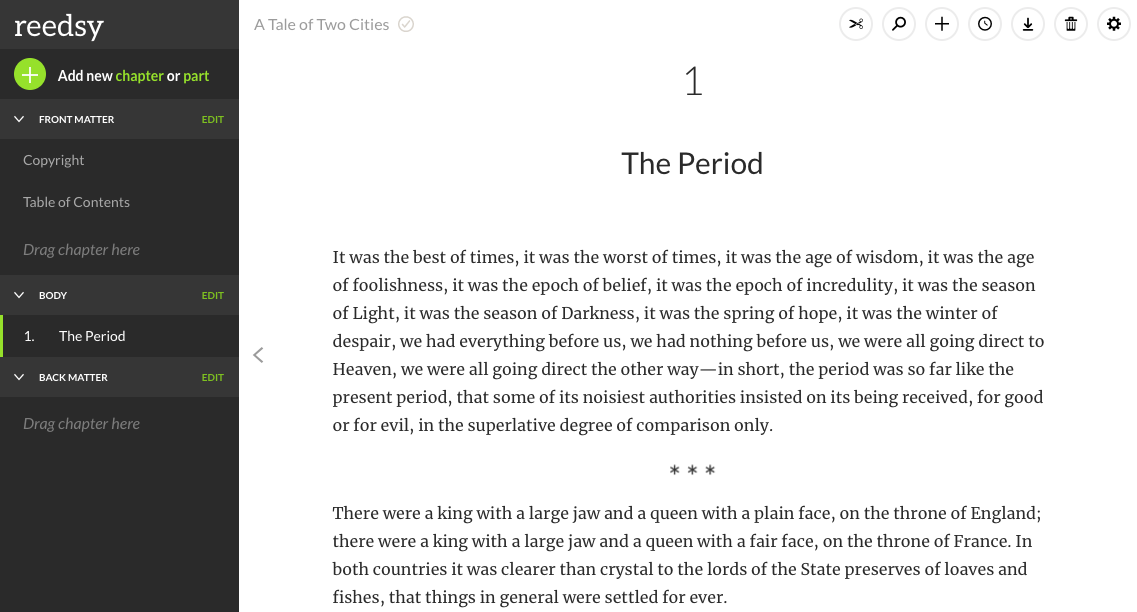
With its sleek interface and easily navigable formatting options, the Reedsy Book Editor is a first-rate choice for modern authors. You can drag and drop chapters, insert images, and even track changes to look at past versions of your work — a function that most paid creative writing apps don’t offer. And if you find that you’re falling behind on your writing schedule, you can just enable its built-in goal reminder system, which will encourage you to get back on track.
The Reedsy Book Editor’s advanced typesetting features will also save you hours of work when you get to formatting your book for publication. You can create intricate front and back matter and export it as a clean, professional file that can be instantly uploaded to any ebook retailer or print-on-demand supplier. If you’re looking for an all-in-one writing, formatting, and typesetting tool, look no further than the Reedsy Book Editor. Start using it for free right now.
2. Scrivener
Price: Free trial for 30 days, $45 license fee
Runs on: Mac, iOS, and Window
Best for: Novelists and other long-form writers who want an elaborate, organized interface
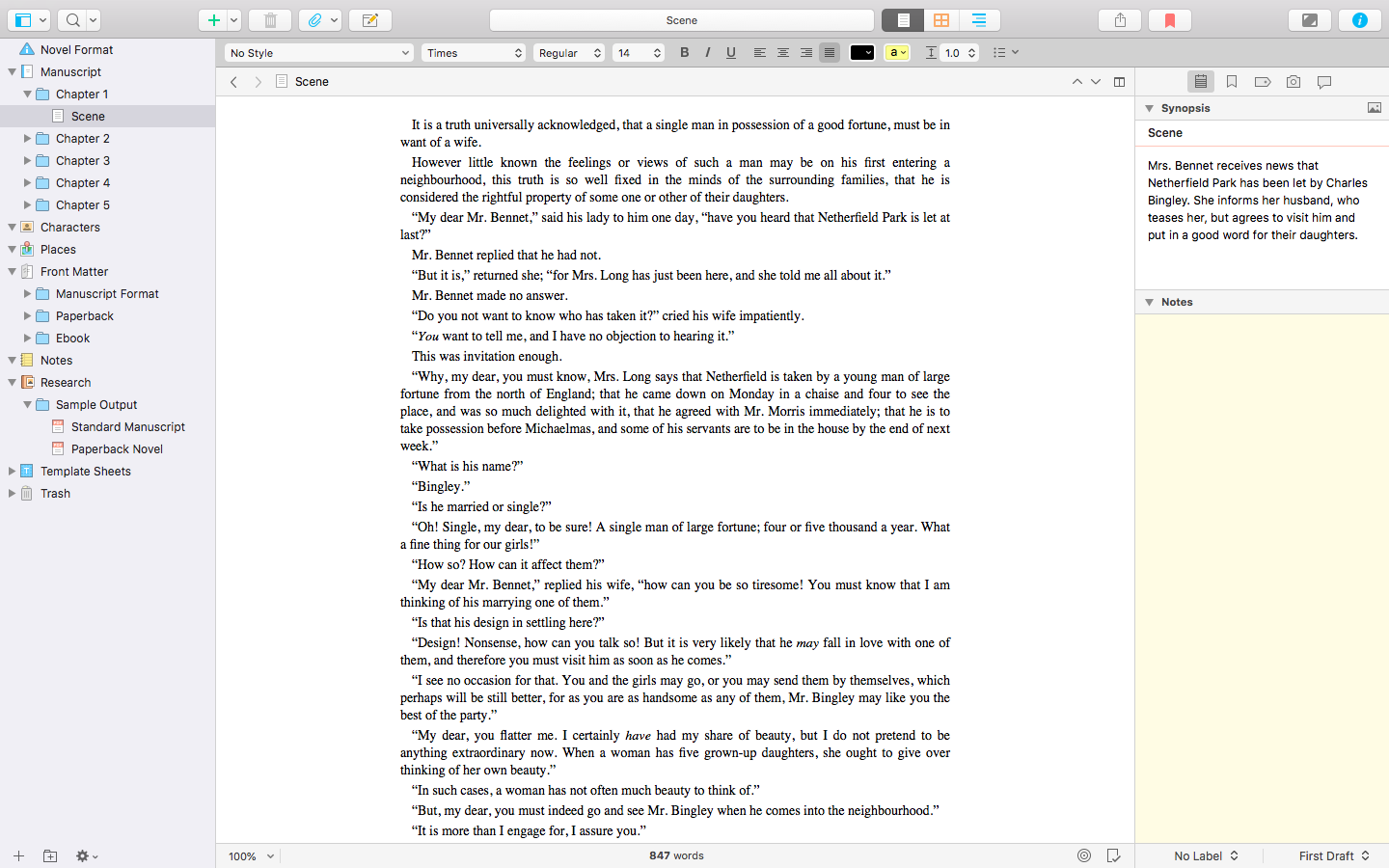
You’d be hard-pressed to find a list of book writing software that omits Scrivener, and for good reason: it manages to be both streamlined and incredibly sophisticated at the same time. With Scrivener, you can choose a template for your project (novel, essay, screenplay, etc.) and get organizing right away. The left-hand sidebar includes sections and virtual notecards for every element you could think of, and you’re able to arrange these elements however you like.
More advanced features allow you to track your research, create specialized materials like front/back matter, and even analyze the content of the text itself. Needless to say, Scrivener is an excellent book writing app for authors, and indeed ideal for any writer who values attention to detail. You can read our full review of Scrivener 3 right here.
3. Ulysses
Price: $4.99/month or $39.99/year subscription
Runs on: Mac and iOS devices
Best for: Writers who want to productivity-hack their formatting
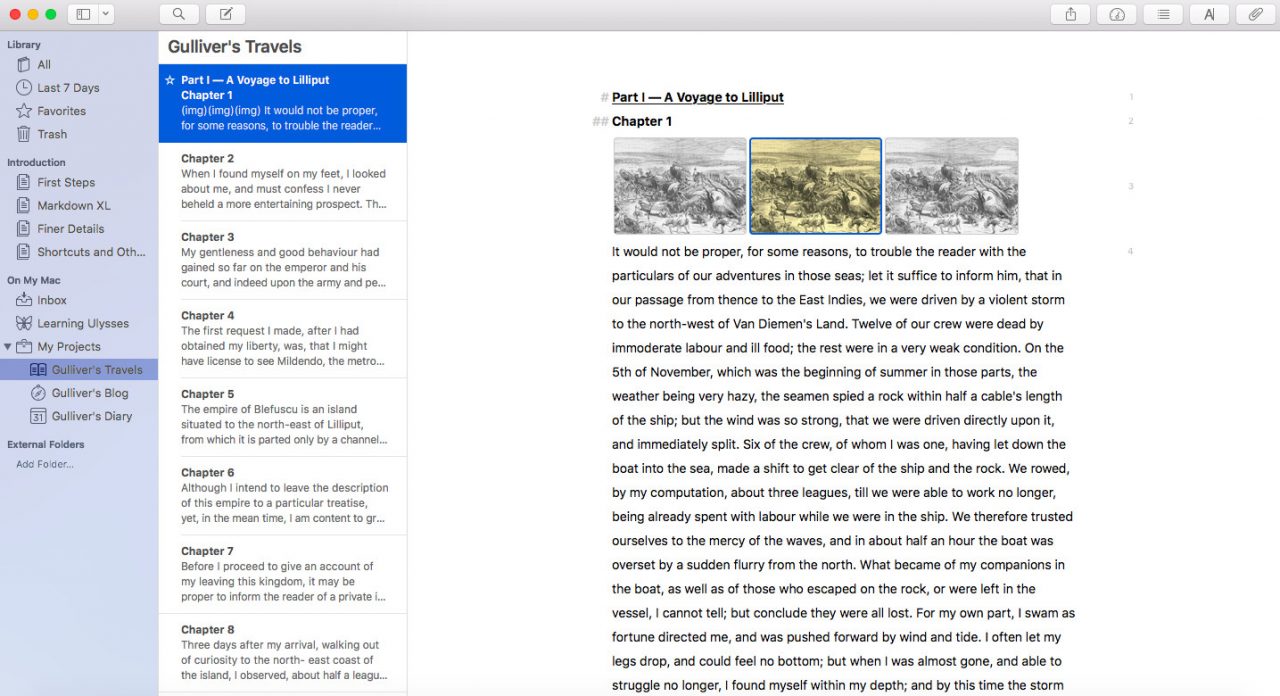
At first glance, Ulysses looks a lot like Scrivener, but closer inspection reveals that they cater to different experience levels and interests. While Scrivener is known for its steep learning curve, Ulysses offers several tutorials alongside its features. This is especially useful because Ulysses uses “Markdown” rather than manual formatting — for instance, in Ulysses, you’d type # to create a header, or > to create a blockquote.
While it may seem inconsequential now, writers who familiarize themselves with Markdown will likely find that it helps them keep their “flow” during a writing session, and it also makes editing much easier. Other than this, Ulysses is a fairly standard writing app; it’s not as outline-friendly as Scrivener, but you’ll have no trouble staying organized with keyword labels, split view capability, progress tracking, and all your projects lined up neatly in the sidebar.
4. Plottr
Price: Flat fee of $25
Runs on: PC and Mac
Best for: Authors looking for a software that will help them smartly and fluidly outline their books
Plottr may be the one plotting software to rule them all. While Scrivener and Ulysses are built to be all-purpose writing platforms, Plottr was created with one main objective in mind: to help you outline and plan your story.
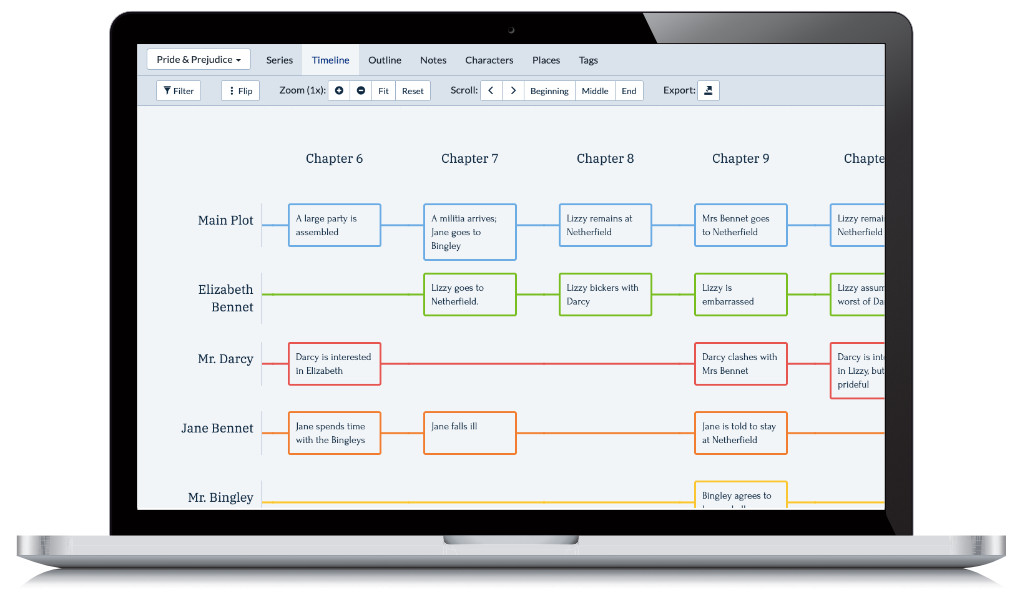
To that end, it shines. Plottr lets you easily build the scenes, plots, and arcs of your story, which its intuitive interface then allows you to visually organize, re-arrange, color-coordinate, and filter until your plot begins to flow and make sense to you.
Additional features like timelines, plot cards, and starter plotting templates (including the Hero’s Journey and Dan Harmon’s Story Circle) are built into the program to help you plot smarter. The sum of its parts is a software that achieves the impossible: making this plotting process, dare we say it, fun.
5. iA Writer
Price: Free trial for 14 days, $29.99 for Mac, $19.99 for Windows
Runs on: Mac, iOS, and Windows (free trial available for Android)
Best for: Writers who prefer simplicity over style
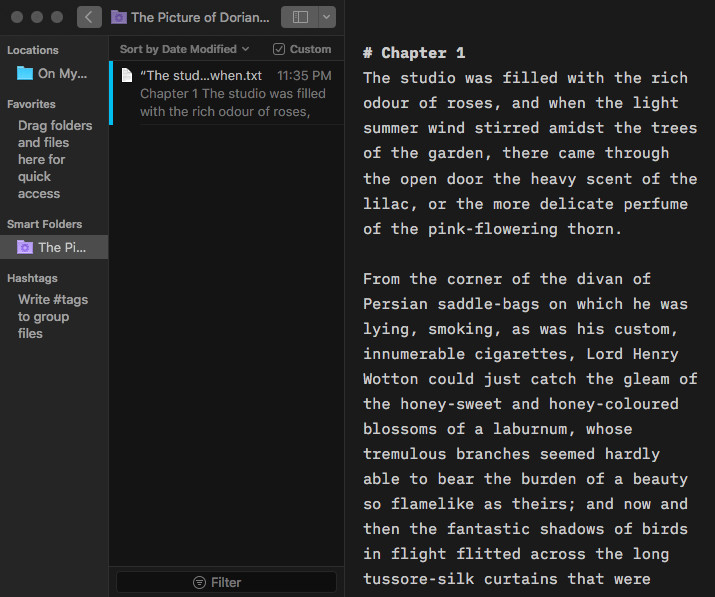
Reviews often compare iA Writer to Ulysses because it, too, employs Markdown for formatting. However, the interface is much simpler and more naturally integrated into your screen. This minimalist design fits perfectly with the mission of iA writer, which is “to keep you focused on just writing.”
In the upper-hand toolbar, you can still access features like dark mode (shown above) and syntax highlighting for different parts of speech (nouns, verbs, adjectives, and so on). But the purpose of iA Writer is to facilitate writing, and its setup clearly reflects that — a definite boon for distraction-prone and clutter-averse writers.
🖊️
Which famous author do you write like?
Find out which literary luminary is your stylistic soulmate. Takes one minute!Start quiz
6. yWriter
Price: Free
Runs on: Windows
Best for: Authors who like to break their stories into bite-sized pieces
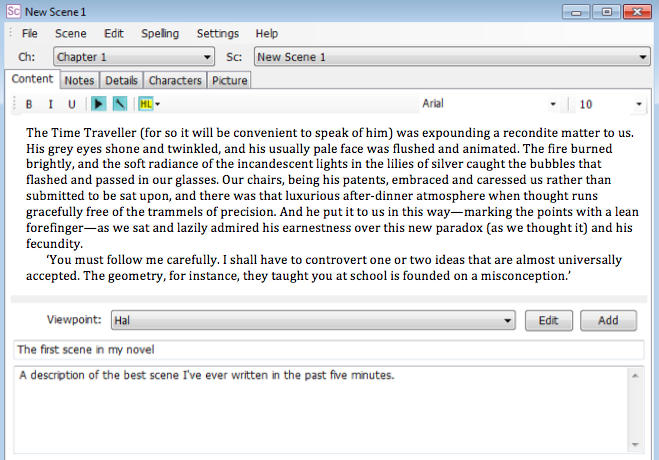
Pivoting to the non-Apple side of things, we have yWriter, a book writing app designed for Windows in a similar vein to Scrivener. yWriter boasts a well-organized interface that divides your story into scenes rather than chapters, which is less stressful for easily intimidated writers. This app is also great for tracking your progress, with features like a storyboard to review your narrative arc, and reports you can generate about your daily word count, the state of your draft, etc.
But perhaps the best thing about yWriter is that it’s a free writing app — astounding in light of all it provides. The only “missing” feature is story templates, which experienced writers can disregard anyway. However, we’d caution users not to disregard yWriter’s intended platform, as the Mac trial is pretty glitchy and unreliable.
7. Storyist
Price: Free trial for 15 days, $59.99 license fee
Runs on: Mac and iOS devices
Best for: Screenwriters who are just getting started
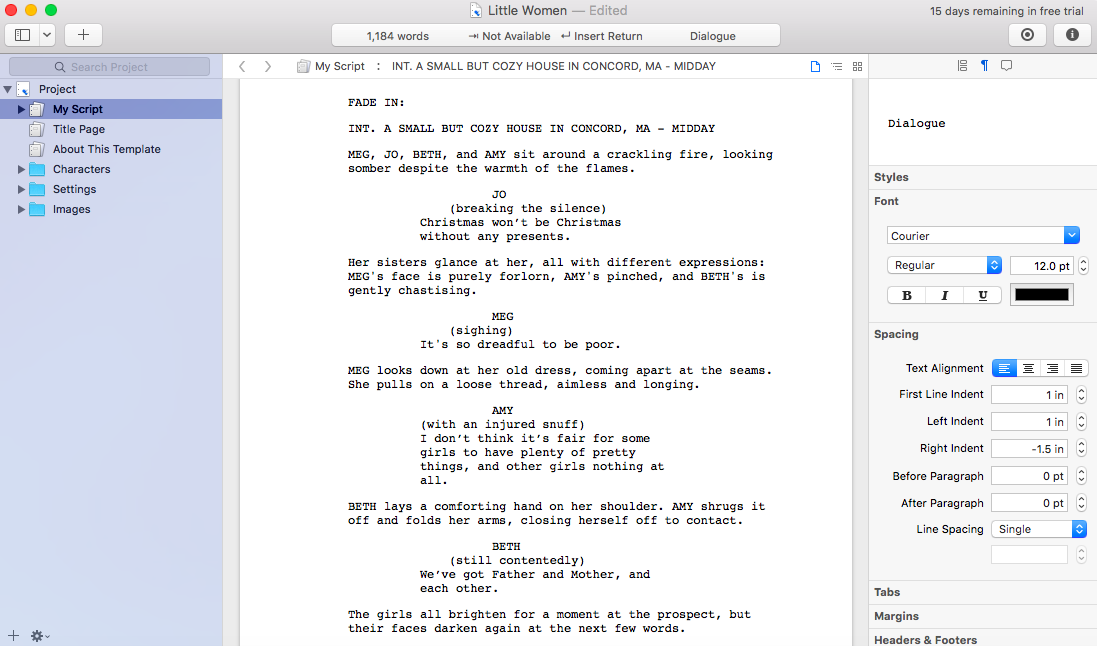
Now let’s talk about screenplay writing apps. Though Storyist provides a solid foundation for novel writing, screenplay and stage play projects are where the app really shines. Upon creating a new project, you’ll work from a highly intuitive script template where each new line prompts you to choose action, character, dialogue, etc. This ensures proper formatting and keeps you conscious of which elements you’re using, so you don’t overdo it on dialogue or forget to transition between scenes.
You can also organize your characters, settings, and images via the sidebar tabs, which may be useful for screenwriters who like strong visuals to supplement their work. But Storyist is feature-minimal for a reason: it’s supposed to be basic and affordable for beginners, with just enough formatting flair to make you feel like an up-and-coming Hollywood darling.
8. Final Draft
Price: Free trial for 30 days, $249.99 license fee
Runs on: Mac, iOS, and Windows
Best for: Professional screenwriters who are ready to level up
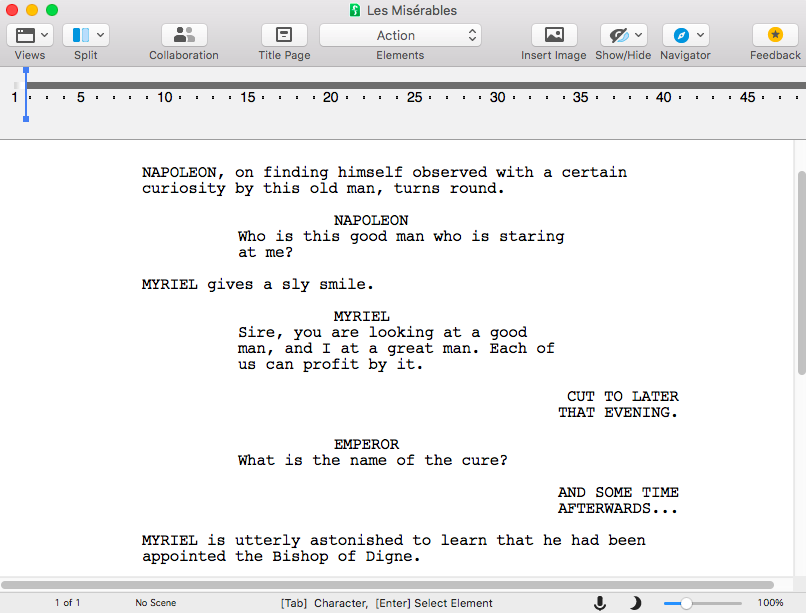
Speaking of Hollywood, if you’re already such an advanced screenwriter that you’re frustrated by the limitations of “beginner” apps, Final Draft is the program for you. In addition to line-by-line formatting and other standard scriptwriting features, Final Draft offers countless options for comments, collaborations, content analysis, and more!
You can track story elements and measure your character’s traits using the inclusivity analysis feature. You can tweak your “beat board” until you find the arrangement that works perfectly for you. When you’re ready to bring in editors, you can all work simultaneously in real time. And if you want to shop your script around, Final Draft will export the file flawlessly.
The only drawback of Final Draft is the price tag — a struggling screenwriter may not have $250 to spare, no matter how stellar the software. If this sounds like you, stick to Storyist or a similar app for the time being, but keep Final Draft in mind for when you’re able to upgrade.
And what about when you’re ready to upgrade not just your tools, but your entire text? Well, that’s what this next section on editing apps is for.
But remember, no app can replace a human edit.
Luckily, all the best editors are right here on Reedsy!
Sign up to meet them today.
Learn how Reedsy can help you craft a beautiful book.
All writing is rewriting, as they say. If you’re ready to take on the “rewriting” stage of your project — or if you prefer to edit as you write, either because you’re a perfectionist or you just want to save yourself the work later — these five apps will let you revise to your heart’s content.
9. Grammarly
Price: Free
Runs on: Web, including browser extension
Best for: Writers who want to carefully check short pieces, such as articles and emails
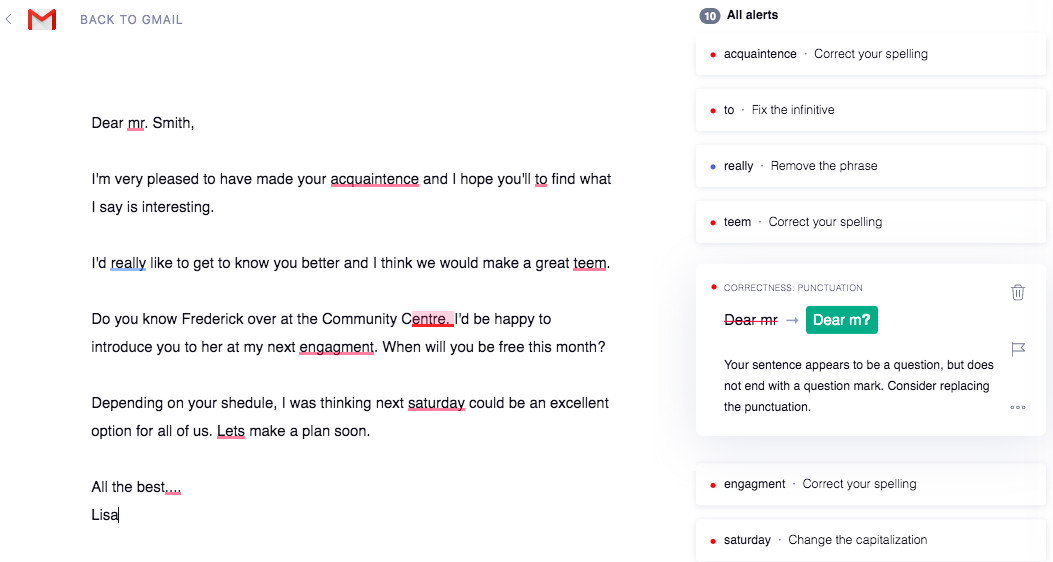
Grammarly is the writing world’s go-to spelling and grammar checker outside of standard word processors. Like any good editor, it underlines the errors and weak phrases in your writing — but Grammarly also goes above and beyond by providing a label and detailed reason for each correction, so you’ll actually learn from your mistakes
On top of these notes, Grammarly has a number of nuanced features to ensure your writing accomplishes exactly what you want it to do. You can “set goals” in terms of your audience, formality level, and tone (happy, confident, urgent, etc.) and analyze your text for factors like clarity, engagement, and delivery.
All this makes for a very well-rounded writing experience. However, we will say that Grammarly, with its goal-oriented interface and meticulous suggestions, is better for short-form copywriting than long-form storytelling.
So if you write a ton of emails, Grammarly could be perfect for you! But if you write books, you might benefit more from the tools to follow.
10. ProWritingAid
Price: Free trial with limited features, $70/year subscription
Runs on: Web, Mac, and Windows
Best for: Long-form writers hoping to hone their personal style
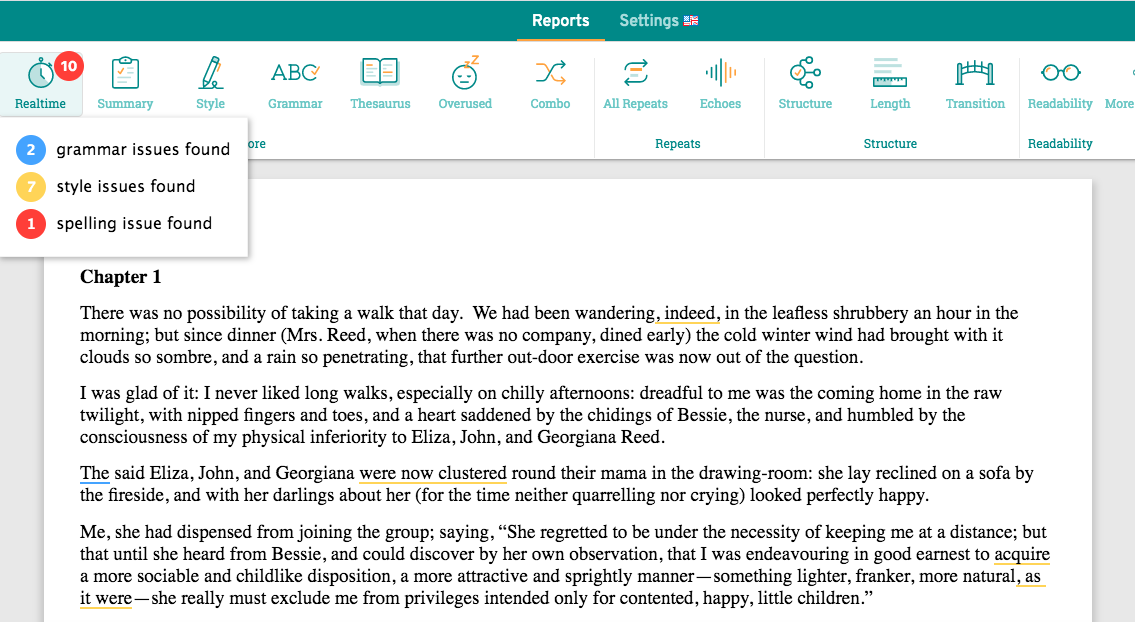
ProWritingAid often draws comparisons to Grammarly, but this app’s approach to editing is a bit more holistic. Though it still points out significant errors, ProWritingAid’s suggestions tend more toward enhancing the flow of your prose — for example, reducing passive voice and filler words — than nitpicking for grammatical technicalities.
You’ll also find more methods of analysis with ProWritingAid, including auto-generated stats regarding your vocabulary, sentence structure, and more. ProWritingAid will let you know which words you’re overusing, which areas are inconsistent, and how you might connect your ideas more smoothly. Overall, it’s a great tool that will undoubtedly help you polish your writing (though keep in mind that you’ll have to pay to access the full range of features).
best writing app for android
- Character Story Planner 2
- Google Docs, Drive, Keep Notes
- Grammarly Keyboard
- JotterPad
- Markor
- Microsoft Word, OneDrive, OneNote
- Novelist
- Pure Writer
- Writer Plus
- Writer Tools
Character Story Planner 2
Price: Free (with ads)
Character Story Planner 2 is actually an app for table top gaming. We’re talking about stuff like Dungeons and Dragons, Hackmaster, and similar types of games. However, this can be an excellent resource for novelists and short story writers. You can create characters with back stories, places, creatures, gods, magic, or whatever else you want. You can basically create an entire world with its own rules, characters, races, and places. In addition, the app includes a creation process for scenarios, story events, and other types of scenes. You can basically write a whole book here and then eventually just transpose it into a word processor later. The app is free with advertising so it’s good for writers on a budget too.
Character Story Planner 2 – best writing apps
Google Docs, Drive, and Keep
Price: Free / $1.99-$199.99 per month
Google Drive is a fairly powerful online office suite. It has a word processor with Google Docs, cloud storage with Google Drive (or Google One), and a note taking app with Google Keep. This is an excellent set of apps for writers. Google Docs is big enough and powerful enough to house a novel, screenplay, etc. I personally use it for script writing for YouTube videos. Google Drive is a cloud storage platform so you can access your writing on a computer, phone, or any other device with an Internet connection. Finally, Google Keep is a decent, free note taking app where you can house ideas and snippets. It all integrates into Google Drive. All of the apps are free and you get 15GB of free Google Drive space. The subscription costs are in case you need more space.
Grammarly Keyboard
Price: Free
Writing with a virtual keyboard is not the ideal way to write things. However, sometimes it’s unavoidable. Grammarly Keyboard is a decent keyboard app for writers. It does basic things like auto-correction for spelling errors. The app also helps with your grammar. It tells you when it spots a grammar issue and offers a correction. Now, in many cases, things are worded a specific way for a reason and some characters just talk with bad grammar. However, it’s still nice having a keyboard with capabilities like this. To be fair, though, we imagine most people are using a Bluetooth keyboard or a Chromebook for this so a keyboard might not be necessary.
Grammarly screenshot 2021
JotterPad
Price: Free / $5.99-$14.99 once / $0.99 per month
JotterPad is a writing app specifically for writers. It has a variety of features for things like novels, screenplays, and other similar types of writing work. The app also comes with a no-distraction mode to really get into the zone. Some other features include a dark mode, a word counter, Markdown support, typewriter style scrolling, and support for cloud storage. There is also split-screen support but only on tablets and Chromebooks. The free version comes with most of the features. A single $5.99 purchase adds some extra stuff while the $14.99 option unlocks everything. There is also a $0.99 per month option for cloud storage support. We’re not big fans of paying monthly for support to Google Drive’s free storage, but you can always skip that if you want to.
JotterPad screenshot 2021
Markor
Price: Free
Markor is a simple, minimal writing app. It uses Markdown for its formatting, but it’s otherwise a simple editor. The app works as a basic writing app but also has features for taking notes, to-do lists, and more. You also get offline support, a convert-to-PDF reader function, and some other productivity things. It’s a perfectly serviceable writing app for a variety of applications and it’s also entirely free.
Markor screenshot
See more:
15 best Android apps available right now
15 best PDF reader apps for Android
Microsoft Word, OneDrive, OneNote
Price: Free / $5.99-$7.99 per month / $119.99 once
Microsoft Office works a lot like Google Drive. It’s a full office suite with accessibility between all of your devices. Everybody knows about Microsoft Word already. Microsoft OneDrive lets you sync your work between multiple devices and OneNote is a reasonably decent note-taking app. We like Microsoft Office a little more because it comes with native desktop apps for Windows. That’s a nice touch in case you want something on your computer with a little more horsepower. You do need an Office 365 subscription in order to get the desktop apps. The free version lets you use the web version of Word for free. We also appreciate that Microsoft lets you buy the whole Microsoft Office suite for a single $119.99 payment. They used to not do that.
Microsoft Word screenshot
Novelist
Price: Free
Novelist is a free writing app for, well, novelists. It has a variety of features specifically for plotting, writing, preparing, and exporting novels or short stories. That includes a timeline feature for all of the various big scenes in your story. In addition, the app features Google Drive support, multiple formatting options, a powerful book preview feature, and an above average text editor. You can get more features from something like Google Docs or Microsoft Word. However, this app is entirely free and the extra novel specific features make it worthy of consideration. We also like the Material Design UI if that helps.
Pure Writer
Price: Free / $3.99
Pure Writer is another simple, minimal writing app. It features very little to get in the way of your writing. That said, there are paragraph and line spacing options, a dark mode, and an extensive document saving function. It saves as you write. Failing that, it notifies the user and locks the app so it can’t be closed until the document is saved. Finally, you get access to a history feature to recover anything you accidentally deleted. It helps make this one stand out from its many competitors. The pro version is also inexpensive comparatively speaking.
Read More On This Topic
WhatsApp announces a big feature drop. Here’s what’s coming to the chat app.
How to follow or unfollow someone on TikTok
How to connect Bluetooth headphones to a Nintendo Switch
Powered by Playwire
Pure Writer screenshot 2021
Writer Plus
Price: Free / $0.99-$15.99
Writer Plus is one of the most popular writing apps for just about anything. It has a bunch of features for that sort of stuff, including headers, rich text formatting, undo and redo, keyboard macros, a night mode, right to left text support, and stuff like word and character counters. The minimal UI and easy navigation put little between you and actually writing and we appreciate that. There is also a quick guide on how to use everything. It’s not heavy like you see with Microsoft Word or Google Docs. However, it’s really easy and fast to just jump in and start typing stuff. The app is also entirely free with no advertising. The in-app purchases are optional donations if you want to support development.
Writer Tools
Price: Free / $4.99 per month / $54.99 per year
Writer Tools is another decent writing app with some useful features for writers. This one has a word processor, but the really cool parts are the other features. You can do things like create characters, plot out timelines and chapters, create new locations for your characters, and house other ideas. There is even a quarterly goal section so you can try to keep to a writing schedule. There is also a progress log in case you want to see your writing consistency. You can work on one whole project for free (with ads). There is a subscription to work on multiple projects, add images, and remove ads. However, we don’t think that the subscription service is worth its price tag so we recommend avoiding it if you can.
Conclusion
Let us know your thoughts in the comment section below.
Check out other publications to gain access to more digital resources if you are just starting out with Flux Resource.
Also contact us today to optimize your business(s)/Brand(s) for Search Engines