
Whether you’re a professional writer or just starting out, tools are essential for producing the best content possible.
We’ve compiled a list of the best content creation apps for 2021 to help you get started. These tools are capable of making your life as a freelance writer much easier and more productive.
Here’s a look at some of the best content creation apps out there today:
Best Content Creation Apps 2021
Whether your designing graphics for social media, blog posts, podcast episodes or videos, there’s a resource listed in this article that will help you streamline and simplify your content creation process and help you show up more consistently and confidently online.
Here are some apps and tools that you can use to create your content.
1. Easil
Easil helps you create easy drag and drop visuals. If you need help designing graphics for your social media accounts, podcast, Pinterest or blog posts, then you may want to try out Easil.
There are 1000s of visually engaging, professionally designed templates that you can use for your content and it can really help you streamline your content creation process and enable you to be more consistent with your publishing schedule.
By the time you’re done creating your graphics, it’ll look like a professional designed it!

2. Canva
Canva is a must-have tool for any marketer, solopreneur or content creator. This tool is really powerful and can help you create PDFs for your freebies, videos for your Stories or in-feed posts, graphics, collages, quotes and nearly anything else.
They offer a free and premium version.
If you’re not really confident with your design skills, consider taking Canva’s free Design School which walks you through some helpful tutorials that will help you become more familiar with using the tool.

Content Strategy Tips & Inspiration
Get tips, tools and tutorials that will help simplify and streamline your content marketing.SIGN ME UP!
3. GoDaddy Studio
GoDaddy Studio helps you create so many beautiful edits for your social media graphics. One of the things you’ll love about this app is that you can import many fonts into the app and easily stay on brand while creating content on the go.
GoDaddy Studio also has a desktop version that you can use to create beautiful graphics. You can create highly visual and engaging graphics and incorporate images, fonts and templates that are available within the app.
They also offer easy tutorials that help you learn more design tricks and techniques that will make you a better designer.

4. PicMonkey
PicMonkey is a photo editing and graphic design software that you can use to create social media content. One of my favorite features of using PicMonkey is that you can import unlimited fonts into this tool.
They have a lot of creative graphics and template designs that you can use to create professional-looking photos, social media graphics, logos or other designs.
➜ Ready to get creative with your designs? Check out PicMonkey here.

5. Adobe Creative Cloud
Making an investment in the Adobe Suite for an annual subscription is worth it if you’re working with different assets such as vectors, photos, videos and social media graphics. You can use InDesign, Illustrator, Lightroom, Spark or Adobe Premiere.
You can create graphics, logos, video assets, infographics, PDF guides and edit your photos all with this subscription.
➜ Learn more about Adobe Creative Cloud tools here.

6. Procreate
Procreate is an app that you can use on your iPad or phone. You can create illustrations, textured backgrounds for your graphics, you can add doodles to your photos or create GIFs and fun animations for your videos.
This is a really fun app that helps you add a personal touch to your assets.
➜ Learn more about Procreate here.

7. InShot
Want an easy way to edit your videos?
InShot is my go-to app to edit all of my videos. You can edit videos for YouTube, TikTok, Reels, Stories, vlogs or any other videos you need. You can incorporate filters, effects, stickers, text and music into your videos all within this app.
InShot is very intuitive to use and makes editing videos really easy and fun. InShot offers free and premium features and the premium features are totally worth it.
The InShot app will help you produce videos faster and with ease.
➜ Check out the InShot app!

8. InStories
Want to elevate your social media graphics?
InStories helps you create beautiful and professionally edited graphics. They have a lot of templates to choose from that are animated and make your content look fancy and engaging.
The templates are great for product-based businesses, bloggers, content creators and lifestyle/vloggers.
You can choose different formats such as Story, Post (square) or Post (portrait).
➜ Check out the InStories app!

9. PiktoChart
Want to create highly visual infographics? The templates and inspiration that you’ll find on PiktoChart will have you looking like a pro in no time.
Create beautiful infographics for your blog posts, website or other PDF materials with PiktoChart.
There are many designs available for different topics, tips and lists and you can really get creative while designing an infographic.
best apps for content creation for instagram
1. Sprout Social
The ability to queue up posts in advance is a game-changer for serial Instagram users. Instagram scheduling allows you to plan out your content calendar without having to worry about crafting posts in real-time.
Additionally, Sprout aggregates your Instagram notifications so you never miss any shout-outs from your followers.

Also, Instagram analytics from Sprout clue you in on your top-performing posts. This allows you to keep creating the content your followers are hungry for, time and time again.
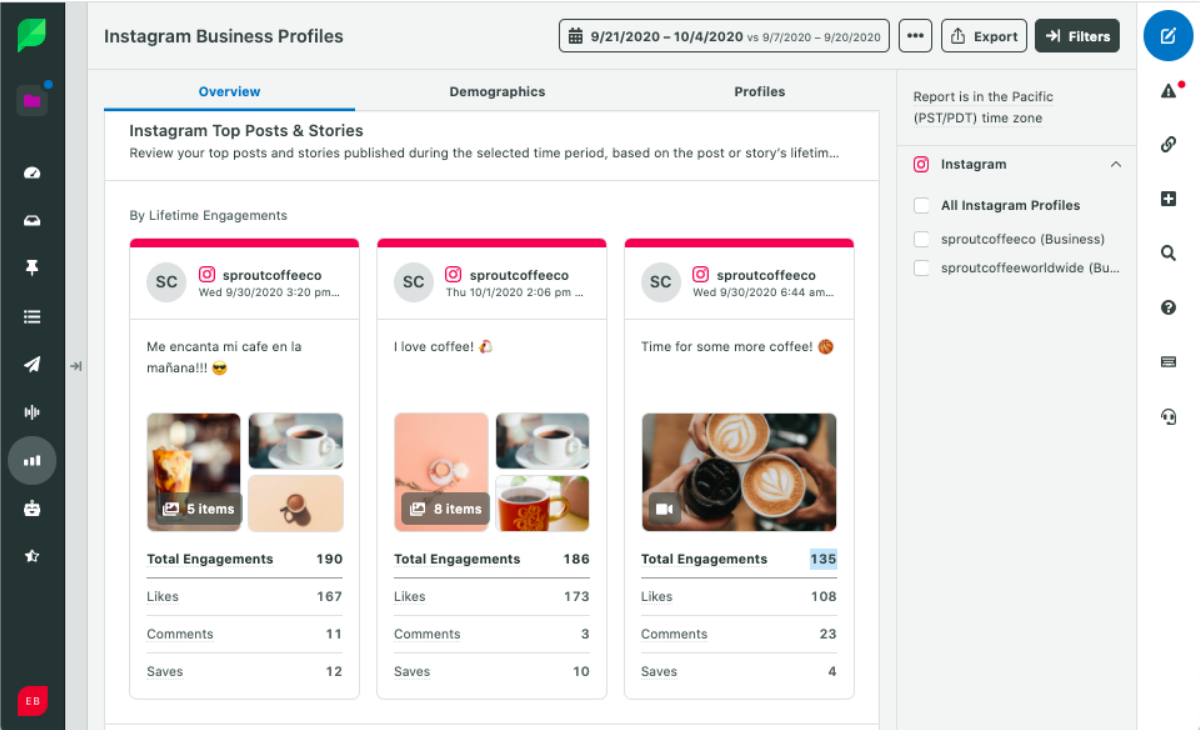
Manage your Instagram media with Sprout Social
Don’t let your efforts creating Insta-perfect images go to waste–use Sprout’s Asset Library to manage images, video and text assets.
Keep curated & approved campaign images on hand for any team member to access, and repurpose images across networks to get the most out of your content.
Start your free trial today and tag media into groups by type, campaign or more to track what has the biggest impact.
Instagram Photo Apps
The era of smartphones has made us all amateur photographers, but that doesn’t mean we snap flawless photos.
Thankfully, there are plenty of editing apps to help us deal with anything from touch-ups to adding visual flair with effects and text overlays.
2. BeFunky
BeFunky is a robust web-based photo editing tool, perfect for cleaning up pictures and designing graphics alike. The full suite of editing tools includes the ability to crop, resize, tilt, soften, sharpen 2nd much more.
As an added bonus, you don’t even have to create an account to use the free version.

3. PicMonkey
Sometimes an otherwise perfect photo needs a bit of touching up. PicMonkey is great for fixing selfies, allowing users to remove wrinkles and reduce shine. Given that images on Instagram that feature a face get 38% more likes, PicMonkey can help you get the picture perfect photo every time.

PicMonkey isn’t just for pictures of people, though. For example, the “Adjustments” feature is awesome for creating epic, landscape-style photos.

4. Adobe Aviary
If you’re using an editor by Adobe, you know your photos are in good hands.
Aviary is a straightforward yet powerful Instagram app with a ton of one-touch tools on deck. Creative touches like softening, sharpening and playing with the saturation of photos may seem subtle but can be the difference to make your photos pop.
Another awesome feature of Aviary is the ability for the app to actually suggest edits on your behalf.

5. Canva
If you’re looking to create social graphics from scratch, look no further. Canva boasts several templates for inspirational images, text-based photos, announcements and everything in-between.

Conclusion
Let us know your thoughts in the comment section below.
Check out other publications to gain access to more digital resources if you are just starting out with Flux Resource.
Also contact us today to optimize your business(s)/Brand(s) for Search Engines