
The social media landscape is no longer a place of novelty.
You need to be there, and you need to have a plan for using it to your business’s advantage.
While social media can be an effective tool for growing your brand, the last thing you want is for it to seem like you’re just taking up space. You want social media to be part of your marketing strategy—not just another expense that doesn’t yield any measurable results.
That’s where we come in. We’ve compiled a list of the best free social media marketing tools on the market so that you can start achieving your objectives with ease and confidence.
Best Free Social Media Marketing Tools
1. AdsReport
With a successful paid social strategy, you can accelerate progress toward your brand’s goals.
Whether you want to grow your audience, sell more products, or do anything in between, Facebook Ads can give a much-needed boost.
But tasks like monitoring ad accounts and tracking results aren’t as simple as they should be.
If you need to confirm basic metrics like spend, impressions, or cost per click (CPC), you often have to sort through a mountain of data in your Facebook Ads account.
When you want to streamline your analysis, AdsReport has you covered.
Once you connect your Facebook Ads account, you can see insights in seconds.
Key metrics like spend, revenue, impressions, clicks, click-through rate (CTR), and CPC appear at the top with helpful comparisons to the previous period.
Track your Facebook Ads insights with one of our favorite social media marketing tools.
Click to view more metrics, and you can see all the other data that matters to your team, such as page likes, landing page views, post engagement, and purchase metrics.
Just want to check stats for a specific campaign? Scroll down, and select the right campaign.
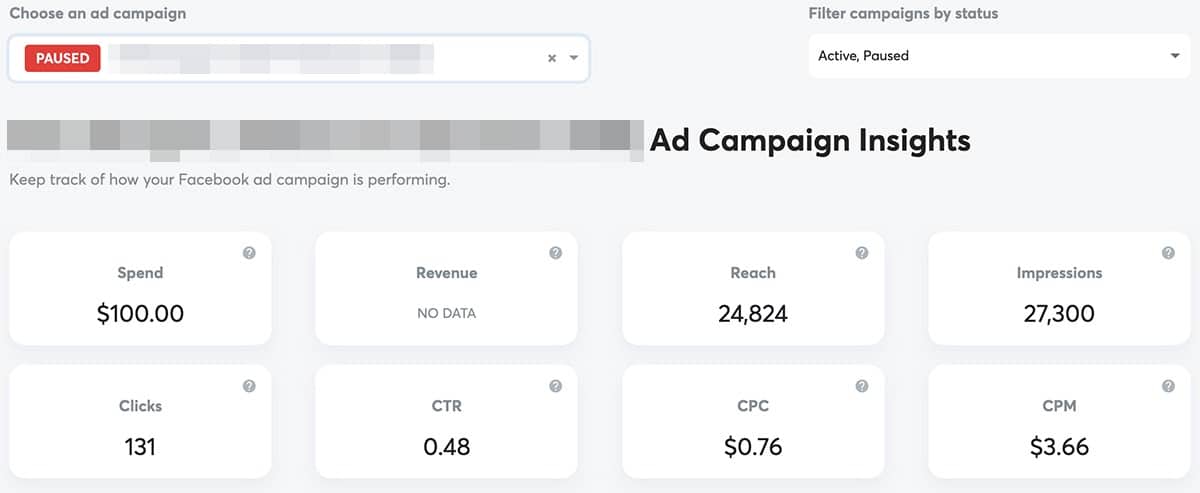
Along with campaign metrics, AdsReport identifies the best-performing ad based on criteria like clicks, impressions, CPC, or CTR.
2. Facebook Barometer
Does it seem like your Facebook strategy is missing something? A little perspective can go a long way. But when you’re so focused on what’s right in front of you, it’s tough to consider external factors.
Let’s say your client’s Facebook following is growing at a steady clip. Or maybe your social media marketing agency is rocking reach compared to previous months. Nice work!
But how do your results compare to your competitors’?
After all, your competitors are working hard to attract a similar audience. It’s essential to keep their progress in mind when you review your brand’s results.
With the free social media tool Barometer, you can compare your Facebook Page to your competitors’ Pages in seconds. Connect your Facebook Page to this free tool, and see how your performance stacks up to over 58,000 other pages. You can compare metrics like:
- Fans reached
- Engagement rate
- People talking about your page
- Negative feedback
- Organic reach
- Paid reach
- Viral reach
- CTR
Barometer is #2 on our list of favorite free social media marketing tools.
The average percentages featured in Barometer are based on the last 50 posts for each Facebook Page, giving you a solid basis for comparison.
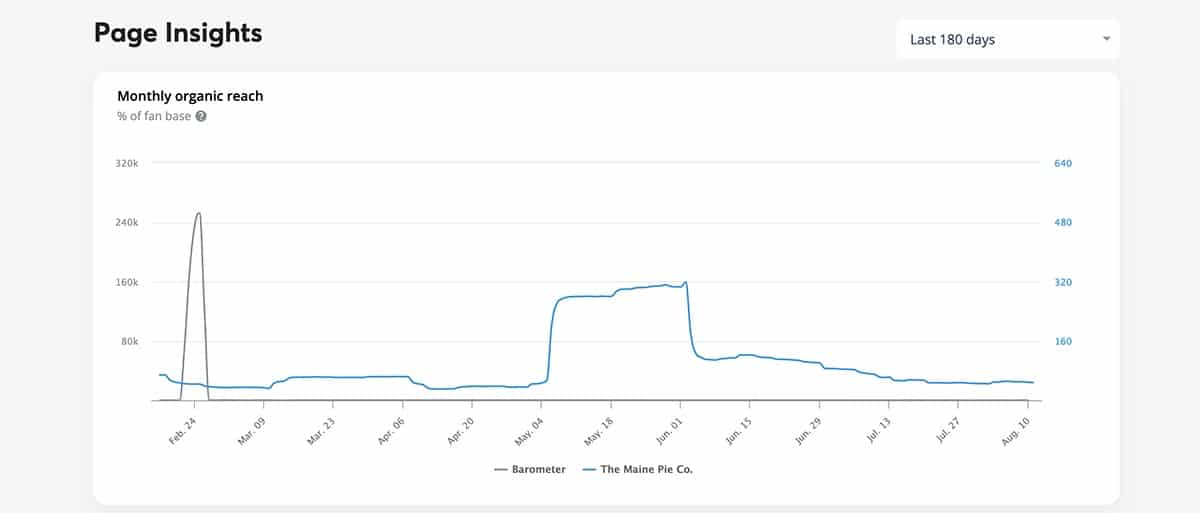
To fine-tune your Barometer, choose the audience range that matches your Facebook Page and get more accurate industry averages.
Then scroll down for page insights like reach and impressions.
You can compare your Facebook Page against the industry average for the past 30, 90, or 180 days to get a better idea of how your brand is truly performing.

3. Bit.ly
When you share links on social media, you don’t always want to show the original URL. Maybe the URL is way too long and would clutter up your post so you’d prefer a shorter link. Perhaps the URL points to a website that you don’t manage and you’d like to find a way to track stats.
Many of the best social media management apps include tools that automatically shorten your URLs.
But these built-in tools don’t always give you much control over the process.
Bit.ly—one of the social media marketing tools out there that make work easier
Meet Bitly, a free social media marketing tool that shortens URLs and stores them in your own personal database.
With Bitly, you can make any URL shorter or create a URL with a custom slug, such as bit.ly/my-custom-slug.
Within your database, you can give URLs original titles and add tags for better organization. That means you can tag all URLs related to a campaign or promotion so you can find and analyze them easily.
But Bitly offers much more than shortened URLs. This tool also provides basic analytics, so you can understand how each link performed. You can monitor the number of clicks your URLs received each day, and you can track each link’s referrals.
With a quick glance, you can see whether social media, email, or SMS campaigns drove clicks.
If QR codes are part of your marketing strategy, you’ll appreciate Bitly’s simple QR code generator. You can create a QR code for any Bitly link, giving your audience another way to connect with your brand.
If you have extra room in your budget, Bitly also offers paid features.
With a paid plan, you can create branded URLs with custom domains, which can improve CTR and help you reach your web traffic goals even more reliably.
4. Canva
Whether you’re sharing a blog post, a seasonal sale, or anything else on social media, you need images. Good, high-quality images.
But snapping your own photos and designing your own graphics takes time and money.
If you don’t have much of either to spare, Canva is an excellent option. This free design app lets you create all kinds of graphics, from Facebook cover images and Instagram Stories to tweets and images for your blog posts.
Canva, one of the most popular social media marketing tools for easy design crafting
You can get started by choosing from hundreds of templates.
All of Canva’s social media templates follow each platform’s recommended image dimensions, so you don’t have to worry about resizing. Just swap in your own text, logos, and photos to customize each graphic.
If you don’t have original photos to work with, choose from Canva’s free library or download free images.
Once you create something you like, you can use it over and over. Just copy the design and update the text or images, and you’ve got a branded template that you can reuse.
If you find that you’re using Canva constantly, you might benefit from the paid version.
When you upgrade to Canva Pro, you can set and save brand colors and fonts, add GIFs, and resize designs for other platforms with a single click.
If you’re an Agorapulse user, you can also take advantage of our Canva integration. Here’s how:

5. Easel.ly
When you publish a social media post, you have limited space and time to attract attention. If you have a long or complicated message to share, you have to get your point across before followers scroll past.
Infographics use the power of images to capture attention and convey more complex ideas.
But designing infographics takes talent. You can’t just throw one together in a few minutes.
That’s where free social media marketing tool Easel.ly can help.
This free social media tool lets you create sharp-looking infographics without a graphic design degree.
Get started by choosing a basic template. Then add graphics, charts, data, and other visual elements.
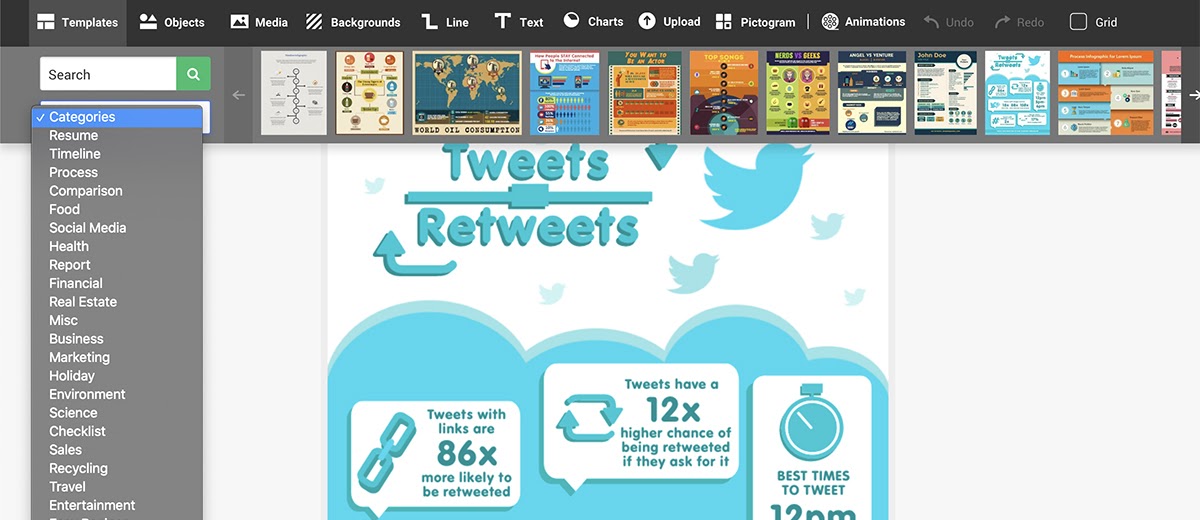
To add movement to your infographic, you can insert animated GIFs. Easel.ly is also integrated with Unsplash, so you can add royalty-free photos to your design.
When you’re finished, you can download or embed your infographic. You can also use Easel.ly’s social media integrations to share directly to Facebook or Twitter.
Although Easel.ly is one of the top free apps for social media, you can get even more out of the paid version of this tool. Upgrade to get hundreds of premium templates, over 1 million icons and photos, and better organization.
6. Easy Advocacy
When your company or client writes a new blog post or publishes an amazing piece of content, you want to get the word out on social media. Your fellow team members can easily become some of your brand’s biggest supporters.
But first, you have to get them on board.
If you’ve found that emails and Slack threads aren’t doing enough to get the message across, you need Easy Advocacy, a free social media marketing tool. You can keep coworkers and stakeholders informed about new content. And you can make it easy for them to share it, too.
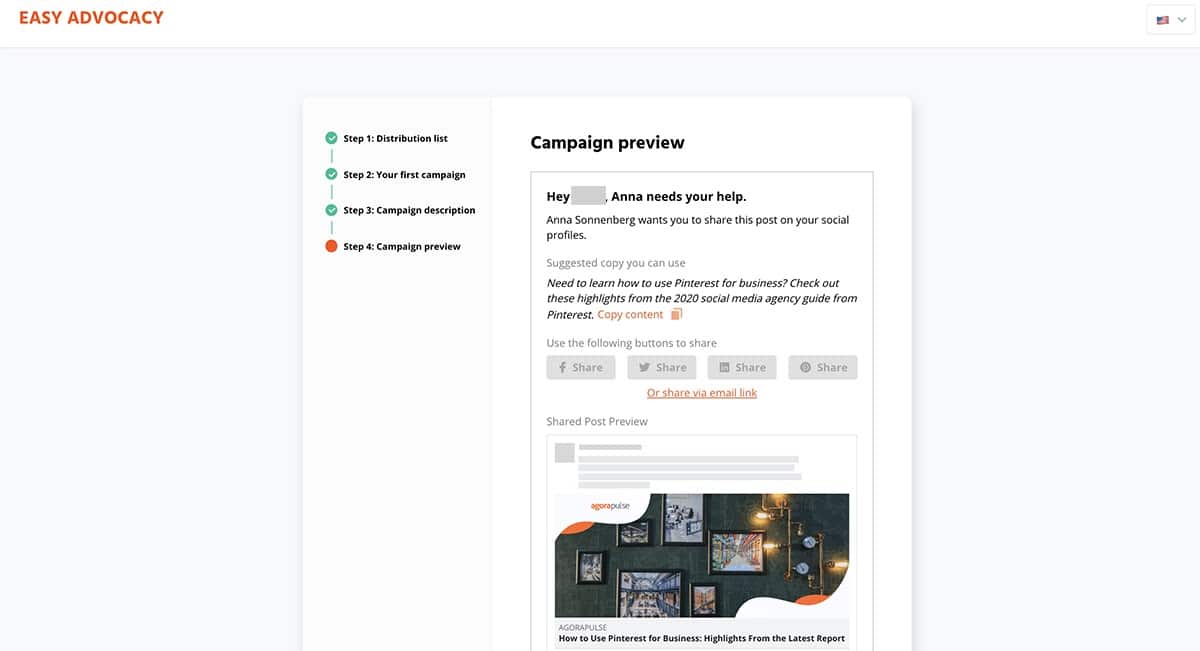
First, set up your distribution list. Then create a campaign by entering a link, title, and suggested copy. Send it to your distribution list, and each person will receive an email prompting them to promote the campaign. The email includes social share buttons and an email link, so promotion takes a single click.
Once you send out the campaign, you can skip manual follow-ups. Your Easy Advocacy dashboard tracks all the key statistics from your campaign automatically.
You can see which members of your distribution list are your brand’s best advocates and on which social network your campaign has performed best.
7. Feedly
As a social media marketer, you need to keep up with what’s happening in social media, marketing, and beyond.
What’s your audience reading? What’s trending in your industry? What content creation ideas can you glean from what your competitors are publishing?
Feedly, a news aggregation app, lets you make sense of all that noise.
With Feedly, you can create your own customized newsfeed. Add the sources you want to follow, and you can filter out irrelevant content while making sure you don’t miss anything important.
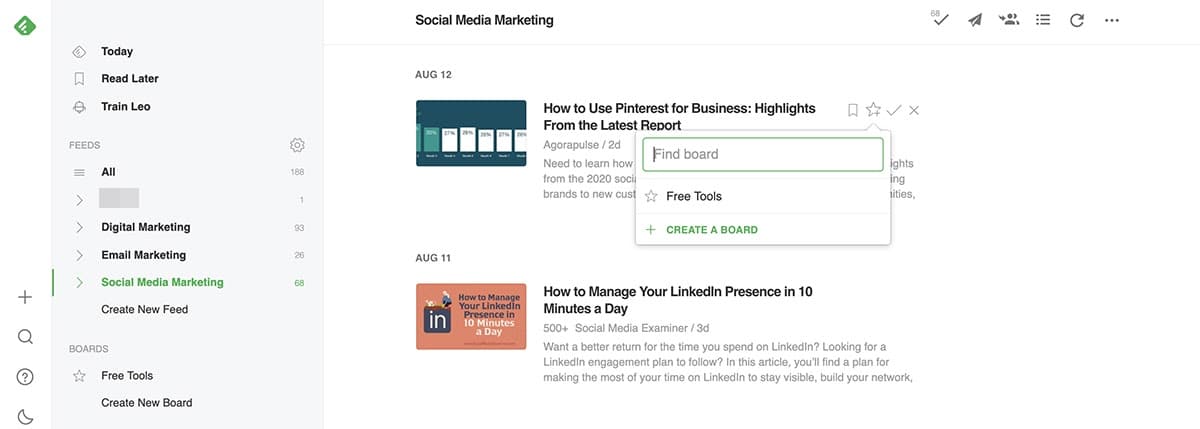
To organize your feed, group relevant sources together in a single feed. That way you can browse all the new posts on a single topic at once. As you read, you can check articles off your list or save important ones to read later.
You can also save articles to a board, which essentially bookmarks them for future reference.
8. Headline Analyzer
It doesn’t matter if you’re an experienced writer or if you’ve been blogging for over a decade. Writing great headlines isn’t easy.
But an excellent headline can result in more clicks, which can turn into increased web traffic and greater reach on social media. That means taking your headline game up a notch can give your brand a critical boost.
With CoSchedule’s Headline Analyzer tool, you can find out where your headline shines and where it could use some work.
Type your headline into the tool, and you’ll get a score and previews of how your headline is likely to look.
Here’s how this free tool scores your headline:
- Word Balance: An analysis of the common, uncommon, emotional, and power words you’ve used
- Characters: The number of characters in your headline, including measurement of how close you are to the optimal length
- Words: The number of words in your headline, including tips for shortening or lengthening as necessary
- First and Last: A spotlight on the first and last three words of your headline, which tend to get the most attention
- Keywords: A review of the common search terms that appear in your headline
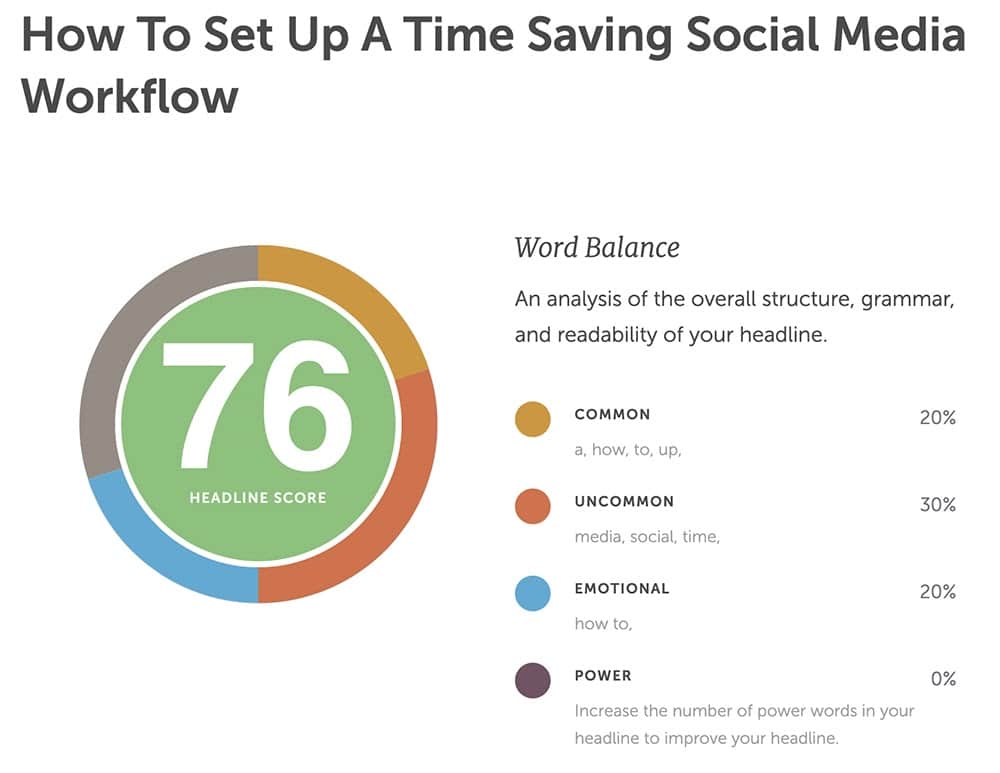
If your headline produces a green score, you’re good to go.

If it’s yellow or red, follow the tips to improve your headline and get more eyes on your social media post.
9. Loom
You can’t always say everything in your social media captions, especially if you’re limited to 280 characters. Ever want to dash off a quick message without having to write it all down? Or create a brief how-to video that explains it all?
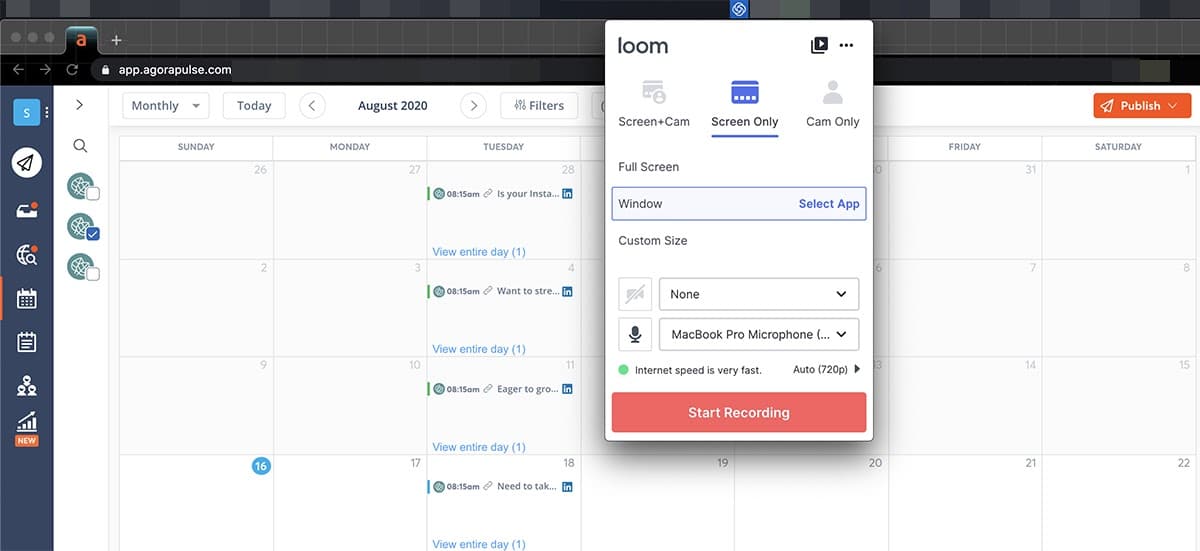
Loom lets you share and record your screen quickly and easily.
For a nice personal touch, you can include a small video of you in the corner, explaining the screen share. Or you can record just your voice or the screen only.
Just press record, say your message, and share it with your audience.
When you’re done with the video, you can click to share to Facebook or Twitter immediately or copy the link so you can paste it into a scheduled social media post.
Incredibly easy to use, Loom makes these video messages quick and efficient.
10. Twitter Report Card
You work hard to implement a solid Twitter strategy. You carefully write your 280 characters, use strategically selected hashtags, and curate super-targeted Twitter lists. How’s that working out for you?
If you aren’t sure how your performance compares to your closest competitors, Agorapulse’s Twitter Report Card can help.
Like Barometer, Twitter Report Card compares your performance to industry averages.
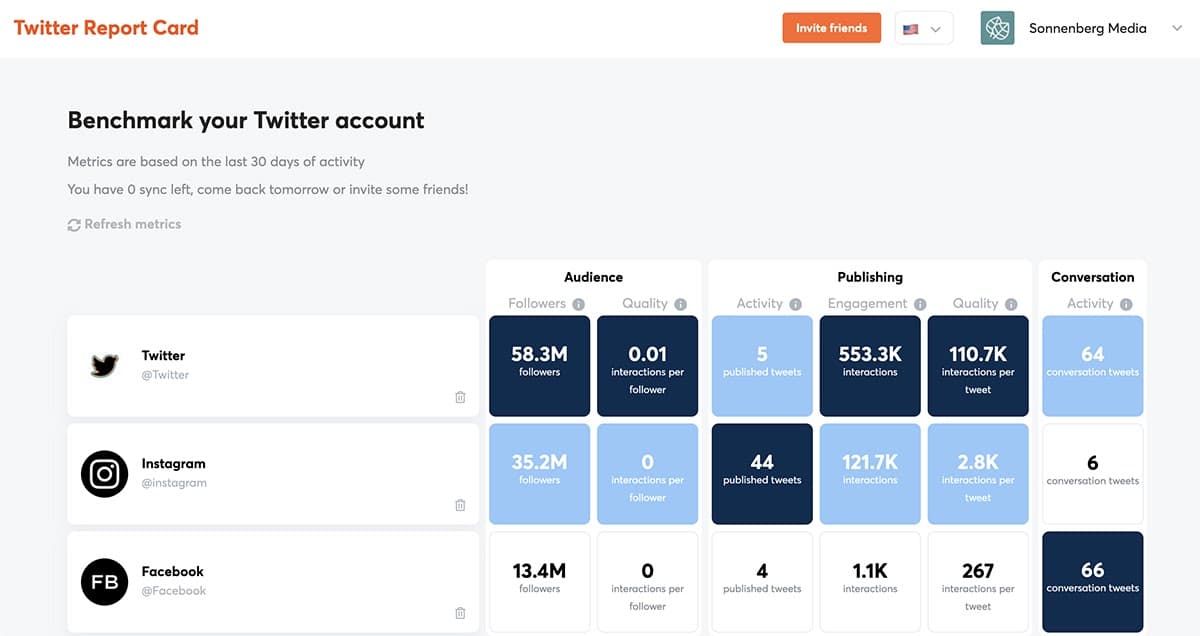
Unlike Barometer, Twitter Report Card lets you choose who to measure your account against.
After connecting your Twitter profile to the tool, add a few competitors. Then check to see how you compare in terms of audience, publishing, and conversion metrics. This free social marketing tool compares stats like:
- Followers
- Interactions
- Interactions per follower
- Tweets
- Interactions per tweet
- Conversation tweets
If you already run a Twitter account or two, this report card can tell you where you stand and show you where you’re winning.
If you want to attract new social media clients for your social media marketing agency, this tool can help you do competitor analysis on Twitter and reveal areas where you could help them improve.
social media marketing tools for small business
- Movavi Video Editor Plus
Video content is one of the topmost liked content portrayals these days. A massive example of that is the success of YouTube videos, TikTok, and Instagram Reels. So, creating excellent video marketing content is essential for social media success. To help you create unique social media video content, Movavi is here!
Movavi Video Editor Plus is an elite, all-in-one video maker which is perfect for individuals and teams. It is easy-to-use and valuable software. It will inspire your creativity and help you produce high-quality video content. You can easily turn your workspace into a creative studio with this tool.
With Movavi Video Editor Plus, you can turn raw footage into a well-put-together and unique video. Create eye-catching social media video ads as well and save them in any convenient format.
Key features
Video editing: filters, transitions, cropping, trimming, and more
Support for LUTs
Audio editing: noise removal, equalizer, and volume normalization
Hollywood-style effects: Chroma Key, object animation, scene detection
Video enhancement: stabilization, manual and automatic correction
A wide range of formats are supported
Supported platforms
Windows 7/8/10/11
Mac OS X 10.13 and higher.
G2 ratings: 4.8/5
Starting price: Free Version is available. A Movavi business license offers more awesome features, which costs $199.95 for a lifetime plan. It comes with a 30-day money-back guarantee.
- SocialBu
With Socialbu, take your social media marketing and management to the next level. You can schedule posts for Instagram, Facebook, Twitter, and LinkedIn. The cool social inbox feature allows you to see all your inboxes in one place. It allows you to see and engage with all your social conversations from one place. It also has an AI-powered content generator that helps you create unique social media posts.
The social media monitoring feature helps you keep track of all social conversations. Many marketers love it as it saves their time and hassle. Because it lets them manage their social media marketing activities. You will also gain more exposure and followers by using it. This will help you build a strong online reputation.
Desirable, isn’t it? SocialBu is an excellent choice to handle your social media marketing like a pro and generate incredible results.
Key features
AI content generator
Social media posts publishing
Social media Calendar
Instagram Stories Scheduling
Bulk Import Scheduling
Twitter Threads Scheduling
Social media Monitoring
Team Collaboration
Fully dynamic Automations
RSS Feed
Social Media Analytics
Android & IOS App
24/7 customer support
Supported platforms
Instagram
Facebook
Twitter
LinkedIn
Google My Business
G2 ratings: 4.4/5
Starting price: $8/month
- Mention
Mention is another valuable social media marketing tool. It enables small businesses, brands, and agencies to track the web. It also allows you to listen to conversations about your brand. You can use this tool to track important conversations taking place online. You can see who is mentioning your business, a particular topic of interest, and so much more.
This software can reveal trends. With mention, a brand can connect with its audience and manage social media. The supported platforms of this tool are Facebook, Twitter, Instagram, and YouTube. Mention is a convenient way to track social media.
Key features
Automated publishing
Slack integration
Pulse notifications
Tags and smart folders
Sentiment analysis
Influencer tracking
Monitoring
Analytics
Social media analytics
Reporting Account management
Supported platforms
Twitter
Instagram
YouTube
Facebook
G2 ratings: 4.7/5
Starting price: $29/month
- Sprout Social
Sprout Social is an all-in-one social media marketing and management tool. They designed it for multiple-person teams focusing on engagement, publishing, and analytics. This tool is a simple yet efficient tool. It saves your time and makes managing social media accounts easy. You can overcome publishing obstacles and automate time-consuming tasks with Sprout.
You can organize posts across profiles, networks, and campaigns too. Likewise, you can do this by using its visual calendar to support long-term plans. And all these are reasons it is one of the best social media marketing tools.
Key features
Activity dashboard
Notification alerts
ROI tracking
Engagement tracking
Campaign analytics
Customizations
Team report
Monitoring
Collision detection
Message tagging
Supported platforms
Instagram
Facebook
Twitter
LinkedIn
Pinterest
YouTube
G2 ratings: 4.3/5
Starting price: $89/month
- AdEspresso
AdEspresso is one of the most convenient tools for Facebook Ads Management. This makes the tool helpful in media marketing. The easy-to-use interface facilitates creating successful campaigns as well.
It will also split test your campaigns’ creatives, demographics, and other aspects. So you don’t have to spend hours doing monotonous work yourself.
Key features
Speedy ads management
Optimize advertisement campaigns
Maximum control over timing and placement
Quick setup
Onboard management
Automated Promotion of ads Collaboration
Supported platforms
Facebook
Instagram
Google My Business
G2 ratings: 3.3/5
Starting price: $49/month
Conclusion
Let us know your thoughts in the comment section below.
Check out other publications to gain access to more digital resources if you are just starting out with Flux Resource.
Also contact us today to optimize your business(s)/Brand(s) for Search Engines