
Finding the right methods to help you learn to read music can be a daunting task. There are many programs, books, and apps out there that claim they can teach you everything you need to know. In this post I will give you my thoughts on seven of them and let you know how I think they compare.
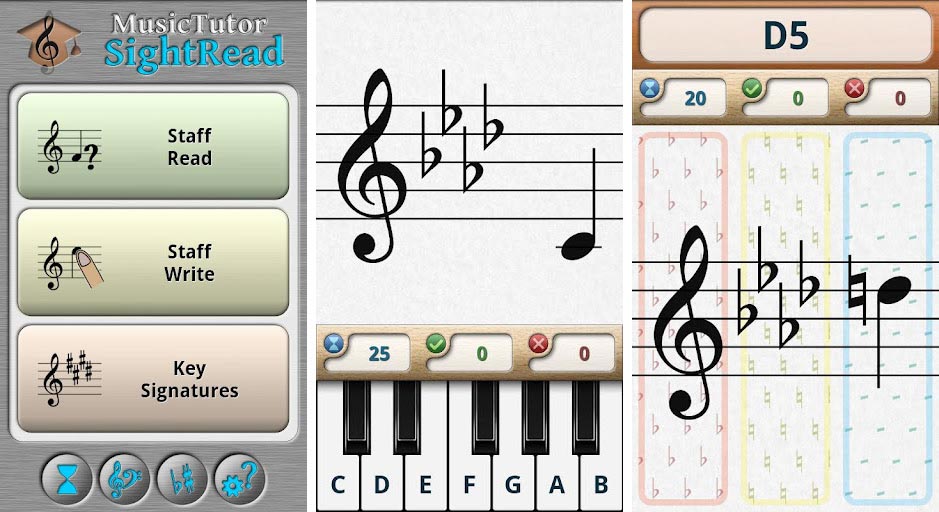
Table of Contents
Best Apps For Learning To Read Music
Tonal Harmony Analysis
The application Tonal Harmony Analysis provides users with the opportunity to input a range of different chords, and identify the suitability of the chord progressions. It provides users with the analysis of each chord progression, offering a range of different options and choices. The app would analyse each option, and identify whether the options worked with different harmonic analysis rules. It can identify potential issues, and explain them, so that you can make a more suitable choice. This is an excellent app, particularly for A Level students, who have a huge amount of rules to learn, and this can be very difficult to teach without the students losing their creativity and musicality.
Download Tonal Harmony Analysis app
ABRSM Theory Works
ABRSM Theory Works
The application ‘Theory Works’ is a course of explanations and exercises to work your way through the theoretical understanding in preparation for music theory exams with ABRSM. It is aimed towards any student that is looking to improve their theoretical understanding, but particularly those who are completing the ABRSM exams, from Grades 1 to 5. The display is very simple to navigate and understand, and needs no further instruction. The use of the explanations are helpful, aided by diagrams where suitable, and further exercises to practise. This app is designed to give students some interactive enjoyment when improving their theoretical understanding, with instant feedback and recognition for accurate answers, without necessarily having a music theory teacher, or to aid alongside this.
Download ABRSM Theory Works app
Read also: Best Music Theory Apps
Newzik: Sheet Music Reader
Newzik: Sheet Music Reader
Newzik: Sheet Music Reader is an in-depth app that allows users to utilise the app by reading the scores, and following them digitally, without the need for printouts or multiple pages, at its most simplest form.
Newzik is designed to give you complete control of your digital scores. Upload, rehearse, perform, organize, improvise, and collaborate to your heart’s content. The app also allows you to record yourself and add in your own notes such as audio video, MIDI track and YouTube links, to develop your rehearsal skills and performance skills.
Devices: iOS
Tomplay Sheet Music
Tomplay Sheet Music
Tomplay Sheet Music is an in-depth app that allows users to utilise the app by reading the scores, and following them without the requirement of any page turns, at its most simplest form.
Tomplay allows you a wide array of features, such as playing alongside the recording, utilising backing tracks, recording yourself, changing the tempo, and annotating the score, among other options.
Devices: iOS, Android
MuseScore: sheet music
MuseScore: sheet music
MuseScore app is there to help aspiring musicians in their journey to master the music they love. It offers free, powerful, and easy-to-use music notation software to create high-quality sheet music, with audio score playback for results that look and sound beautiful.
Using this music notation software, you can create musical scores for piano as well as guitar tablature and percussion sheet music. Beyond notation and tablature, you can also add chord names and lyrics to your sheet music. MuseScore also has a good variety of export options.
Download MuseScore: sheet music app
EarMaster – Music Theory & Ear Training
EarMaster – Music Theory & Ear Training
EarMaster provides an excellent range of teaching and listening questions to develop any music learner from beginner topics to much more developed aural awareness. There are a range of products dependent on the type of student you are, and the EarMaster Cloud is ideal for students in a music class or school.
This app is designed to build and develop your aural skills in rhythm and pitch identification. It takes you through from basic rhythmic and pitch understanding and simple interactive questions, to much more advances understanding of chord progressions, interval identification and sight-reading and sight-singing of far higher complexity, including jazz workshops and customised exercises.
Download EarMaster – Music Theory & Ear Training app
Music Tutor (Sight-reading)
Music Tutor (Sight-reading)
Learn to read sheet music and improve your sight-reading skills with Music Tutor app. Develop your speed and accuracy in reading sheet music by identifying music notes in timed sessions. Choose to practice between treble, bass and/or alto clefs for a duration of 1, 5 or 10-minute sessions. Music Tutor helps with ear training and practicing your listening (aural) skills. During the practice session, every note is displayed along with the sound of the note.
Download Music Tutor (Sight-reading) app
Vocal Training
Aspiring singers can now become extremely proficient without expensive coaches or schools. And one of the best tools for self-improvement is the singing app.
VoxTrain
VoxTrain
Transform Your Voice in 18 Weeks! The course Voxtrain is a vocal training class. It is aimed towards any student interested in understanding their voice and improving their singing from absolute beginnings, to developing the complexities and understanding the depth of singing through use of breathing, tone and control. The display is very easy to navigate and understand, and needs no further instruction. The use of the videos is engaging and helpful, aided by diagrams where suitable, and further exercises to practice. This app is designed to give students some interactive enjoyment when improving their singing, without necessarily having to have a singing teacher too, and being able to practice in their own home.
Voxtrain provides the student with an interactive way to improve their vocal skills using any of their devices. The app gives students the opportunity to practice vocal skills, and understand how to improve their singing.
The videos are so informative. It gives such depth without going over your head, and the presenter speaks clearly and slowly, which really helps the learner to understand. It also has a good musical accompaniment which definitely helps the video along!
Download VoxTrain app
Read also: Best Singing Apps
Learn Music Instruments
To play music instruments such as guitar, bass, banjo and ukulele, you need to understand the various chords and scales. Most of the professional musicians who have mastered the art of playing these instruments had to spend hours training.
flowkey
flowkey
Flowkey is much better at teaching its learners how to learn music, understanding how to read the theory and rhythm. It does this in a fun and enjoyable manner. You might want to go find your own favorite songs to learn yourself. You can quickly navigate to Beginner, Intermediate, Advanced & Pro level songs at the top of the screen. It is aimed towards any student wanting to develop their understanding and keyboard skills, and covers not only the skills to play the keyboard, but also the theory behind this, development of this as a musician, and a range of songs to work through. The layout is very simple and easy to navigate and the course is really interesting and versatile.
Download flowkey app
Yousician
Yousician
Yousician helps you to learn music instruments such as bass, guitar, piano or ukulele. Yousician is an interactive music instrument app that’s designed to really provide a fully-formed experience for just about everyone to better their instrument playing.
One of the features that make Yousician stand out is its exhaustive choice of learning options. Use Practice Mode to slow songs down. This will help you build the coordination you need to play songs up to speed. You can also learn songs in parts; then once you’ve mastered each part you can try the whole song.
The app is designed to give the player a chance to improve through practice and competition. When you’re starting, you can tackle the standard lesson structure, and as I mentioned, the lessons ramp up at a very comfortable pace.
Download Yousician app
Simply Piano by JoyTunes
Simply Piano by JoyTunes
Simply Piano by JoyTunes is one of the widely used and most popular music learning application available on both iOS and Android platforms. Here you can learn from basics, like understanding the sheet music, to advanced level, like playing from both hands. This app is perfect for beginners as well as advanced players. You can personalize your workout as well as try your hand at tons of popular songs available in its library.
Best apps to read sheet music
1 forScore
forScore is perhaps the most popular sheet music app that you can use to read music. If you are looking for an app that will display your music on your Android device or iPad while keeping it organized, then you should definitely try forScore. Even though it doesn’t contain all the bells and whistles that the other sheet music apps have, this one has enough functionality to take over your music library.
forScore can be used to display different music in its written form – from c-instrument sheet music and traditional piano to various lyrics and chords. The app actually comes with its own classical music library, however, you have the ability to buy and insert additional music packs.
Even though its base price point might be high in comparison to other apps, forScore is highly rated, makes great use of the entire iPad screen, and offers a good use of annotations. These are just some of the reasons why it’s one of the best apps in the App Store for musicians. It’s worth mentioning that the forScore app also has a metronome, which makes it easier to keep a consistent tempo and control the BPM of the song.
2 OnSong Pro
OnSong Pro offers so many features and is the perfect helper for both professional and aspiring musicians. Although it’s one of the most expensive music readers on the market, it is definitely worth every penny. With the app, you can easily create your own sheet music library from scratch and simplify the music notation with only chords and lyrics. The best thing about OnSongPro is the editor and markup language that can help you make writing a song fairly easy.
Other cool features include the markup language which shows you how it deals with chords and the “Flow” feature that allows users to arrange each section in order without having to repeat the text. Despite the expensive base price and in-app purchases, with OnSong Pro you can annotate and modify your songs.
OnSong Pro also includes performance tools like a metronome, annotations, MIDI integrations, library management, and much more.
3 Songsterr
If you want to try an app that takes tablature to the next level, then Songsterr is the one for you. It’s clearly organized, easy to use, and breaks down every instrument in a song while also including a playback feature. Thanks to this playback feature, it’s so much easier to learn the part by playing it in real time. This way, you don’t have to jump back and forth between different tabs and you can listen to the music to get the feel from it just right.
What is also great about Songsterr is that it’s available as both an app and in a website version, so you can work on your sheet music from anywhere. The website provides a better value for the users that do not want to pay a monthly subscription fee. Through the web version, you have the opportunity to view the tablature and hear the playback without having to subscribe or pay any fees. If you want to learn songs and get a lot more features, then you might want to try the actual Songsterr app.
Among some of the extra features on it are loop mode, offline mode, and half-speed mode. It also gives the ability to use apps such as AmpliTube as a mobile practice studio.
4 MusicNotes
When it comes to the best sheet music apps for Android & iPad, MusicNotes is certainly among one of them. It is often called “iBook of sheet music” because of its easy-to-use and user-friendly interface, as well as its wide variety of helpful features. In addition to storing your music, MusicNotes can also help you learn very quickly. With the app, you have the opportunity to play the music and then slow down the BPM to learn it faster. It has many positive reviews online and is a great way for you to organize your sheet music.
Apart from traditional sheet music, MusicNotes also supports tablature, lyrics/chords, music notation, and c-instrument. It comes with a handful of songs as examples but if you want to build your own library, you have to create an account on their website. What makes MusicNotes so useful are its performance, abilities to create a music library (song-by-song), and the opportunity to organize your sheet music library the way you want. As of now, MusicNotes remains one of the premier sheet music apps on the Google Play Store.
5 Notion
An app that is very underrated but great for music composition is Notion. Unlike all of the previously mentioned apps, this one focuses more on the music composition than the music library. The app has a powerful music notation software that allows users to compose on their iPads whenever they want to. As if that’s not enough, it also has the ability to mark articulations for different instruments (like notating a slide or bend on the guitar) and includes a sample library that covers many instruments.
Besides the sample library, you can easily import your own material and edit it. Even though it’s not as stage-friendly as OnSong Pro and forScore, Notion has its own features and characteristics. This app is the perfect fit for the aspiring and professional songwriters. This app allows you to do several things all at the same time like import MIDI files, transpose into a different key, support for chord or tab, and of course, handwriting recognition for a composition with a stylus.
6 GuitarTab
GuitarTab is a simple app that as the name suggests, is optimized for chords and guitar tabs. What makes GuitarTab an absolute favorite with thousands of great and positive reviews is that it’s free and only has a few inexpensive in-app purchases. Despite the user interface which may be lacking and require some work, GuitarTab has so much to offer. It has a huge amount of content in its free section, which can’t be said about most of the sheet music apps.
The app’s library isn’t as extensive as that of Songsterr or OnSong Pro but if you want to learn a specific song in the simplest way possible, then you’ve got the right app. GuitarTab is a great alternative that users choose over Tab Pro and Tabs and Chords that come with an expensive subscription service.
Even though it’s free, the app comes with its own inexpensive in-app purchases that allow you to remove all of the ads, transpose to a different key, print the music, and many other neat features. However, in comparison with most of the guitar-oriented apps, the ads of GuitarTab are not even that intrusive.
7 Paperless Music
Paperless Music is one of the best piano sheet music apps out there. It’s a straightforward sheet music app that you can use to manage your library. It’s perfect for not only scores but guitar tabs and fake books too. With Paperless Music, you can import PDF files from various places such as AirDrop, Files, and iCloud. After you upload your files, you can use the enhanced search engine to find a specific piece by filtering the composer, genre, title, key, and/or duration.
The app displays the sheet music crystal clear for your convenience, and thanks to the built-in editing tools, you can add annotations any time. In case you need hands-free page turns, just like most of the popular sheet music apps, Paperless Music also supports Bluetooth devices like AirTurn and PageFlip.
The best thing about Paperless Music is that you are not required to sign up and create an account with them. It also doesn’t have any ads, third-party tracking, subscriptions, and in-app purchases. However, the only drawback is that the app is still available only for iOS devices and is still in development for Android.
Conclusion
Let us know your thoughts in the comment section below.
Check out other publications to gain access to more digital resources if you are just starting out with Flux Resource.
Also contact us today to optimize your business(s)/Brand(s) for Search Engines