
Wondering what days are most popular with your family? Want to have certain things planned every day, while still allowing flexibility? This calendar is made for busy parents who want to help their family stay organized, but still have time to enjoy life. It’s designed for efficiency and ease of use. After using it for a few weeks you’ll never feel like you are drowning in an unorganized family schedule again!
Table of Contents
Best Family Calendar App
1. Calendar: Best Simple Calendar
via Calendar
This app helps you become better at managing your time. With its AI-enabled technology, you get a personalized calendar experience that allows you to spend time on things that truly matter, i.e., your family.
The Calendar has a couple of key features that make it ideal for use by the whole family.
Through its Analytics, you can see how much time you actually spend with anyone in your contacts (so you get reminded if you’re devoting more hours for work lunches rather than having date nights with your spouse or some bonding time with your kids).
Lastly, if you have family members living overseas, it’s often difficult to set a schedule for a chat with them. But with Calendar, you can arrange a “meeting” with the family member at the most convenient schedule, regardless of timezone differences.
2. Cozi: Best for Families
via Cozi
With this app, you can keep all family members in the loop. Its features allow you to coordinate everyone’s schedule in one place.
The color-coding feature helps you keep track of each member’s appointments, assignments, and tasks through the respective colors assigned to them. Plus, you can share your menu plans and to-do lists that you can coordinate and edit simultaneously so that nothing is missed!
Check out our review on why Cozi works best for families.
3. TimeTree: Best for Planning with Friends
via Best Mobile App Awards
With this app, you can share your plans with the people who are close to your heart. Plan and coordinate events together with your family by creating your schedule on just a single calendar.
Imagine the coordinating needed to organize a family camping trip. A suitable venue has to be chosen. The most ideal date for the activity has to be set. Plus, a list of things to bring has to be organized.
If members of the family are all busy, there will never be a chance for a sit-down meeting. This is where the convenience of family calendar apps comes into play.
With its chat feature, every member of the family can give their opinions and offer suggestions about the events in the collaborative calendar. Pictures can also be posted about an event, giving a more memorable experience for all users.
And you know what? Making plans together as a family instills a strong set of value regarding goal-setting. This good habit will help them handle challenges and achieve success later in life.
4. CloudCal
via Android Apps For Me
Another family calendar app you can consider is CloudCal. Have you ever had days when you run from task to task, wondering when you’ll have a breather?
This app can give you an idea of what tasks are at hand for the day so you can apply the best time-management strategies to accomplish and keep track of everything important in your life.
Its colorful features help keep track of your daily, weekly, and monthly schedules. The “magic circles” tell you how busy you are any given day and possible (and welcome) moments of rest.
Syncing with other calendars is also possible, so you’ll never miss a single important family event.
5. OurHome
via OurHome
Time will come when you need to teach your kids the value of responsibility. This app helps you monitor if your kids are doing their assigned tasks.
You can manage family task assignments and organize the day-to-day activities of your household. Its gamified approach can motivate kids to do what is expected of them.
Schedule the tasks and allocate them to the members of the family. Track their progress, send reminders, or give penalties for tasks undone.
The app has a goal-setting feature so your kids know what goals they are aiming for. The calendar provides information for all family activities, so that all members are up to date with family activities and responsibilities.
You might want to check out our definitive list of age-appropriate chores for kids.
6. Any.Do
via Any.Do
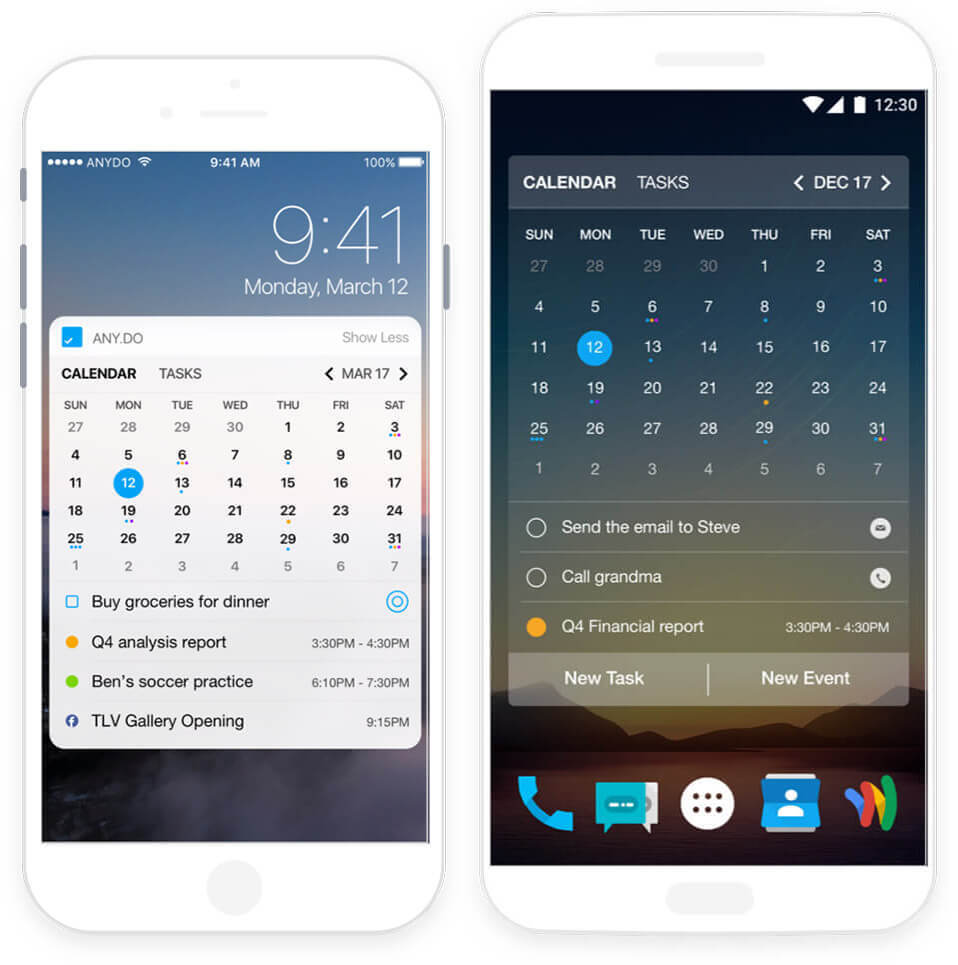
This app meets the criteria for design elegance and reliability. It is user-friendly, making it among the most popular calendar apps for families and other groups.
Categories help you organize the events and the lists you create in its interface. Notes can be added to the tasks you create. You can put a deadline on the task and mark it as important. Furthermore, you can share it with family members if the activity requires their participation
In the pro version, you are allowed to collaborate with another user to create tasks, projects, and lists that you can simultaneously edit and view on your individual gadgets.
You can easily review the upcoming to do’s and schedule by using the “Moment” feature. You’ll get a reminder at the same time each day to check and plan for the days ahead.
7. Google Family Calendar
via Google
When you create a family group in Google, you can add up to 5 members who live in the same country as you do. When your group is created, a “Family” calendar is automatically generated, which is accessible to all group members.
As a member, one can add, view, and edit events on this calendar. You can easily keep track of all your family activities because they’re all in one place and accessible in different devices.
Birthdays are easily remembered, as well as anniversaries. You can also apply color coding to identify every member in the family group.
Note that when a member leaves the group, he or she can no longer access the information in the calendar. Moreover, if you decide to remove the group, the other members will no longer have access to the family calendar.
8. Picniic
via Stephanie Click
This “family management app” functions as a calendar, a to-do list, cookbook, meal planner, shopping list, and a family information locker.
Family events and individual schedules are shared in the calendar. Like other family calendar apps, the users can choose their own colors for easier identification and reference.
To make it easier to manage the household, the app provides recipes for popular family dishes. The ingredients list can be added to an in-app shopping list with just a click of an icon.
9. FamilyWall
via FamilyWall
This app guarantees security and privacy for all the information you share with other members of your family. The timeline representation of all posts on the Family Wall allows you to browse the activities and interactions of each member of the family.
The family calendar is color-coded based on each member’s designated color. Everyone is updated as to individual schedules or group activities requiring their participation.
The locator, when activated, allows you to check a member’s latest location check-in or real-time location.
The gallery is a repository of all videos and photos of memorable events, which can be shared with friends and distant family members.
10. Trello
via Trello
A project management tool can also work very well in keeping your household organized.
This is what I personally discovered when I used Trello in managing things at home, such as class schedules (for the kid and adults), inventory and restocking of art supplies, for plotting doctor’s appointments, and family outings every month. Before this discovery, I only used the app exclusively for work.
How to use it? As a parent, you can keep track of children’s developmental milestones. You want everyone to stay updated with what’s going on in the family.
There are also chores, assignments and other tasks that teach the younger members of the family to be responsible. The “corkboard” gives an overview of all the things that are important for your family.
The cards can be dragged and dropped in their appropriate categories that can be added, moved, edited, or deleted by any of the members with whom you share the board.
Give your activities and events a due date, and these are immediately saved on the calendar. These are all visible for those who have access to the board.
best family calendar app android
1. TimeTree
The app features a calendar with upcoming events (it displays a month by default but you can switch the view to a week or a list) for a whole family or a group of people. Planning has never been easier when you have a chance to find out what everybody is up to on a specific day. You can invite new members to share their events by email, WhatsApp, Facebook, and SMS. The app allows adding media files and comments to each event. Every time an event is created or edited, TimeTree will send a notification to all the users of the same calendar. You are able to create multiple calendars and import data from Google Calendar. The app also supplies a built-in chat, to-do list, memos, schedule book, and convenient widgets.
2. Family Shared Calendar: FamCal
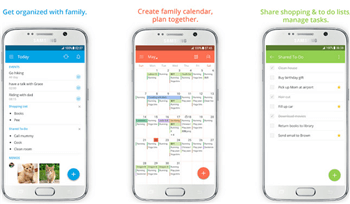
FamCal accommodates schedules, assignments, contacts, and reminders in one calendar to keep all the members of your family posted about the upcoming events. Each member of a group is assigned a specific color so you won’t get confused about who created an event.
Jamal makes it possible to configure notification and give a heads up to particular family members. The app also boasts the ability to create shopping and to-do lists and share them with everyone. You can easily add unlimited notes to your events and lists.
3. Hub Family Calendar Organizer
Hub Family Calendar is a tool to keep and manage your events and to-do lists under one roof. Every family member can create events and share them with everyone else. Moreover, if some of your relatives don’t have the app installed, you can keep them updated by sending events by email.
Not only that but the app comes with built-in grocery and to-do lists. You can give assignments to your family members, set due dates, track how everything is going, set reminders, etc. It will help you to share responsibilities between the ménage and keep everything organized.
Hub Family Calendar is also a powerful communication tool allowing you to share messages, notes, photos, and comments.
4. TeamUp Calendar
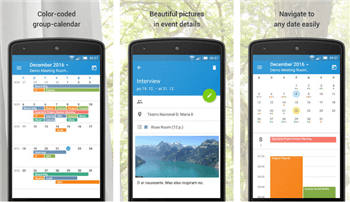
The app makes it possible to create multiple calendars in order to organize your family, work teams, friends, etc. You can create, edit, and share events between all the users of a particular calendar. All the events are color-coded so you don’t get confused even if events pile up. To use the app you need to create a shared web calendar on the developer’s site. All your calendars will be displayed in a convenient dashboard that is accessible even offline.
TeamUp calendar is convenient to use when you need to create repeating events or event signup. You are also able to link locations on a map, upload multimedia files, add custom links for particular users, and much more.
5. Google Calendar
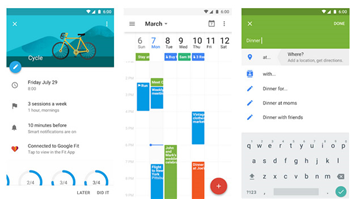
Google Calendar is one of the most popular calendar apps on Google Play. It is great for individual use but also suitable for organizing people. Its features will be useful for family planning as well. You can create events, sync them with all your devices and share them with family members.
Google Calendar is a great solution for people who need calendars for personal agenda but don’t want to have a dedicated family calendar app. However, if you already have both, Google Calendar will communicate with your family app to export/import events.
When you create events, the app will offer to automatically add locations and guestlists.
Conclusion
Let us know your thoughts in the comment section below.
Check out other publications to gain access to more digital resources if you are just starting out with Flux Resource.
Also contact us today to optimize your business(s)/Brand(s) for Search Engines