
Graphic web design software that’s easy to use
Graphic web design software is a category of software applications for creating and editing professional-looking graphic art. It can include digital drawing, illustration, painting, photo editing and manipulation, animation, and many other kinds of design.
In this article, we’ll look at some of the best graphic web design software on the market right now.
All of these programs are available for a free trial, so you can pick the one that’s best for your project and try it out before deciding whether to buy it.
Graphic Web Design Software
Best Graphic Design Software
Adobe Photoshop

Adobe Photoshop is arguably the most popular graphic design software and is used by millions of artists around the world. Whether you are looking to create banners, posters, websites, or logos, this best graphic design software can do it all for you. From small edits to sophisticated designs, Adobe Photoshop has tools for every level. If you are someone who works with illustrative designs, you can even draw or paint anything you like.
Along with image editing, you can create naturalistic artwork and composition in this software. You can define the size of your canvas, isolate elements from backgrounds, create custom brushes, work in 3D, do much more.
Platform: Windows and Mac
Sketch
Sketch is a Mac-only graphic design program that focuses mainly on digital design. These digital designs are used to create websites, apps, and interfaces. Unlike Photoshop, Sketch isn’t built for photo editing or print work. With Sketch, you can create a prototype by collaborating with other designers on the platform itself. The program has a smart layout feature in which the component will automatically resize based on the content. There are hundreds of plugins in the software which will let you do vector editing and other design work with precision down to the pixel. Digital icons are another thing that can be created through this software. Sketch, on the downside, is not great for print design or illustrations.
Platform: Mac
Adobe Illustrator

Adobe Illustrator is a design software that is centered around vector design. You can create artwork, icons, posters, etc. and the designs created in Adobe Illustrator can be used in business cards or billboards and from smartphones to 8k screens. You can use this software to draw, mix, and refine designs to create something spectacular. Adobe has made a mobile version called Adobe Illustrator Draw, which is one of the best graphic design apps out there.
To draw, you can use the shaper tool and create vector shapes. Geometric shapes can be added to other outlines and can be moved, reshaped, and scaled. Even the fonts in the software can be manipulated according to your needs by adjusting their weight, slant, or width. For beginners, Adobe provides professionally designed templates to save time. The user interface of the program is helpful, but there is a steep learning curve to get good at illustrator.
LunaKcy

Lunacy is a free, super-fast graphic software for UI, UX, and web design. It has everything you are used to in other similar apps and goes beyond. With Lunacy, you will save tons of time that you normally spend googling for graphics. Thousands of icons, illustrations, and photos are available right inside the app. What’s more, Lunacy is charged with handy AI-powered tools to automate routine tasks: background remover, image upscaler, avatar and text generators.
Unlike Figma, Lunacy is not addicted to the internet, and most of its features work offline. If you prefer online collaboration with fellow designers, it is also possible. Unlike Sketch, which runs only on macOS, Lunacy natively handles .sketch files on all the basic platforms. The interface of the app comes in 21 languages.
Platform: Mac, Windows, and Linux
Mega Creator
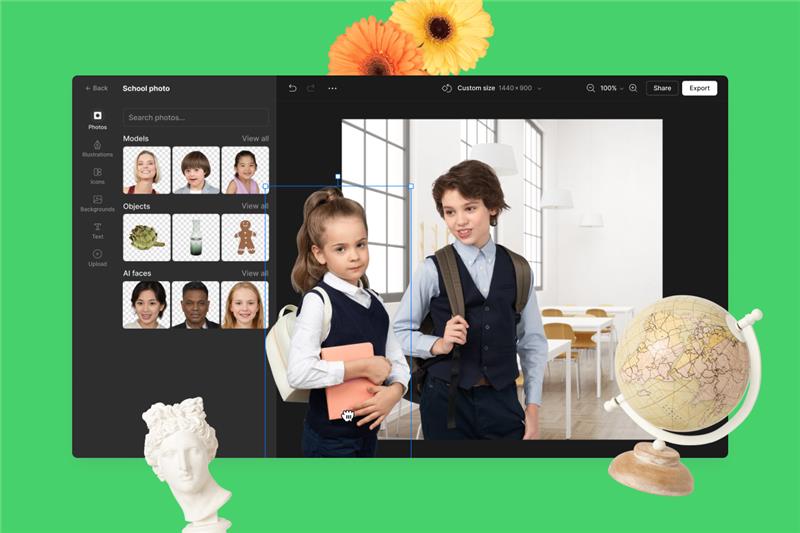
Mega Creator is an online DIY graphic editor for building catchy graphics from pre-made elements. It is an excellent tool for web and mobile app designers, social media marketers, bloggers, copywriters, teachers and students, everyone who needs pro-looking pictures in a short time. You can compose illustrations by customizing thousands of flat and 3D illustrations. Or you can craft custom photos by mixing backgrounds and cut-out photos of people, animals, objects, and even AI-generated faces.
You can also get creative by mixing illustrations and pictures for a beautiful collage. If you need a little inspiration, start with basic templates and edit them beyond recognition. And, of course, you can upload your graphics and mix them up with the elements from the Mega Creator’s gallery. No special skills are required.
Platform: Web Browser
Affinity Designer
The Affinity Designer is a cheaper alternative to illustrator, which is especially suitable for someone who is in the early stage of design career. The software is known to work smoothly, which can improve your workflow and make you express your creativity more freely. You can move and zoom your artwork at 60fps; see the gradients, effects, and adjustments changing live along with the transforms and curve edits.
Affinity Designer lets you work on both vector and raster workspaces, and you can switch between them easily. This software can work on any device, and you can create unlimited artboards within it. Affinity designer provides a graphic design app for the iPad with the same features offered on the desktop versions. Advanced color controls are provided where you can work in RGB or LAB color spaces with up to 32-bits per channel. You can find a wide range of toolset in the program which can be used to achieve a high level of accuracy and productivity. The grids and guides are fully customizable, where you can change the spacing, sub-divisions, gutters, angles, etc. Another powerful feature of Affinity designer is that you get floating-point accuracy by zooming your artwork, even by more than a million per cent.
Platform: Windows, iPad, and Mac
Adobe InDesign

Another software by Adobe that can be used to create designs is the Adobe InDesign. This graphic design software is used primarily in the publishing industry because you can design magazines, info sheets, books, posters, interactive PDFs, brochures, etc. with it. With the ‘adjust layout’ option that InDesign provides, you can change the text of your document, and the graphic will adjust accordingly.
The properties panel has been redesigned to give you more intuitive control over the tools. The Sensei technology integrated into InDesign makes the automatic arrangement and resizing of images. Beginners can quickly learn this graphic design software because it has a low learning curve. To work with other members of your team in creating a design, you can use Adobe InCopy. The Creative Cloud Libraries can help you share text, colors, and graphics with other members.
Platform: Windows and Mac
CorelDRAW Graphics Suite 2019
CorelDRAW was earlier built only for Windows OS; it is now available for Mac as well. With this graphic design program, you can create professional vector illustrations. There are powerful design tools to help you work faster and smarter. You will find numerous customization options, whether you are working on logos, web design, or print projects. CorelDRAW now uses AI technology to provide you with LiveSketch, which converts sketching into precise vector curves. The suite contains tools for graphic design as well as layout. It has Photo-Paint and Corel Font Manager for photo editing and font management.
The software has web graphic tools and presets to develop creative web content; you can publish directly into your WordPress site through it. The file compatibility is also overwhelming; the program supports over 100 file formats.
Platform: Windows and Mac
Xara Designer Pro X
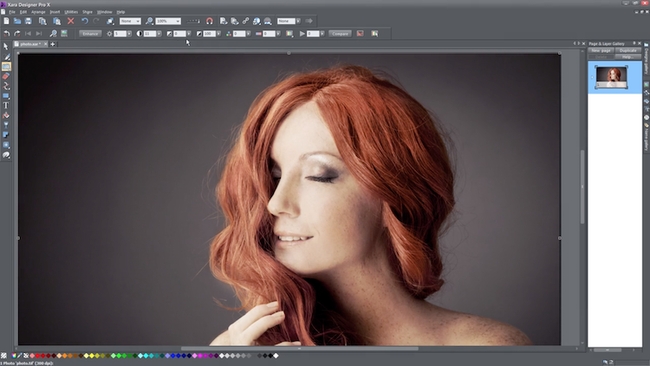
Xara Designer is built for both bitmaps and vectors. The program can handle desktop publishing, graphic design, illustration, photo editing, all in one place. The graphic design software provides you with hundreds of template layouts, design elements, and over a million archive photos to get you started quickly. While drawing any shape, lines, or curves using vectors, you would not face any loss in quality when you scale it up. You can create custom design elements and use them in any of your designs. Tools like gradients, outlines, and transparency in the software will give your artwork a special touch.
Platform: Windows
GIMP
GIMP is a free graphic design software that works on many platforms like Windows, Linux, and Mac OS. GIMP is an open-source program that allows you to change its source code and distribute the program. There are many customization programs and 3rd party plugins that can be used in GIMP to improve your productivity and create better designs. GIMP can also be used to retouch images, wherein you can even make creative composites. Interface components and mockups can also be designed, along with print designs such as icons and logos.
Platform: Windows, Linux, Mac
Gravit Designer

This is another free graphic design software that can be used to create vector-based designs. You can create logos, edit photos, and create animations and illustrations in this program. Gravit does not have an offline version in the free plan. The software is fully customizable according to the user’s needs. The pro version of Gravit is paid and has more advanced features like advanced export options, offline version, more color space, etc.
Platform: Windows, Mac, Linux, Chrome OS
Visme
Visme is an online design tool that goes above and beyond basic design capabilities, without requiring you to learn any complex software. It has an easy drag-and-drop editor, which lets both businesses and individuals create stunning and interactive visual content. There are hundreds of templates to choose from across 40+ categories, from presentation and infographics to press releases, reports and social media images. With a free Visme account, you can use some of these templates, but you get full access to millions of stock photos, videos, icons, animated graphics, fonts and graphs to customize these templates as much as you want. If you want to access premium templates and features like the brand kit, you need to upgrade to a paid account. There are multiple download formats available in Visme, from image to offline web. You can also publish your projects online and share them with a live URL. The unique thing about Visme is you can bring your content to life with advanced animation and interactivity features. For example, you can create a custom animated character, or add links, hover effects and pop-ups to your designs.
Platform: Web Browser
Genially
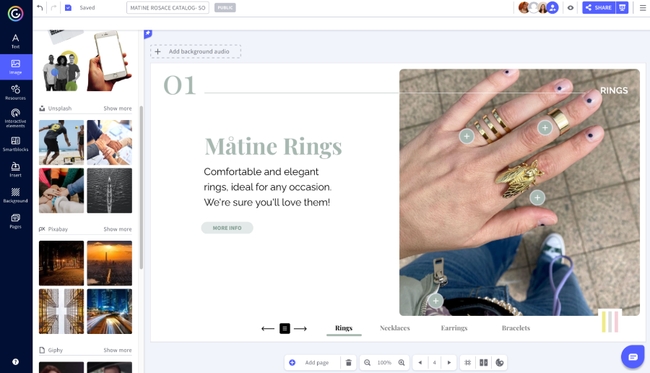
Genially is an accessible all-in-one tool for creating interactive and animated designs. You can choose from thousands of templates or you can start from scratch to create posters, infographics, social media content, client pitches, interactive images, website sliders, and more. Best of all, Genially puts no limit on the number of creations you can make as a free user.
There are thousands of visuals to choose from within Genially’s interface from vectors and image libraries (Unsplash, Giphy, and Pixabay are integrated within the editor) to maps and charts. You can also make any element interactive and add animation effects to it in seconds. Finally, Genially allows you to add buttons to your creations to turn your designs into microsites, product catalogs, and other interactive spaces, and it also gives you the option to insert media such as videos and social media posts within your creations.
Platform: Windows and Mac
Vectr
Free graphics software, Vectr can be used to create vector graphics. These vectors created won’t lose their quality when scaled. Vectr doesn’t use pixels to create the design; it uses mathematical equations. This free graphic design software is available both online and for desktop. Vectr provides you with an easy to use platform which you can use to create any 2D graphics. It can be business cards, logos, posters, brochures, etc.
Vectr provides you with detailed guides on how to use the program, which you can use to learn and create anything with your imagination.
Platform: Windows, Web Browser, Linux, Mac, and Chrome OS
Colorcinch
Colorcinch is a fan favorite! It’s a simple-to-use free online photo editor that is rich in features. You can quickly and easily edit photos using the array of editing tools to adjust exposure, contrast, color, etc, or crop and rotate images, but Colorcinch goes much further than basic image editing. It can be used for creating all kinds of graphic design projects too. You can use their specialty effects such as the cartoonizer to turn any photo into a cartoon with a huge variety of cartoon styles, and they have the most extensive libraries available on the internet for filters, effects, overlays, masks, graphics, and icons.
All of this is wrapped up in one of the most polished and efficient UI’s of any online photo editor. Getting started on Colorcinch couldn’t be simpler – there’s no need to register with the site, and you can simply upload your image and start editing. When it comes to exporting your finished image, there’s a choice of export options to suit you.
Platform: Web Browser
VistaCreate
VistaCreate is an online graphic design tool for those in need of original and impressive visual content. It allows creating customizable social media, web, print, and ad content for your personal and professional needs. With its intuitive online editor, not only does it offer a massive library of trendy templates, but it also lets you download content and create your own designs from scratch.
Everything you need to do is sign up for free, choose a template, and customize it the way you want. Instruments are many: add texts and objects, remove image backgrounds, change colors and fonts, resize images, upload illustrations, and much more. VistaCreate offers about 10,000 animated objects to follow the latest trends in design and helps you craft high-quality visuals. Most instruments are free here; for the unlimited downloads and some extra features, you can upgrade to a Pro plan for a token payment.
Platform: Web Browser
Canva

If you have no previous experience in designing and you are looking for something very easy, then Canva is for you. This free online graphic design software allows you to create designs easily and quickly. There are a ton of templates, fonts images, many of which are free to use. Canva works on the drag and drop concept, where you only need to select the elements and drag it to your work area and customize it. This program does not provide you with advanced features like Photoshop. It, however, solves a beginner’s design need who doesn’t want to get into the process of learning and purchasing premium software. Canva is available as a graphic design app that can be used in Apple and Android devices. The basic features in Canva are free; you will, however, be charged if you want to use more features in it.
Platform: Web Browser, Android, iOS
PixTeller
PixTeller is an easy to use editor tool that can be used to create graphic images (downloadable in PNG, JPG, PDF format) and animations (downloadable in MP4, GIF format). Anyone can use it to make images, animated gifs & videos for personal or business use, with no technical or design knowledge. Creating graphics is a time demanding process, but with this design tool, anyone can make personalized visuals from scratch or by customizing any pre-made templates in minutes.
Platform: Web Browser
Design Wizard
Design Wizard is an online graphic design software, the pricing of which starts at free and increases along with the features. This graphic design software provides users with more than a million curated images, 15000+ templates. Another interesting feature of Design Wizard is its integration with Hubspot, Marketo, and Buffer.
Platform: Web Browser
Infinite Design
This graphic design app is built only for Android devices, which can be used to create vector graphics. The app can be used to create complex and eye-catching designs without much effort. As the name suggests, this app provides an infinite canvas where you can zoom, pan, or rotate. There are four types of symmetry that you can experiment with, and there are unlimited layers that you can work on. This app provides advanced features also like translate, scale, flip, distort, etc. The image you are creating on the graphic design app can be turned into a fully editable vector path. The advanced features in this app are accessible by purchasing it only.
Platform: Android
Inkscape
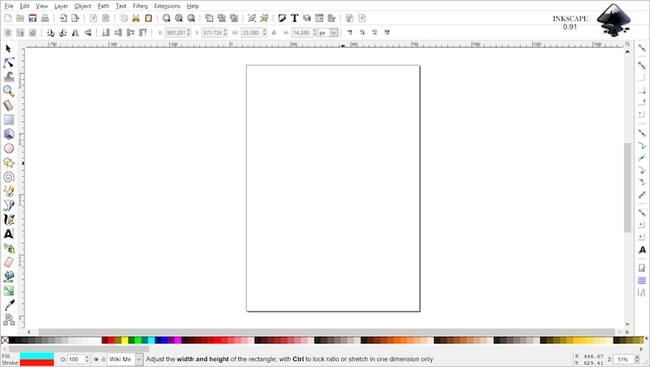
Inkscape, like many other platforms, provides multi-purpose use. It can be used by designers, illustrators, or web designers. The software has flexible drawing tools, which make it easy for beginners to understand the software and create art without difficulty. As the text is an integral part of graphic design, Inkscape has a powerful text tool at your disposal. This software is open source and can be used with any platform. A designer has to spend some time understanding how to use this software. This software is best used to create images that are vector-based and needs to be required in SVG format. Inkscape provides a lot of filters and a helpful community for the designer to grow.
Platform: Windows, Linux, and Mac
Adobe Comp
Adobe Comp is a graphic design app designed to be used along with other Adobe software like Photoshop, Illustrator, etc. Designs can be created with the use of text and shapes. Adobe provides free fonts from Typekit library, which are the same as desktop. With Comp, you can convert your rough designs into crisp graphics and finish the designs on your desktop with other Adobe software.
web design software for windows 10
#1) Web.com
Best for Beginners, eCommerce Entrepreneurs, and Small Businesses
Web.com Pricing: Offer Starter Package – $1.95/month, Full price of $10/month after the first month.

Web.com is an ideal website builder for small businesses and beginners who are making their first attempt at designing a website. The platform features over 100 templates, layout designs, and drag and drop editor that makes website creation really easy.
It also offers further features like inventory management and order tracking if you want to create an eCommerce store. The site also takes care of domain registration, hosting, SSL certification, and more, thus offering a full-cycle website building service. If website creation is too overwhelming for you, then you can try seeking expert service.
Here, a dedicated expert will be assigned to you by Web.com who will help you design a site from scratch and even help you with functions like SEO and PPC advertising.
Pros:
- Cheap Starter packer for the first month.
- Get experts to design websites from scratch.
- 24/7 Customer support
- Industry-specific templates
- Free domain with each plan
Cons:
- Limited customization features
- The price after the first month is expensive.
Verdict: Web.com shines as a website builder because of the entire suite of features it offers to make website creation simple. Its editor is easy to use, helping you design a website, add or remove elements within it with just a click. This is a tool we recommend to beginners who have no experience building a website.=> Visit Web.com Website
#2) Wix
Best for Artists, Photographers, and Musicians for showcasing the portfolio. It will work best for small-scale websites, entrepreneurs, freelancers, and for personal use.
Wix Pricing: Wix is available for free to use forever. To upgrade the site, it provides Premium plans i.e. VIP ($39 per month), Pro ($22 per month), Unlimited ($17 per month), and Combo ($13 per month). Enterprise package will cost you $500 per month for one website.

Wix provides a cloud-based platform for development. It has all the features required for creating a completely personalized and high-quality free website.
Wix provides hundreds of fully customizable templates and an extensive collection of images, clip arts, and icons. It can also provide marketing solutions such as email marketing, SEO assistance, etc.
Wix will help you with building an online presence with free and secure web hosting. You will get a mobile-optimized version of your website. You can access the Wix App Market for free apps. With a free plan, it provides 500MB storage and 1GB bandwidth.
Pros:
- Wix Editor will allow you to access 500 designer-made templates.
- You will get a drag-and-drop website builder.
- You can upload your own fonts or can use more than 100 existing fonts.
- It provides the features to add scrolling effects such as zoom-in or fade-in scrolling.
- It provides advanced design features that will allow you to add animation, video backgrounds, and scroll effects to your websites.
Cons:
- As per the reviews, it is difficult to revamp the website with Wix as it will not allow you to switch the theme once your website will be up and running.
Verdict: Wix will help you to create a free and professional website. You will get free reliable web hosting, top security, best SEO, and a dedicated support team. Wix can provide enterprise services such as Onboarding & Scale-up services, Professional Services, Security, etc.=> Visit Wix Website
#3) Weebly
Best for HTML or CSS experts.
Weebly Pricing: Weebly is free for basic use. It offers three more pricing plans for websites i.e. Connect ($5 per month), Pro ($12 per month), and Business ($25 per month). For online stores, there are three pricing plans i.e. Pro ($12 per month), Business ($25 per month), and Business Plus ($38 per month).

Weebly provides a free website builder for creating a website, blog, or online store. There will be customizable templates, domains, and easy-to-use tools. It provides a built-in editor that will help you to personalize the website extensively.
Pros:
- Weebly provides SSL Security for free.
- It provides unlimited storage with its premium plans.
- It provides features like password protection, advanced site stats, and site search, etc.
Cons:
- Weebly’s drag-and-drop functionality is not perfect and hence you should have programming skills to customize the website.
- It doesn’t provide control to restore the website on your own. You will have to contact the Weebly team in case the website goes down.
Verdict: This platform will let your customers pay as per their choice as Weebly is a part of the Square product suite. It provides support through chat, email, phone, and community forum.=> Visit Weebly Website
#4) Adobe Dreamweaver
Best for skilled web developers and coders.
Price: Adobe Dreamweaver is available for $20.99 per month. It offers a free trial for the product.

Adobe provides web design software that is useful for making powerful HTML websites and apps. It is a code-free web designing tool. It will allow you to code efficiently with HTML, CSS, JavaScript, etc.
By using coding shortcuts, multi-line editing, error-checking & line previews, it will help you to work faster.
Pros:
- Dreamweaver provides the features for fast and flexible coding such as code hints, visual aids, and allows editing of HTML, CSS, etc.
- You will be able to use the assets form your library and Adobe Stock as Dreamweaver is a part of the Creative Cloud.
- You can preview the websites and you will be able to edit them in real-time.
- It provides the features of seamless live view editing, multi-monitor support for Windows, Redesigned & modern UI, and Git Support.
Cons:
- It may take time for beginners in getting familiar with the tool.
- To use this tool, you should have coding skills.
Verdict: Adobe Dreamweaver is a tool for creating, coding and managing dynamic websites. It provides a smart and flexible coding engine. Dreamweaver will help you to build responsive websites that can fit any screen size.
Website: Adobe Dreamweaver
#5) Mobirise
Best for small & medium websites, landing pages, online resumes, and portfolios.
Price: Website Builder Kit is available for $2693. Mobirise is providing a 96% discount till 29 Nov 2019 and thus it is available for $97. Mobirise is available for free to use for personal as well as commercial use.

Mobirise is a free web design software. It supports Windows and Mac platforms. It provides more than 1800 website blocks, templates, and themes. It can be used by non-techies. You will be able to build mobile-friendly websites with Mobirise.
Pros:
- For small customer’s projects & fast prototyping, the tool works great for pro-coders.
- It will allow you to create a unique mix by combining blocks from different themes.
- You can host your website on a local drive, FTP, or Amazon S3, Google Cloud, GitHub pages, etc.
- It will allow you to choose the Fonts from a list of more than 800 Google Fonts and retina-ready free icons.
Cons:
- As per the reviews, documentation & support needs to be improved.
- Software updates need to be installed manually.
Verdict: Mobirise provides the platform that has the features of a drag-and-drop editor, inline editing, preview & publish, more than 2000 website blocks, webpage templates, and contact forms.
Website: Mobirise
#6) Webflow
Best for Artists and Designers to showcase creative skills. It is best for small to large enterprises and online businesses.
Price: Webflow will allow you to start building for free. Then you will have to add a site plan for going live. It offers two types of plans i.e. Site Plans & Account plans. Site Plan for websites starts at $12 per month and the Site plan for e-commerce start at $29 per month.
It provides a free account plan for individuals. It can be upgraded starting from $16 per month. Account Plans for teams start at $35 per person. All the prices are for annual billing.
Webflow provides a variety of products like Designer, Interaction, CMS, E-Commerce, etc. You can drag the unstyled HTML elements or pre-built pieces. It provides cross-browser compatibility.
Webflow can provide the features of enterprise-grade scalability, security, and support. It can be a complete platform if integrated with marketing tools and collecting from data & storing backups.
Pros:
- You will be able to create immersive interactions and animations.
- The tool will allow you to use any font.
- You can adjust everything from tracking to line-height.
- You can define global color swatches and will be able to update every instance of color in one edit.
- It provides an intuitive editor i.e. even clients and colleagues can update the content.
Cons:
- It doesn’t provide a phone or live chat support.
Verdict: With Webflow, you will get the features of unlimited projects, client billing, enhanced staging, code export, white labeling, site password protection, and team dashboard. It will allow you to export code for download. The code can be downloaded in a ZIP file for all the HTML, CSS, JavaScript, images, and other assets.
Website: Webflow
#7) Squarespace
Best for Photographers and artists to showcase the designs and creativity.
Price: Squarespace is available in four pricing plans i.e. Personal ($12 per month), Business ($18 per month), Basic Commerce ($26 per month), and Advanced Commerce ($40 per month).
Squarespace is useful to entrepreneurs, photographers, restaurants, small businesses, etc. It is an all-in-one platform. The created websites will be mobile-optimized.
Pros:
- Squarespace provides modern templates that will be compatible with modern browsers and mobiles.
- Its style editor will have hundreds of customizable fonts, colors, and page configurations.
- It provides free typeset fonts, starter layouts, chart blocks, free google fonts, etc.
Cons:
- Squarespace has a learning curve or you need to get familiar with the tool to customize the website with drag-and-drop features.
- There is no app store and thus you have to use its built-in features only
Verdict: Squarespace provides unlimited storage and bandwidth with all the plans. You will get SEO features for site visibility.
Website: Squarespace
#8) GIMP
Best for small to medium businesses and freelancers.
Price: GIMP is a free and open-source tool.

GIMP stands for GNU Image Manipulation Program. It is a free and open-source tool for image editing. It can perform the tasks of image retouching & editing, free-form drawing, converting between different image formats, etc.
It supports Windows, Mac, Linux, Sun Open Solaris, and FreeBSD. The tool will help you with creating icons, graphical design elements, and art for user interface components and mockups.
GIMP will allow you to change the source code and distribute the changes. It can be used by graphic designers, photographers, illustrators, scientists, etc.
Pros:
- GIMP supports C, C++, Perl, Python, Schema, etc.
- It has top-notch color management features so that you will get high-fidelity color reproduction over digital and printed media.
- It supports various file formats ranging from simple such as JPEG & GIF to special ones such as multicolor-depth Windows icon files.
- GIMP provides the features of Customizable Interface, photo enhancement, and digital retouching.
Cons:
- As per the reviews, the interface is a little messy.
Verdict: Artists will get the power and flexibility for creating unique creations through the tools that will be required for high-quality image manipulation. It is a highly extensible and customizable platform.
Website: GIMP
#9) Sketch
Best for small to large businesses and freelancers.
Price: Sketch provides two options for buying new licenses, one for a personal license ($99) and the Volume license ($89 per device for 2 devices). To renew an existing Personal License, it will cost you $69. Renewing existing volume license price starts at $64 per device. You can try the product for free.

Sketch is useful for creating, prototyping, collaborating, and turning the ideas into marvelous products. Using Anima Toolkit, you will be able to create timeline animations. It provides various plugins such as Bitmap compressor, Material Theme Editor, Pexels, etc.
Pros:
- Felipe plugin has the functionality for converting wireframes into UI elements.
- It will be easier to create, update, and share all the design components with your team.
- The tool will allow you to use real and diverse data sets for adding faces, names, places, etc.
Cons:
- The tool is not suitable for old machines as it slows down them sometimes.
- Cloud sharing can make a pixelation and distortion.
Verdict: Sketch provides the platform that will let you create, prototype, and collaborate with designers, developers, and stakeholders.
Website: Sketch
#10) WordPress
Best for beginners, online stores, small businesses, freelancers, or for personal use.
Price: You can start using WordPress for free. There are four pricing plans i.e. Personal ($4 per month), Premium ($8 per month), Business ($25 per month), and e-commerce ($45 per month).

For site customization, WordPress provides a lot of free themes. It will also help you with Marketing and Monetization Tools that includes SEO Tools, Simple Payments, and Recurring Payments.
Pros:
- With the premium plan, you will get access to unlimited Premium themes.
- It provides functionalities for advanced design customization.
- It offers email and live chat support.
- Depending on the plan, it provides storage space ranging from 3 GB to 200 GB.
Cons:
- Unavailability of a built-in drag-and-drop website builder.
Verdict: WordPress provides tools to create a website or a blog. You will get dozens of free, customizable mobile-ready designs and themes. It provides free hosting and support.
Conclusion
Let us know your thoughts in the comment section below.
Check out other publications to gain access to more digital resources if you are just starting out with Flux Resource.
Also contact us today to optimize your business(s)/Brand(s) for Search Engines