
Email is one of the most powerful marketing tools in your arsenal. In fact, an estimated 60% of marketers believe email marketing is core to their business.
Whether you’re using email to drive sales, build awareness, or strengthen customer loyalty, the basic steps of an email campaign are the same—you’ll just need to adapt them according to your specific goals.
Here’s a quick guide to creating a great email campaign—along with some real-life examples and templates to help you get started today!
How To Use Email Marketing Tools
Businesses use what’s known as email service providers (ESP) to send marketing emails.
An email service provider is software that sends and manages email marketing campaigns.
It’s also referred to as an email marketing platform, email marketing tool, email marketing service, or email marketing software.
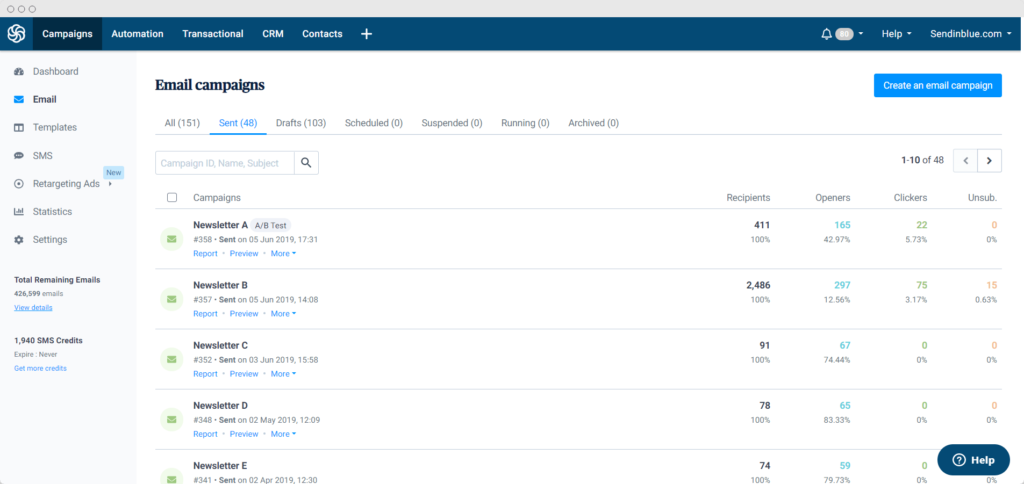
Now you might be wondering, can’t I just send marketing emails with my regular inbox provider? Do I really need to pay for a product on top of that?
Technically, it’s possible. (We even explain how in our guide to sending mass email with Gmail). Beware, though. You’re likely to run into problems with limited email bandwidth, design, and more importantly, email deliverability. Here’s why:
Internet Service Providers (ISPs) like Gmail, Outlook, Yahoo, etc. are designed for personal use — not for email blasts. So when a mass email is sent from an ISP, it’s easily flagged by spam filters and your account can be disabled for suspicious activity. 
ESPs, on the other hand, have the necessary infrastructure in place to ensure good email deliverability rates — i.e., the ability to land emails in your subscribers’ inboxes. If you want to set yourself up for email marketing success from day one, get yourself a dedicated email marketing service.
How to Start Email Marketing: What Do I Need?
Keeping it simple, there’s two main things you need to run email marketing campaigns.
1. Email marketing software
As we’ve just explained, a dedicated email marketing provider is the way to go. Sending marketing emails through an ISP will only put your brand and email sender reputation at risk.
2. An email list
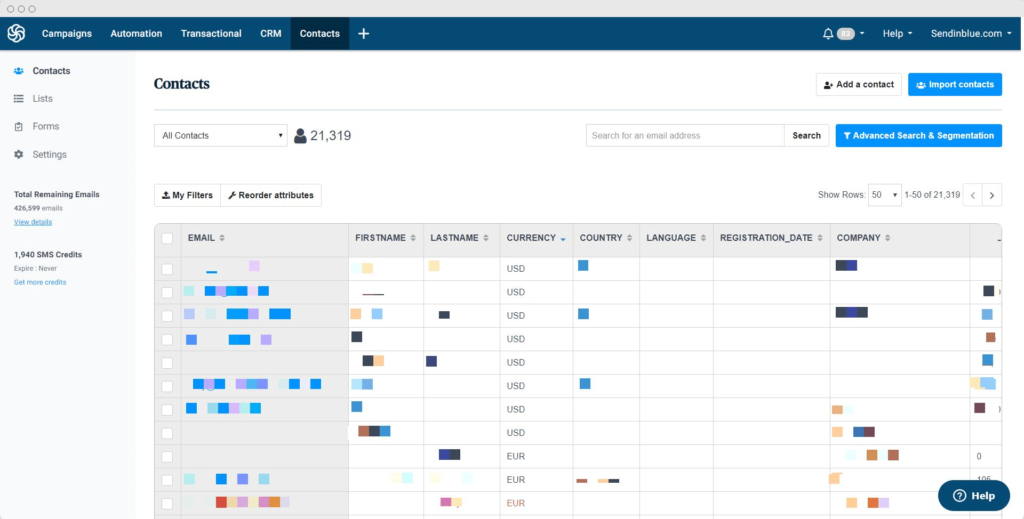
This list should contain the email addresses of interested subscribers who have opted-in to receive email communications from you.
Yes, that’s right — opt-in. Because here’s the thing about email contacts:
Everyone on your email list needs to have given their express permission to be there.
What does that mean?
It means they agreed to receive emails from you when they entered their email address into an email signup form on your blog, website, landing pages, social media, or anywhere else. In email terms, this consent is referred to as an ‘opt-in.’ (‘Opting out’ would be an unsubscribe).
Permission-based marketing is essential to conform with data protection laws and safeguard the integrity of your brand. After all, nobody likes a spammer. 
Still with us? Great, because here’s where it gets exciting — learning how to launch an email marketing strategy, starting with your first email campaign.
How to Launch Your First Email Marketing Campaign in 8 steps
1. Choose the right email marketing software
The first step is finding an ESP to send and manage your email campaigns and email subscribers.
Popular email tools include Sendinblue, Mailchimp, Constant Contact, Convertkit, Mailjet, Mailerlite, and HubSpot — to name a few.
With hundreds of ESPs on the market, it’s hard to know which one is right for your business.
And it’s easy to get sucked in by shiny bells and whistles you probably don’t need (not yet, anyway).
Evaluate your needs. Distinguish between must-have features and nice-to-have features. Make a list. 
Here are some questions to help narrow down your options:
- What’s your budget? If it’s very limited, then cheap email marketing services should be your starting point.
- What kind of emails do you plan to send, and how often? This’ll give you an idea of your required email volume (i.e. number of email sends).
- If you’ve already got a list of opt-in contacts, how many are there?
- What’s your skill level when it comes to designing emails? If you’re a complete beginner, you’ll want a drag and drop email editor. Email templates will also come in handy. On the other hand, if you prefer to code emails from scratch, you’ll be on the lookout for an HTML editor.
- Do you plan to set up automated email workflows? See what the ESP offers in terms of email marketing automation. Some solutions only offer basic autoresponders.
- If your business communicates with different buyer personas, what contact list segmentation capabilities are offered?
- Will your business be sending transactional emails? (Note that these are not considered email marketing). Some folks like to manage these emails with a separate service, while others prefer all emails under the same roof with a tool like Sendinblue.
It’s also a good idea to consider your future needs. Found an ESP you like? Do some simulations: Ok, if my list grows to x, how much will this ESP cost? If I want to add x to my strategy, does this ESP have the feature-set to support me? What sort of integrations or apps will I be able to add on?
Optimism for the future is a good thing, but don’t get carried away. Of course, stay focused on the essentials for now. 
Pricing by email volume vs. pricing by subscribers
As you’re exploring different options, you’ll notice most providers base their pricing on the number of subscribers.
Lots of email marketing solutions will try to lure you in with cheap entry plans for a small number of subscribers (often 250 or 500). The catch? The prices tend to jump significantly once your list grows beyond these limits, as is the case with Mailchimp.
And hopefully your list will grow because that’s kind of the point.  But it sure would be a shame to end up overpaying for email in the long run.
Sendinblue, on the other hand, structures its pricing according to email volume rather than the number of subscribers. That way, you grow your email list infinitely and it won’t impact the pricing.
The Lite Plan starts at $25 for unlimited subscribers and 20,000 emails — more than enough for any small business just starting out. Test-drive Sendinblue today on our free plan.
Create my free Sendinblue account >>
2. Build your email list
You can’t send email campaigns without anyone to send them to, so it’s time to start building a list of engaged, opt-in subscribers.
Most ESPs let you create subscription forms to embed on your website.
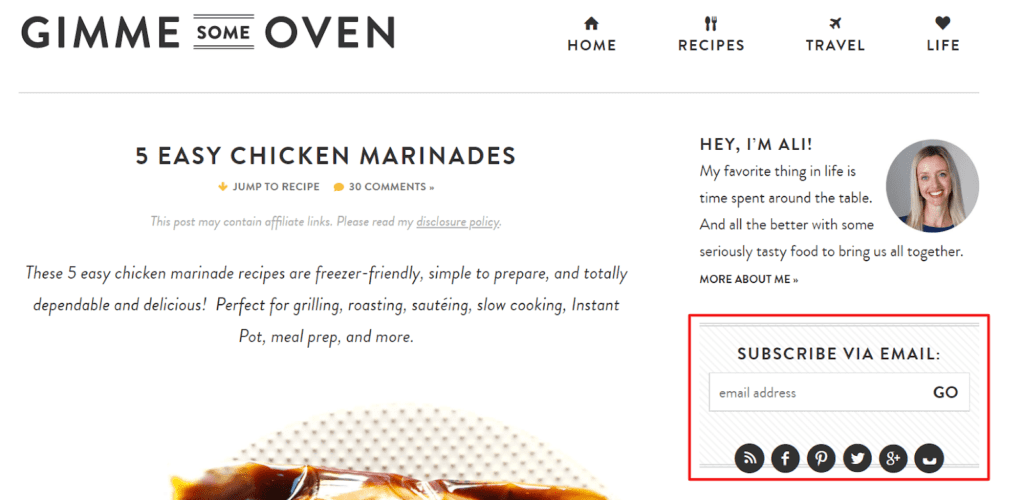
When creating a subscription form, be super clear about your signup promise — what kind of email content will subscribers receive and how often?
If you promise a bi-weekly email newsletter with content marketing tips, stick to that. If you start sending unrelated promotional content, expect people to unsubscribe, or worse, mark your emails as spam.  (Very bad for deliverability rates!)
Remember: People trust you enough to give their email address in the first place, don’t abuse that trust.
Add opt-in forms to your website and other places
Place your email subscription form in highly visible places where people will definitely see it. 
Typical subscription form hotspots include blog posts, the homepage, and contact page. Creating a pop-up form on your website can be a good idea, too. Just make sure not to disrupt the user experience too much. Pop-ups that prevent visitors from using your site can be big deterrents! (Think of your signup form placement like your call-to-action placement).
Share forms on social media by including a link in your bio or posts.
Run an ecommerce/online store? Include a signup option as part of the checkout process.
Supercharge your list with content upgrades and lead magnets
Nothing makes a list grow faster than premium content.
Guarded content like ebooks, reports, checklists, or infographics are great ways to grow your contact list. Visitors get valuable content in exchange for joining your newsletter list. It’s a win-win! 
Special offers and discounts are a great way to get people onto your list, too. For example, clothing brand Mango offers 10% off your first order when you subscribe to their newsletter.
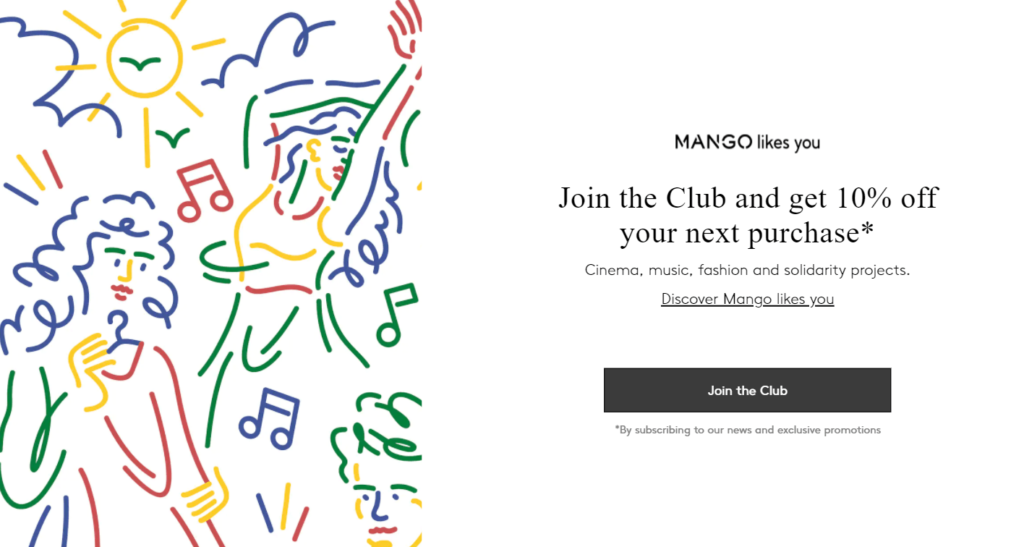
Discover more tactics in our guide to email list-building.
3. Set up a welcome email for new subscribers
When someone signs up to your email list, you’ve gotten their attention. Now it’s time to engage them even further with a welcome email. 
A welcome email is an automated message sent to new customers and subscribers. The idea is to introduce your brand and any content that will establish your relationship with the subscriber — a welcome discount, links to latest articles, useful information, etc.
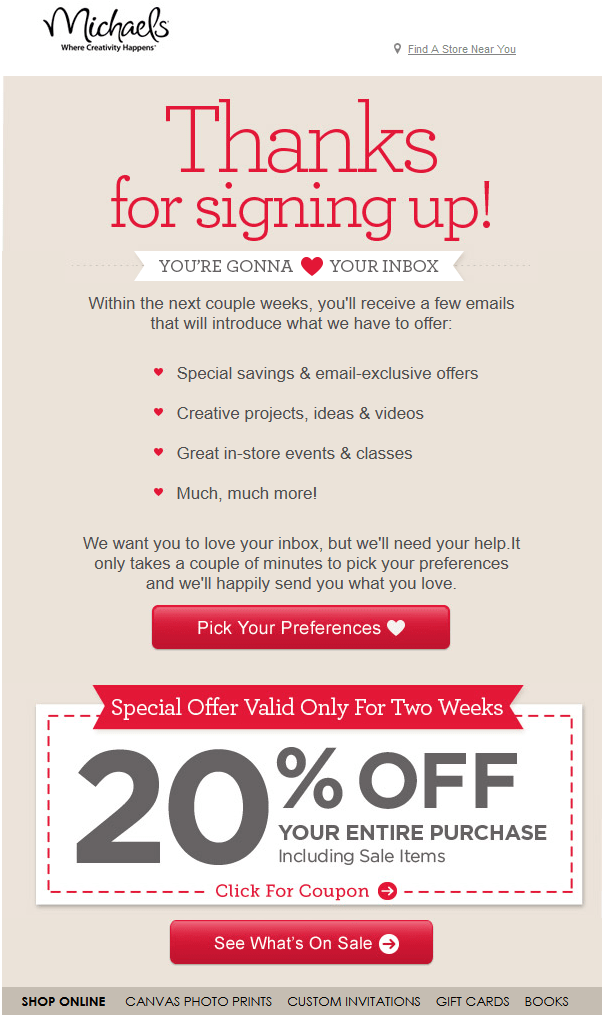
Email deliverability tip: Get subscribers to add you to their contact list so they never miss an email.
4. Define the goal of your email marketing campaign
Now that you’ve started building your email list, it’s time to think about what you want to achieve from this first campaign.
Every email marketing campaign should have a clear goal.
Examples of common goals include:
- Promoting a new product
- Sharing a discount with loyal customers
- Getting more downloads for your latest ebook
- Updating subscribers on some important piece of company news
Your goals can be specific or broad — as long as they fit with your business and your audience. In either case, having a clear goal in mind will make it easier to create your email content.
5. Build responsive emails
Responsive emails automatically adjust their formatting to fit the device they’re viewed on – mobile or desktop. 
You might be wondering, do I need to hire an email designer for this?
If you’re bootstrapped and on a budget, then no. You don’t need one. To make things easy, most email marketing services have some form of drag & drop email editor. These are great for producing clean, simple, hassle-free designs.
Of course, that’s not to diminish the value of having a dedicated email designer, especially for ecommerce. An email designer will help you stand out from the crowd with custom templates. It’s definitely something to consider down the line — or even now if you have the means.
That said, email design doesn’t have to be difficult or technically over your head. Using a drag and drop editor, you can create stunning and professional marketing campaigns. 
There’s no need to get hung up on creating fancy, elaborate emails. More importantly, you should focus on creating an email that embodies your brand, whatever it may look like. Oftentimes, this means keeping it simple. You can always build upon this later on as your skills grow.
Save time with pre-made email templates
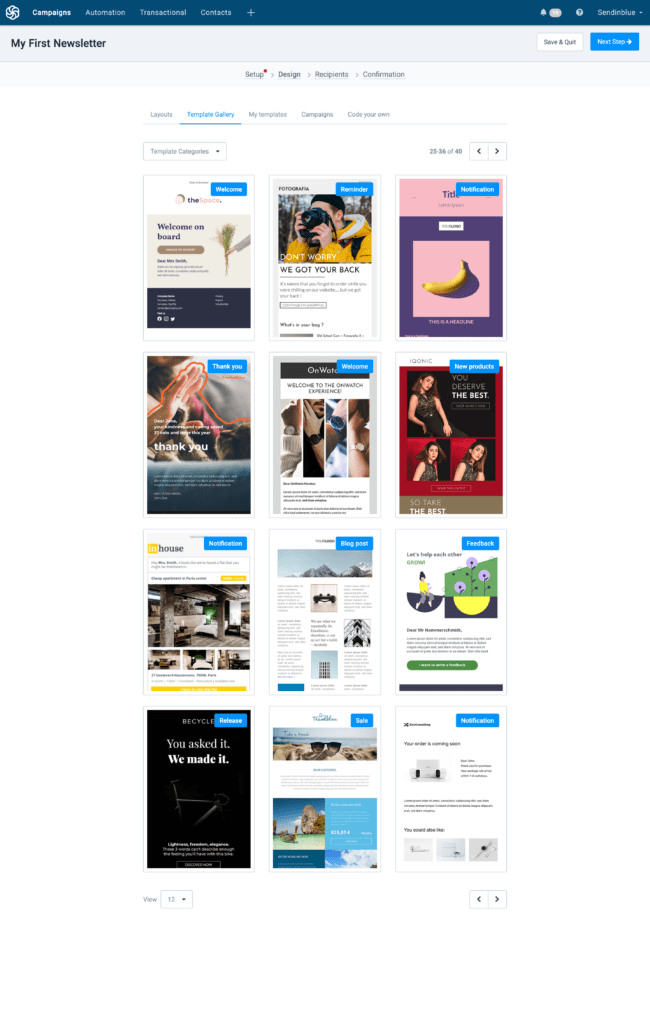
Email marketing templates are the perfect shortcut to standout email design.
If your email marketing service offers templates, pick one you like and personalize it to match your brand colors and font. 
Re-use the template over and over for future email newsletters. All you’ll have to do is update the content. Quick and easy.
Sendinblue has over 40 newsletter templates available on all plans (even the free one). There are also plenty of free email templates available from other sources.
6. Write your email copy
You know your goal. You know your target audience. Now, it’s time to build on that foundation.
Your email copy needs to offer value and feature topics that interest your audience. You also need to hone in on your voice and tone. 
To write persuasive, engaging email copy, keep these tips in mind:
- Ask yourself “What does my audience need from me? How can I help?”
- Imagine you’re writing to one person.
- Show your brand personality.
- Tell a story.
- Write to instill curiosity, starting with the email subject line — more on that below.
- Use a conversational tone, i.e., write the way you speak.
- Break up the copy with short paragraphs and use bullet points where possible.
The email signature should be the name of a real person. This is more personal than a faceless brand logo.
Don’t have much copywriting experience? Don’t worry. Writing emails is something you can practice and improve at with time. 
6. Optimize your email open rate, clicks, and conversions
There are a number of ways to boost your email open and conversion rate, starting with your email sender name.
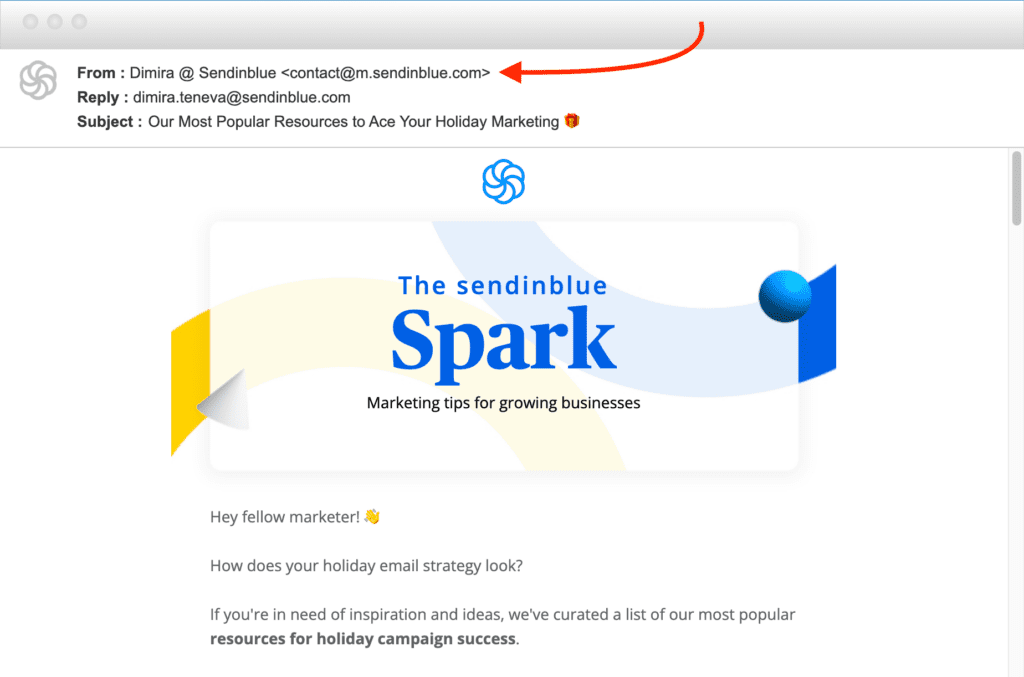
Use an easily recognizable sender name and address
When you get an email, what’s the first thing you look at? Probably who it’s from.
The sender name answers the recipient’s first subconscious question: Is this genuine or is it spam?
The best way to reinforce trustworthiness and brand recognition is to incorporate your brand name into the sender name. There are several ways to go about this:
- Your company/brand/newsletter name on its own
- A combination of brand name and your first name (e.g. Dimira at Sendinblue)
- A distinct sender name to differentiate specific types of email content (e.g. Sendinblue Product News)
To be easily recognized in the inbox, use the same sender name and address for all campaigns.
Avoid no-reply email addresses, as these diminish trust in your brand and prevent subscribers from reaching out with questions. You want engagement from your audience — why close off a potential means of communication?
Write an intriguing email subject line
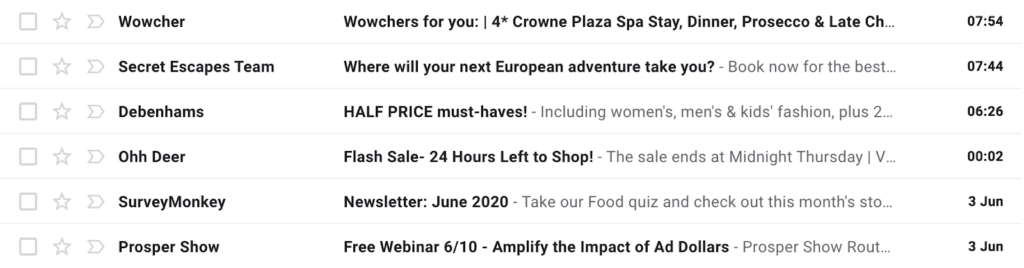
Introducing one of the most important elements of your email marketing campaign: The email subject line. 
These few words could determine whether your email is read or not. And with so much competition in the inbox these days, they need to stand out.
Aim to create intrigue or a desire to open in just a few words.
- Keep the subject line to 50 characters.
- Highlight your most interesting offer.
- Appeal to your subscribers’ emotions and ambitions.
Take a look at our best subject line resources to boost open rates:
Optimize your email preheader/preview text
The email preheader (or preview text as it’s also known) is the snippet of text that appears after the email subject line for certain email clients, particularly on mobile devices.
The preheader adds valuable context to your subject line and can significantly boost your open rates. The subject line and preheader should work together to start telling the reader a story.
Again, it should instill enough curiosity to make the reader want to open the email and learn more. 
Fail to set a preview text and the email client will see the first line of text.
“View this email in your browser” isn’t the most enticing, is it?
7. Test your email campaign before sending
Always send a test email before officially hitting send. Small mistakes can easily slip through the cracks and may harm your brand image. 
Keep your eyes peeled for:
- Typos
- Forgotten or incorrect links
- Text formatting errors
Have some team members proofread and check the test email on both desktop and mobile devices.
If you’re with Sendinblue, you can use the email preview feature to test different screen sizes and email clients.
When everything is good to go, double check that you’ve selected the right email list(s).
8. Schedule your campaign for the right time
Rather than choosing a random day and time to send your emails, be strategic. Choose a time that makes sense for your audience, based on what you know about them.
Most people tend to only visit their inbox a few times each day. Find a time that’ll put you top of the inbox when subscribers are checking their emails. This is sure to increase your open rates.
Email marketing campaigns tend to perform better when sent on Tuesdays or Thursdays in the mornings around 10:00 AM or in the afternoons around 2:00 PM.
It makes sense: Many people check their emails in the morning when they get to work, as well as after returning from lunch.
But, what works for most may not work best for you. It’s important to test different times to see where the sweet spot is with your audience.
Sendinblue Premium users get access to the send time optimization feature, which selects the best time for each individual contact based on previous engagement data. 
Check out Sendinblue’s research on the best time to send an email!
8. Monitor the campaign results
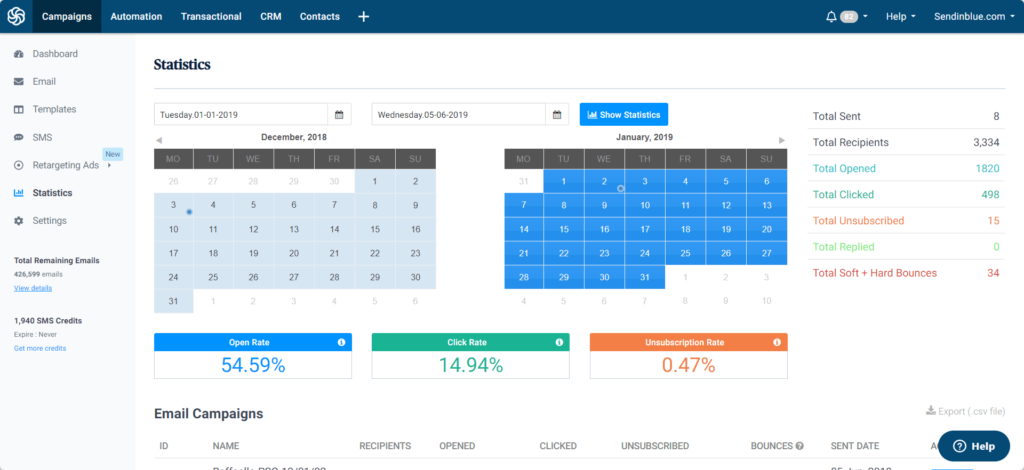
Analyzing key email marketing metrics will teach you how to improve your strategy for future campaigns. As a beginner email marketer, there will always be areas for improvement. 
Most ESPs have an analytics dashboard with at least the following real-time metrics:
- Open rate: The ratio of the number of people who opened your email divided by the total number of recipients.
- Click-through rate: The ratio of the number of people who clicked on a link in your email divided by the total number of recipients.
- Unsubscribe rate: The number of people who unsubscribed divided by the total number of recipients. If this number is high, you need to review your email frequency and segmentation — we’ll look at this in more detail shortly.
- Bounce rate: The number of emails that failed to deliver divided by the total number of emails sent.
- Soft bounces are due to temporary issues like the recipient’s inbox being full. Hard bounces, on the other hand, are due to permanent issues, like an inactive email address.
what is email sender software
Today, email services are more popular than bulk email software. While both platforms can send emails in huge quantities at a time, that is about all that an email software does. Email services, on the other hand, come with additional features. For one, an email service allows its customers to create and manage mailing lists. So, you can easily add new contacts to their mailing lists, when new subscribers opt-in for marketing content, clean up the list to remove non-viable addresses or segment recipients according to a particular criterion.
When using email software, one must install additional programs to perform most of the functions that an email service does. Therefore an email service is convenient. While both require updates from time to time, email services perform updates automatically without the users incurring any additional costs. Software, however, requires the user to pay to install any new upgrades. Therefore, it is not only convenient to use a service instead of the software, but also affordable. SendPulse is an excellent example of a reputable and reliable email service that allows bulk email marketing and automation.
How to Choose a Bulk Email Sender
- Compare prices
- Look into domain reputation
- Check for email templates
- Ensure mailing list management is available
- Look for email automation
What should online business owners and marketers consider while selecting the right bulk email sender? The first thing is to make sure it is a bona fide bulk email service. Then, assess the following factors:
- Compare prices. How much does the email company charge for its services? For any business, the cost of investment as compared to the expected return (ROI) should be a top priority. Choose a service provider that offers high-quality service and support that meets your budget. SendPulse, for example, has several affordable pricing plans to choose from based on the number of emails you want to send. For less than 500 subscribers, businesses can send 15,000 bulk emails, every month, for free!
- Look into domain reputation. When working with desktop software, the immediate issue is the non-existent domain and IP address reputation, which will likely result in your emails going to the spam folder. Online services usually handle this problem without your participation required.
- Check for email templates. An email template saves a lot of time when creating a bulk email campaign. They are reusable and can be customizable for multiple purposes. So, choose a service that offers a wide variety of templates for different email marketing goals. SendPulse has lots of pre-designed templates that you can edit and use for free.
- Ensure mailing list management is available. A reliable service should offer mailing list management. It should help users identify invalid contacts, delivery errors, spam reports, and so forth. Pick a service that allows users to perform functions like removing recipients who unsubscribe, adding new subscribers to the list, and list segmentation.
- Look for email automation. Automated email campaigns usually only require an initial setup, and then send emails automatically based on users’ actions. This is different from one-off marketing campaigns and newsletter sending in that emails must be triggered. For example, when a visitor signs up, an automatic confirmation email is sent to verify their subscription, also known as double opt-in. Other examples of automated emails include welcome emails on signing up, thank you emails after a purchase, and reminder emails. Learn how to automate marketing functions using SendPulse’s Automation 360!
Discover more about the differences between an email service and email software in this article.
Useful Features
Before choosing a service, look for features and tools that are useful for creating effective bulk email marketing campaigns. Some of these include:
- Segmentation: involves grouping subscribers according to age, gender, location, buyer status (prospect, loyal customer, etc.), and so forth.
- Personalization: ability to create content that is valuable and targeted for a particular customer.
- A/B testing: assesses two variants of any part of an email to determine which one performs best.
- Subscription forms: enable brands to grow their mailing lists by collecting new subscribers.
- Mailing list importing: involves moving an existing mailing list to a new campaign.
- Email verification tool: checks your mailing list and removes outdated and invalid addresses.
- Reporting: includes metrics on the performance of a specific email campaign.
How to Send Bulk Emails for Free
To send a bulk email campaign in SendPulse for free:
- Click “Sign up” below the free pricing plan.
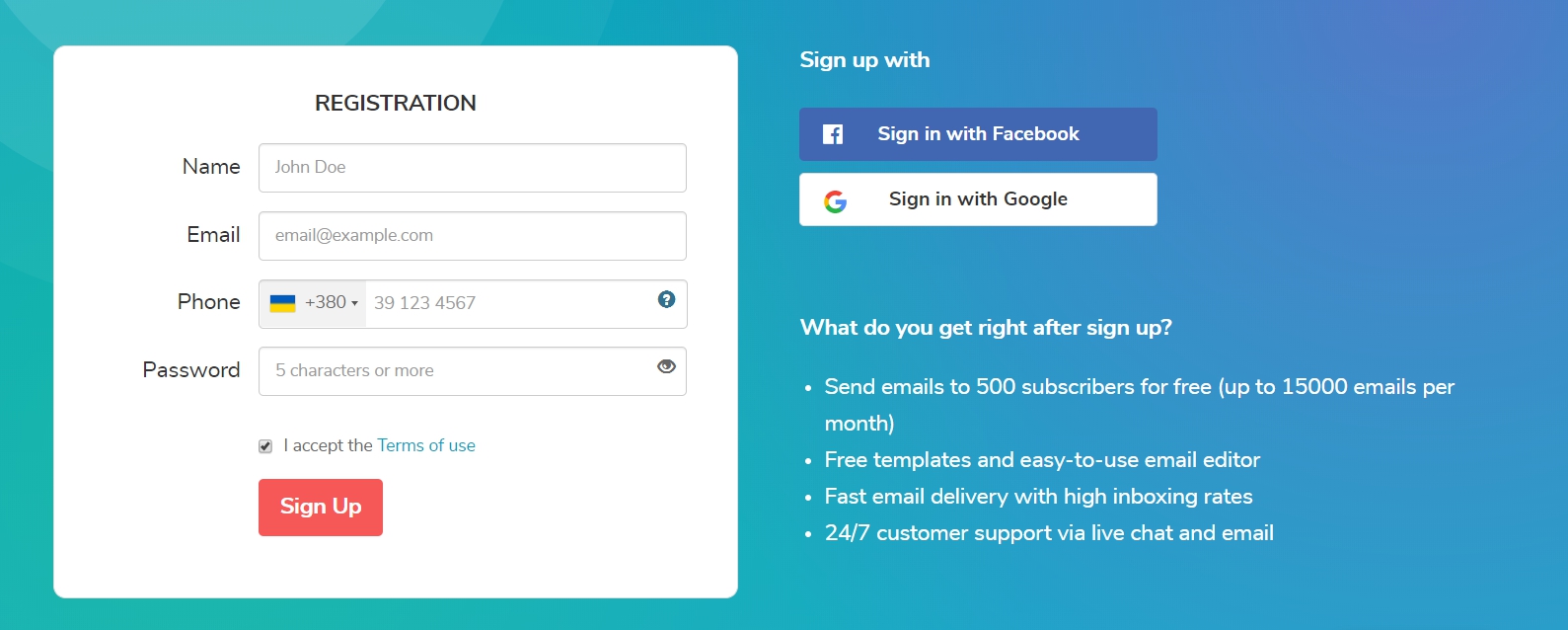 Registration form
 - Upload your mailing list. Verify your mailing list before sending a campaign to increase deliverability.
- Create a campaign
- Select an email template
- Check and send
- Proofread the message body for any spelling mistakes and counter-check that the sender`s address is correct.
- Send bulk email
Conclusion
Let us know your thoughts in the comment section below.
Check out other publications to gain access to more digital resources if you are just starting out with Flux Resource.
Also contact us today to optimize your business(s)/Brand(s) for Search Engines