
Do you have a novel you’re dying to write but don’t know where to start? We’ve got your back. We rounded up the best apps for novel writing, so you can just focus on getting started.
Whether you like to use old-fashioned pen and paper or a cutting-edge laptop, we’ve got an app for you. No matter what kind of writer you are—from the meticulous planner to the “just let me get this down!” procrastinator—you’ll be able to find a tool that fits your style.
To decide which app is right for you, consider the following questions: Do I want a simple word processor? Do I want an app that’s specifically made for novelists? Do I want an app that’s compatible with my phone or tablet? Do I want an app with extra features like research tools, organization functionality, and collaboration capabilities?
Best Apps For Novel Writing
Have you been sitting on a great idea for a novel, but haven’t quite got around to putting pen to paper yet? Writing a book can be incredibly challenging. Getting started, then staying motivated isn’t always easy. Writer’s block sets in, procrastination takes over, and we let our fear of failure stop us from pushing ahead.
Luckily, there are some amazing tools out there to overcome these roadblocks, including a new generation of book writing apps.
Table of Contents
How Can an App Help Me Write a Book?
Apps for Writing a Book
There are a seemingly endless array of apps for writing a book, and they each help you solve a different writing-related problem.
Writing
Many book writing apps are designed with the physical writing process in mind. While many writers are perfectly happy sticking with Microsoft Word, Google Docs, or other standard word processors, these apps offer a more substantial alternative.
They provide tools specifically geared towards writing a book. For example, drag and drop chapter and scene options and character profile tabs.
Some even offer features that allow you to compare your current manuscript sections to previous versions of your work.
Editing
Then there’s a whole host of editing apps that go much further than your standard spell checker.
They help you with every aspect of the editing process, from checking sentence structure and grammar to improving your writing tone and flow and checking for plagiarism.
Goal Setting and Focus
Some apps which are geared towards writers also focus on time management and goal setting. When you’re in the process of writing a book, it’s so easy to get derailed and let your writing practice slip.
These apps are designed specifically to help you stay on track and keep you focused, so you can reach your goals of writing a book.
In this blog post, we’ll be reviewing the best apps for writing a book in 2022. So if you’re a writer who needs a little extra help (who doesn’t?), then read on; these apps can help take your writing to the next level.
Best Apps for Writing a Book
1. Scrivener
Scrivener
Scrivener is one of the biggest writing apps out there right now. It works for all kinds of writing, from something as small as an email, to a full on screenplay or novel. But it’s these long form types of writing where this app really excels.
When you log into Scrivener, you’ll first choose a template that suits your project (for example, a fiction or non-fiction book). You can either begin writing directly into the interface or import your text from elsewhere.
The sidebar on the left of the screen has tabs for a variety of elements that help you organize your writing. The best part is, you can personalize these tabs to show exactly what you need, and omit everything that you don’t.
There’s an endless array of helpful tools to choose from. There’re tabs for individual scenes within chapters of your book, as well as character tabs to help with individual character building throughout the story. There’s also a handy research tracking tool to keep your research focused and applicable.
If you struggle with organization and you value attention to detail, then Scrivener could be a massive help to you when you’re writing a book.
Work on: Mac, iOS, and Windows.
Cost: Free for the first 30 days, after which there’s a one time license fee of $40.84
Pros:
Perfect for long-form book writing
Personalize the interface for your specific needs
One-time fee rather than a monthly subscription
Cons:
Takes a while to learn how to use
If you work between 2 different operating systems, (eg. Work laptop and home laptops), it can be hard to transfer work between them.
2. yWriter
yWriter
For writers who use a Windows operating system, yWriter is a fantastic app that works in many of the same ways as Scrivener.
When you’re writing a book, the sheer amount of words to write ahead of you can feel pretty overwhelming. yWriter helps you to break down your writing into scenes or sections, making the whole process feel more manageable.
You can set targets and goals for yourself, such as a daily word count, and also track your character development and narrative arc using the storyboard tool.
yWriter has a huge selection of useful features and it’s reassuringly easy to use, even for new writers and people who aren’t particularly tech savvy.
Unlike Scrivener, there’s no option for story templates, but aside from that, this free app really holds it’s own, and is a great way to stay on track with your writing.
Works on: Windows
Cost: Free
Pros:
Beaks down writing into manageable sections
Great for goal setting
Free of charge
Cons:
No story template options
Currently only available on Windows operating systems.
3. iA Writer
iA Writer
iA Writer is another app geared explicitly towards book and other long form writers. It’s great for people who hate clutter and don’t want to spend a long time learning how a new app works before they get started using it.
The user interface is refreshingly sleek and simple, but it still offers plenty of tools to help you organize your writing.
There’s a syntax highlighting system that can pick out various parts of speech such as adjectives or nouns, etc. This is great for the editing process.
You can also break down your book into manageable chapters and separate them into smaller sections, which helps to keep the writing process from feeling overwhelming.
There’s also a handy dark mode to preserve your battery life and give your eyes a break after a long day staring at a screen.
Works on: Mac, iOS, and Windows
Cost: Free for Android users. $8.99 for iPad and iPhone, $19.99 for Windows and $29.99 for Mac
Pros:
Simple and easy to use
Sleek, clutter-free design
Dark mode for tired eyes and battery preservation
Cons:
No automatic storage
More expensive for Mac users
4. Ulysses
Ulysses
Ulysses is another top dog in the writing app world. It’s comparable to Scrivener, but with some important key differences.
While Scrivener requires a little extra time to learn how the interface works, Ulysses is much simpler to use. Many features offer short tutorials so it’s easy to get to grips with the various writing tools.
Another key difference in Ulysess is the use of “Markdown” formatting. For those uninitiated, this is a simple plain text language that makes writing and editing online much easier. It’s quick to pick up, and once you’re familiar with it, it will save you time in the long run.
This app also has all the standard writing app features you’d expect, including organization tools like keyword labels, daily and weekly progress trackers and daily word counters and stats.
Works on: iOS and Mac
Cost: Free trial, followed by either $5.99 per month or $49.99 per year
Pros:
Quick and straightforward to get started
Markdown formatting simplifies the user experience
Cons:
Currently not available on Windows or Android operating systems.
5. Reedsy Book Editor
Reedsy Book Editor
Reedsy Book Editor is one of the easiest to use writing apps available right now. The interface is incredibly sleek, and there’s no messy clutter to contend with; just a super simple, minimalist design that lets you focus on one thing; writing.
This book editor has great potential, especially when it comes to formatting your work. You can insert images within the body of text, drag and drop chapters and scenes, and create a professional and polished front and back matter.
It’s also particularly useful if you’re writing an ebook. You can format and export your work into an instantly uploadable file that is ready to submit to a publisher or print on-demand service. In fact, this is the perfect tool for anyone planning to self-publish their work.
Another stand out feature is the ability to compare your current draft to previous versions, so you can examine the contrasting versions in real time.
Works on: Web-only
Cost: Free
Pros:
Sleek, clutter-free interface
Great for formatting to publisher ready levels
Free
Cons:
Web-only program means you’ll need an active internet connection to use Reedsy.
6. Grammarly
Grammarly
Even if you’re new to the world of writing apps, you’ve probably heard of Grammarly. This supremely popular grammar tool is used by writers everywhere. From something as short and simple as an email, to full-length novels and screenplays, Grammarly is a powerful editing tool.
Grammarly has a surprising amount of features for a free app, but it’s the spell checker and grammar editor that writers tend to use the most.
Spelling errors, incorrect grammar and sentence structure are highlighted on the screen, with helpful suggestions for replacing words and phrases. The corrector also explains exactly why the highlighted text is incorrect, so you can pick up some extra grammar knowledge along the way.
Grammarly Premium lets you set specific goals for your writing when using the paid version of the app. Tell Grammarly your audience, desired tone and level of formality and it will analyze your text based on these markers. It also assesses how clear and easy to understand your text is, and scores your delivery and reader engagement levels.
While Grammarly doesn’t provide all of the additional book writing features found in some of the other apps on our list, it’s a great additional tool for editing your work. It’s also super handy to keep installed on your device for writing emails and other short-form documents.
Works on: Web and most major browser extensions
Cost: Basic Grammarly is Free. Grammarly Premium costs $29.95 per month, $59.95 per quarter, or $139.95 per year. Watch out for regular subscription discount offers.
Pros:
Simple to use
Improves spelling and grammar
Scores your text on various markers
Cons:
Web-only program means you’ll need a solid internet connection to use Grammarly
No additional book writing tools
7. NaturalReader
NaturalReader
Before you send your book to an editor, you’re going to want to do some thorough editing yourself.
One great way to approach the final editing process is to read the text out loud. While this is a great way to check your text’s sentence structure, flow, and readability, you can often miss key issues.
That’s where NaturalReader comes in. This editing app acts as a text-to-speech reader that reads your book right back to you.
You can choose from a variety of voices and adjust the reading speed as you wish. As the human-like voice reads your work back to you, the text is highlighted along the bottom of the screen so you can follow along and pinpoint any mistakes.
While running a whole full-length novel through NaturalReader might be too long a task, it can be a great way of checking shorter sections or running your daily writing through to check for issues with sentence structure and flow.
Works on: Mac, Windows and Web
Cost: Basic version is free. One time payment premium packages vary from $99.50 to $199.50
Pros:
Reads your own text back to you
Gives your eyes a break from looking at the screen
Free package available
Cons:
Premium version is more expensive than many other apps on our list
Conclusion
While the authors of yesteryear had to go it alone, in 2022, there’s a whole new world of apps that can help you when you’re writing a book.
From basic spelling and grammar checkers to intricate book writing assistants that keep you focused, organized and motivated; there’s a book writing app to help make the process much easier.
Don’t let writer’s block and procrastination stand in your way. Try out these apps for writing a book today and see how your writing and focus improves.
free book writing apps
Writing isn’t easy. Thankfully, there are all kinds of apps out there to make the process easier by helping you stay organized and focused. Whether you are writing for a living or just writing a grocery list, these free apps for writers will help you complete your project with ease.
Contents:
- ProWritingAid
- Hubspot’s Blog Ideas Generator
- Canva
- Milanote
- LibreOffice
- Scribus
- FocusWriter
- Evernote
- Diaro
- Todoist
- The ProWritingAid Blog
Try ProWritingAid’s editor for yourself below: - Writing Forward
- 5 Minute English
- Grammar Girl: Quick and Dirty Tips
- Daily Grammar
- Lousy Writer
- The Purdue Online Writing Lab (OWL)
- FluentU
- English Grammar 101
- Grammar Ninja
You CAN Master English Grammar - ProWritingAid
Come on. You were expecting this. But our writers really do believe that ProWritingAid should be at the top of this list. ProWritingAid is an online editor, writing coach, and style guide, all rolled into one. It highlights a range of potential pitfalls in your writing that your average grammar checker misses, like overused words, transitions, vague and abstract words, and more.
The free ProWritingAid online editing tool allows you to upload your documents and access more than 20 in-depth writing reports, which will help you improve the strength and clarity of your texts quickly and easily.
You’ll get an overview of your writing, with tips on how to make the most improvement in the shortest amount of time. You’ll also keep learning while you write with informational videos and blog articles that pop up as part of ProWritingAid’s suggestions.
prowritingaid suggestion
Check out this review and tutorial by bestselling author, Joanna Penn:
ProWritingAid also has more software integrations than any other editing software, including MS Word, Google Docs, Scrivener, Open Office, and Chrome so that you can edit wherever you write.
Ready to try it for yourself? Click the button below to get started.
Start editing like a pro with your free ProWritingAid account now
- Hubspot’s Blog Ideas Generator
Even the best writers run into blocks sometimes. Hubspot’s Blog Topic Generator can help you when it feels impossible to come up with new content.
hubspot blog ideas generator
Hubspot’s Blog Topic Generator Simply input three nouns into the generator and get a week’s worth of topics in seconds! Now, THAT was easy!
- Canva
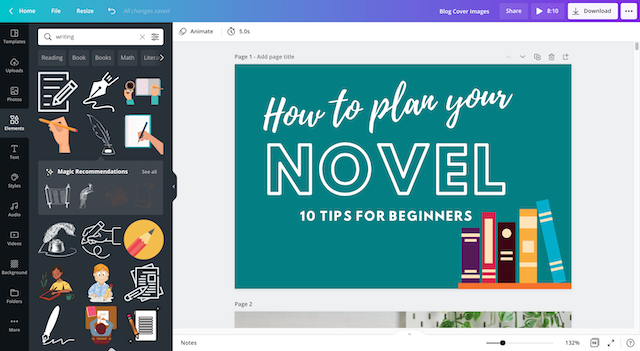
As writers, we don’t just have to worry about the words we put on the page (or screen). Many of us have to create images for our work, whether that’s a cover photo for a blog post or a graphic to promote your book on social media. Canva is an amazing, powerful free tool to help create beautiful images.
canva interface
Canva’s drag and drop templates can help you create everything from a Pinterest graphic to a book cover. If you’re hesitant to learn Photoshop, Canva is an amazing alternative to help you create rich, high-quality graphics.
- Milanote
Milanote is an easy-to-use tool to organize your ideas and projects into visual boards. As a writer, visualizations can help you keep track of everything from character relationships to the order of scenes.
milanote interface
Milanote’s flexible interface allows you to do things like:
Write notes and to-do lists (handy for keeping yourself on track with your book writing plan)
Upload images and files (useful for keeping visual inspiration for everything from scenery to character outfits)
Save images, texts, and links from the web
and even more!
- LibreOffice
LibreOffice is an amazing word processor option for people who are looking for a free alternative to Word.
libre office interface
LibreOffice has a number of great features, including a clean and sophisticated word processing layout and support for a vast number of file formats. You can create everything from a simple memo to a complete book using the online editor, which makes it a great choice for people looking for a word processor for all types of projects.
A grammar guru, style editor, and writing mentor in one package.
Try it for free!
ProWritingAid
- Scribus
Do you need to create beautiful layouts for your words? If so, Scribus may be for you!
scribus interface
Scribus is a free, open source platform that allows you to create rich, professional layouts for everything from one-pagers to magazines. While it takes a bit of learning to get started, Scribus is both easier to use and cheaper (since it’s free!) than tools like Adobe InDesign.
- FocusWriter
Distraction is Enemy #1 to many writers. Facebook never looks as enticing as when you’re on a tight deadline or trying to meet a goal. If this sounds like you, FocusWriter is here to help.
FocusWriter interface
FocusWriter minimizes your work into a clean, distraction-free word processor interface, so you can simply write without worrying about the clutter on your computer screen. FocusWriter isn’t the best tool for going through your second or third draft, but it’s great for getting through that first run so you can do the in-depth editing elsewhere later.
- Evernote
Evernote is an amazing “second brain” which allows you to flexibly take notes and capture ideas in a variety of areas.
Evernote interface
You can do just about everything in Evernote, from creating to-do lists and checklists to drawing out specific notes to capturing receipts for tracking business expenses. Evernote offers up to 60 MB of space on its free plan, which is plenty if you’re just using plain text notes. If you’d like to add more graphic or larger files, you can upgrade your storage for small fees.
- Diaro
Your life is precious, and if you’re the documenting type, you want to remember every moment, good or bad. Diaro is an advanced diary application, but it can be used for keeping a journal or simply writing notes.
Diaro interface
Use Diaro to help you keep your thoughts and memories organized and well documented. Attach photos or locations to your entries and share with others via email and social networking sites. With Diaro, you never have to worry about others stumbling across your deepest darkest secrets, because your diary will be password protected.
- Todoist
The best writers are able to organize and prioritize their work. Todoist is a task management application that helps you create to-do lists and custom schedules so you can work more effectively.
Todoist interface
With Todoist, you can create recurring tasks (e.g. “Write every day at 7 p.m.!”) to help yourself set and achieve goals. Never worry about forgetting an important task again!
Make Writing Apps Work for You
These apps are never going to replace you as a writer, editor or designer. But they’ll definitely help you become a better one. Without the right app, writing is harder than it needs to be. Simplify your life and kickstart your success with these writing apps.
What writing apps do you use? Anything we’ve missed? Tell us in the comments!
Try ProWritingAid’s Editor for Yourself
Enter some text and click button below to see improvements. (Make some some erors like this ones to sea how it worx.)
Check Text
Improve Your Grammar with These Sites
Grammar
Whether you’re a native English speaker or an English language learner, English grammar can be tricky to master. Take the examples below:
The young boy loved cooking, his dog and going outside.
Cute.
The young boy loved cooking his dog and going outside.
Eek! With the simple omission of a properly placed comma, that sentence goes quickly from cute to macabre.
No matter how long you’ve been writing, you can always freshen up your grammar skills. Thankfully, there are numerous sites online that exist purely to help you write correctly. Here are 10 of our favorites.
- The ProWritingAid Blog
From quick lessons on commonly misspelled words to in-depth examinations of pleonasms, the ProWritingAid blog is a great place to dive into the intricacies of the English language.
Here, you’ll find articles, videos and quizzes that teach and examine common grammatical errors, with plenty of contextual examples to help you learn.
ProWritingAid Editing Tool
Practice always makes perfect, so once you’re done perusing the blog, hop over to ProWritingAid’s Editing Tool and input your work. ProWritingAid’s in-depth reports will check your work and see how well you’ve mastered your study.
Try ProWritingAid’s editor for yourself below:
Enter some text and click button below to see improvements. (Make some some erors like this ones to sea how it worx.)
Check Text
Sign up for your free ProWritingAid account now
- Writing Forward
The Writing Forward blog, created by a passionate writer, offers tons of posts on creative writing, grammar and more. The “Grammar Tips” section will walk you through tons of pesky grammar rules, from whether or not you can end a sentence with a preposition to figuring out subject-verb agreement.
The blog also offers great advice about every part of the writing process from plotting to publishing, so be sure to check out the rest of the site’s informative content.
- 5 Minute English
What 5 Minute English lacks in style, it more than makes up for in quick, useful lessons. 5 Minute English’s lessons are designed for non-native speakers, so they cover some of the trickiest language topics, such as parallel verbs and reflexive pronouns.
Visit 5 Minute English if you’re looking for a fast, fun review of some of the most complex and confusing English language topics.
- Grammar Girl: Quick and Dirty Tips
Winner of the 2017 “Best Education Podcast” Award, Grammar Girl (aka Mignon Fogarty) exists to help “you do things better.” Like grammar, for instance.
Articles on Grammar Girl cover all sorts of topics (such as the weird history of oxymorons or the meaning of the phrase “in the doldrums”) so you can visit to not only brush up on your grammar skills, but get a lesson in English language history. The articles are snappy and fun to read, so you don’t feel like you’re engaging with boring material.
A grammar guru, style editor, and writing mentor in one package.
Try it for free!
ProWritingAid
- Daily Grammar
A self-described “fun, convenient way to learn grammar,” Daily Grammar is a comprehensive teaching tool for anyone needing to polish up their English grammar skills.
Daily Grammar is more a course curriculum than a blog, with over 400 free lessons and over 80 free quizzes for you to learn and then test your knowledge. You can visit the site to access topics or have them delivered to your inbox through their complimentary email service. By visiting Daily Grammar, you’ll be on your way to grammar mastery in no time.
- Lousy Writer
Lousy Writer’s main goal is to help you become a better writer, fast. Lousy Writer focuses on how to communicate effectively by breaking down word usages and sentence construction into clear, easy-to-understand tips.
Of particular use on Lousy Writer are the cheat sheets, which help you understand tricky concepts like possessive nouns or homonyms. These cheat sheets are great refreshers on difficult topics for English language speakers and English language learners alike.
- The Purdue Online Writing Lab (OWL)
The Purdue OWL (Online Writing Lab) offers over 200 free resources on writing, teaching writing, grammar and mechanics, English as a Second Language, and style guides. Sponsored by Purdue University, this website is a great resource for people looking to teach and learn.
In addition to their grammar lessons, you can find formatting guides for styles such as MLA and APA, as well as suggestions on how to avoid plagiarism in your work.
- FluentU
FluentU
One of the best ways to learn English grammar is to hear English being spoken aloud. FluentU’s library of real-world English houses videos that are timely, fun, and useful for people looking to master the English language.
While FluentU does have a subscription fee, you can access a limited free trial to see if you like the service and find it useful before deciding to commit to pay.
- English Grammar 101
Are you one of those people who simply loves learning from a textbook? If so, English Grammar 101 is the site for you!
English Grammar 101 is basically a grammar textbook, only digital, so you don’t have to worry about hurting your back lugging it around every day. You’ll go through hundreds of in-depth lessons on everything from nouns to capitalization, with quizzes, reviews, and tests for each topic to assess your mastery.
- Grammar Ninja
Who says learning grammar can’t be fun? With Grammar Ninja, you’ll play games that help reinforce the grammar rules you’ve been learning.
Playing games is one of the best ways to improve your understanding and mastery of concepts, and grammar is no exception! If your eyes are going a bit crossed after studying one of the more serious lessons, pop on over to Grammar Ninja for an exciting, refreshing take on the same concepts.
You CAN Master English Grammar
No matter how tricky or frustrating it might seem, you can master English grammar! The free resources listed in this article will help you become a stronger writer in no time.
Have we missed one of your favorite sites? Tell us in the comments!
The ProWritingAid Youtube Channel has loads of grammar tips and tricks
Check out our video on split infinitives below, and subscribe to our channel for more.
Ready to take your writing to the next level?
20 Editing Tips From Professional Writers
20 Editing Tips From Professional Writers
Whether you are writing a novel, essay, article or email, good writing is an essential part of communicating your ideas.
This guide contains the 20 most important writing tips and techniques from a wide range of professional writers.
Subscribe for writing hacks, special offers and free stuff
We will not share your details
Your Email
Go
Your Personal Writing Coach
Join over a million writers who already use our editing tool
Try it for free!
ProWritingAid
Have you tried ProWritingAid yet? What are you waiting for? It’s the best tool for making sure your copy is strong, clear, and error-free!
The ProWritingAid Team
The ProWritingAid Team
ProWritingAid: A grammar guru, style editor, and writing mentor in one package.
The most successful people in the world have coaches. Whatever your level of writing, ProWritingAid will help you achieve new heights. Exceptional writing depends on much more than just correct grammar. You need an editing tool that also highlights style issues and compares your writing to the best writers in your genre. ProWritingAid helps you find the best way to express your ideas.
Conclusion
Let us know your thoughts in the comment section below.
Check out other publications to gain access to more digital resources if you are just starting out with Flux Resource.
Also contact us today to optimize your business(s)/Brand(s) for Search Engines